

Updated October 5, 2026: Google rolled the generative AI performance reports out to all websites worldwide on August 31, 2026, and this guide now reflects that. It was first published on June 8, 2026, during the initial rollout.
Key Takeaways
- On June 3, 2026, Google launched dedicated Search Generative AI performance reports in Search Console, with separate reports for Search and Discover.
- The Search report covers visibility inside AI Overviews and AI Mode. Search Labs experiments are not included.
- It shows five things: impressions, pages, countries, devices, and dates. It does not show clicks, CTR, or traffic today.
- A separate new toggle lets you opt out of generative AI features. Opting out means no impressions or traffic from them, and Google says it won’t be used as a ranking signal elsewhere.
- Google started with a subset of website owners, beginning in the UK, and rolled the reports out to all websites worldwide on August 31, 2026. That update covers the reports; check your own Search Console settings for the opt-out control.
- During the early rollout, some supporting pages weren't reachable, and trying to include your site could return a "Page couldn't be found" screen.
On June 3, 2026, Google launched the first official way to see how your site shows up inside its generative AI features. The new Search Console reports track your impressions in AI Overviews and AI Mode, separate from your normal blue-link performance. For two years there was no first-party answer to “am I visible inside Google AI search?”, now there’s a report for it.
The catch is that it's narrow, and the announcement bundles a few separate things together. So I’ll take them one at a time: what shipped, who gets it, and what it does and doesn’t tell you.
What did Google actually ship?
On June 3, 2026, Google announced new Search Generative AI performance reports in Search Console. There are dedicated reports for both Search and Discover. The point of them is to give you a dedicated view of your site’s visibility inside generative AI features on Search.
Until now, this data was folded into the overall performance report. It will keep being tracked there, giving site owners a view of overall visibility in Google Search. What’s new is a separate, dedicated view just for the generative AI features.
For the Search report, “generative AI features” means two things specifically: AI Overviews and AI Mode. Google expects to update that list over time as Search develops. Search Labs experiments are not included, because those are still in active development.
What does the report actually show you?
The generative AI performance report gives you five things. Here’s the full list, straight from Google’s documentation.
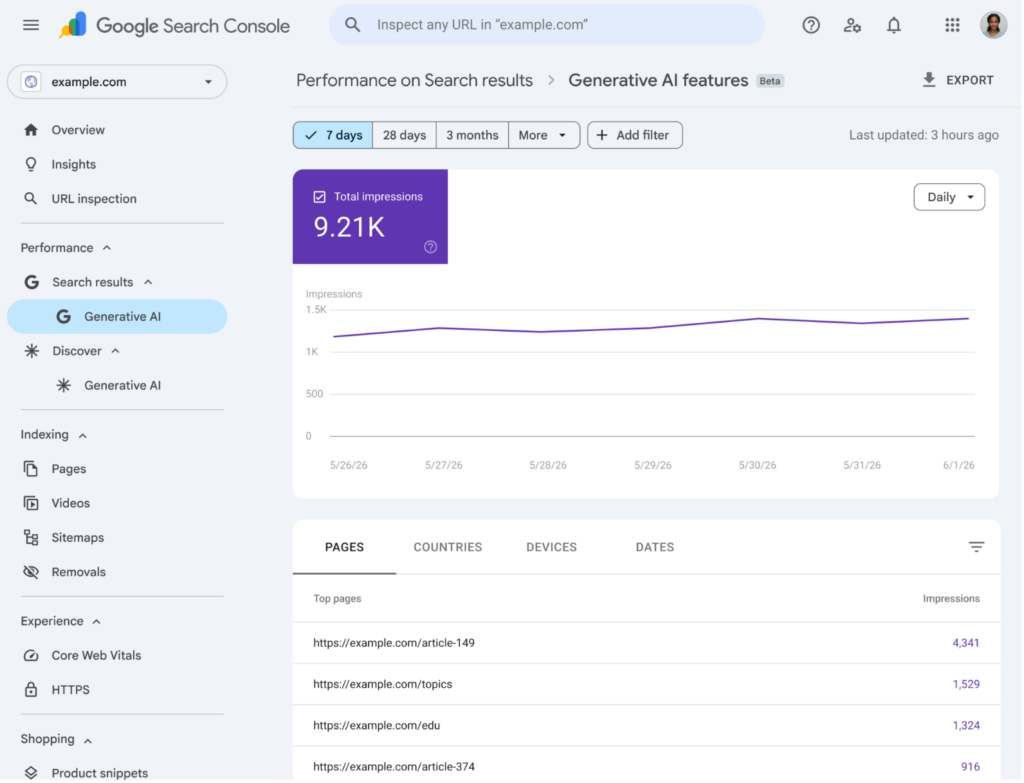
Impressions: how often URLs from your site appeared in generative AI features. This is the core metric, counting how many times links to your site were shown to a user in a generative AI feature on Google Search.
Pages: which of your URLs actually appeared inside AI features. This dimension groups data by the final URL linked after any redirects, assigned to the canonical URL rather than a duplicate.
Countries: your visibility broken out by the country where the search originated.
Devices: which devices people were using when they saw your site, desktop, tablet, or mobile. This one is available for Search results.
Dates: performance over time, with hourly, daily, weekly, and monthly granularity. All dates are in Pacific Time.
You can slice the data by choosing a dimension, the same way you do in the standard performance report. The newest data can be preliminary, shown as a dotted line on the chart, because it’s still being collected and might change in the next few hours.
Why does it matter that this is impressions, not clicks?
Here’s what I want to flag clearly, because it’s the easiest thing to misread.
The generative AI performance report measures impressions, not traffic. It tells you how often your links were shown inside AI features. It does not, today, tell you how many people clicked through, what your CTR was, or how much referral traffic those appearances drove.
That matters because of how these surfaces behave. AI features answer the question in place, and a brand can appear inside an answer many times without a single click. So read this report for what it is, a visibility signal, and not as a traffic report wearing a new label. Google has said it’s working with website owners on which additional metrics would be most helpful, and that it’ll add more over time.
What about Google Discover?
There’s a second report most coverage will skip, and it’s worth a mention even if it’s secondary for most readers.
Alongside the Search report, Google launched a dedicated generative AI performance report for Discover. So if your site shows up in generative AI features inside Discover, that visibility gets its own view, separate from the Search report rather than mixed into it.
One practical difference is worth noting. The device dimension, desktop, tablet, or mobile, is called out as available for Search results, so don’t assume every dimension behaves identically across the Search and Discover reports. For most of my readers, Search is the surface that matters; just know the Discover view exists if Discover is a real channel for you.
What is the new opt-out control in the announcement?
The same week, Google began testing a separate control in Search Console, and it’s worth understanding on its own terms.
It’s a toggle that lets a website owner decide whether their site appears in and helps ground responses in Google’s generative AI Search features, AI Overviews, AI Mode, and AI Overviews in Discover. Sites that opt out will not receive traffic or impressions from those features. Google says this control will not be used as a ranking signal for search results outside of the generative AI features.
Google frames this as building on its history of giving sites control, citing snippet controls and Google-Extended as precedent. The honest read: this is a real lever, but it’s a blunt one. Opting out doesn’t tune how you appear; it removes you from the surface and the impressions that come with it.
Who gets it, and when?
Every website, since August 31, 2026. That's the most important practical update.
Google started by rolling the reports and the new control out to a subset of website owners, beginning in the UK, so it could test thoroughly before a global release. The reasoning Google gave was straightforward: receive feedback, refine, then widen access. On August 31, 2026, Google rolled the reports out to all websites worldwide. That update covers the reports and does not describe the opt-out control, so check your own Search Console settings for it.
If the report shows little or no data, the likely reason is that your site hasn't received enough impressions in generative AI features to populate it.
There's also a second possibility Google flags: if you’ve excluded your site from Search generative AI features, you won’t show up, you’d need to be included to be eligible for display.
Why does the “include my site” link lead to a dead end?
The same week, Google began testing a separate control in Search Console, and it’s worth understanding on its own terms.
It’s a toggle that lets a website owner decide whether their site appears in and helps ground responses in Google’s generative AI Search features, AI Overviews, AI Mode, and AI Overviews in Discover. Sites that opt out will not receive traffic or impressions from those features. Google says this control will not be used as a ranking signal for search results outside of the generative AI features.
Worth being clear on the baseline: being included is the default for every property. Your site’s links and content can already appear in these features, earning impressions and traffic, without you doing anything. The toggle is there to opt out, not opt in, so leaving it alone keeps you in.
Google frames this as building on its history of giving sites control, citing snippet controls and Google-Extended as precedent. The honest read: this is a real lever, but it’s a blunt one. Opting out doesn’t tune how you appear; it removes you from the surface and the impressions that come with it.
Google shared some scale numbers alongside the launch, and they frame why this reporting exists at all.
AI Overviews now has over 2.5 billion monthly active users, and AI Mode has surpassed one billion monthly users. Google’s framing is that people are more satisfied with Search, are searching more often, and are asking entirely new kinds of questions. Whatever you make of the framing, the surface is large enough that measuring presence on it stopped being optional.
Google also used the announcement to reiterate guidance you’ve heard before: provide unique, non-commodity content, organize it well, create a good page experience, and use high-quality images and video. That’s consistent with what Google has said elsewhere about AI search. It’s also consistent with the reporting being live on its parent blog, which tied this release to Preferred Sources reaching AI Overviews and the Highly Cited badge expanding into broader Search.
What’s worth doing this week?
There isn’t a heavy implementation lift here, which is part of the point. But there are a few sensible moves.
First, open the report. Since August 31, 2026, Search Console carries the generative AI performance report for every website. If yours is thin, your site likely hasn't crossed the impressions threshold yet.
Second, if you do have it, baseline now. Pull impressions, pages, countries, and devices, and note which of your URLs are actually surfacing in AI Overviews and AI Mode. That gives you a starting point to watch as the feature, and your visibility, evolves.
Third, make a deliberate decision about the opt-out toggle rather than an accidental one. Opting out removes you from generative AI impressions and traffic, so it’s a choice to make on purpose, with eyes open, not a setting to flip without understanding the trade.
And if you want to send Google feedback, the report has a “Submit feedback” link with a dedicated form, and there’s the Google Search Central Community for questions. Google has said this feedback shapes Search Console overall, even if it generally can’t act on individual submissions.
What should you actually take from this?
For two years, the gap in AI search wasn’t strategy. It was sight. You could read every study on chunking, fan-out, and grounding and still not know, from Google directly, whether your own pages were showing up in AI Overviews.
This release narrows that gap. It doesn't close it: impressions aren't traffic, and the metric set is deliberately thin to start. But the direction is the part to notice: Google is now reporting on AI visibility as its own thing, with its own view, the same way it reports on blue-link performance.
Get familiar with it while it’s early. The teams that win the next year of AI search won’t be the ones with the longest checklist. They’ll be the ones who started watching the right signal before it became the standard one.
Want to see your AI visibility beyond what Search Console shows, across AI Overviews, ChatGPT, and Perplexity? Quattr’s AI Search Visibility platform tracks your citation share, mentions, and brand gaps across every major AI surface.
FAQs on Search Console’s Generative AI Reports
It measures impressions, how often URLs from your site appeared in generative AI features on Google Search, specifically AI Overviews and AI Mode. It also lets you break that down by pages, countries, devices, and dates. It does not currently report clicks, CTR, or referral traffic for these features.
Most likely one of two reasons, now that Google has rolled the report out to all websites worldwide (August 31, 2026). Your site may not have received enough generative AI impressions to populate it. Or you may have excluded your site from Search generative AI features, in which case you’d need to include it to be eligible.
During the early rollout, the supporting pages rolled out alongside the reports. Google's documentation points you to include your site to become eligible, but during that partial rollout the setting wasn't reachable in every account, so some owners landed on a "Page couldn't be found" screen. If the page still doesn't load, check Google's help documentation for the current setting.
Yes. Google launched a dedicated generative AI performance report for Discover in addition to the one for Search, so Discover visibility gets its own view rather than being folded into the Search report. Note that not every dimension is described identically across the two, the device dimension, for example, is called out as available for Search results.
Yes. Google rolled the reports out to all websites worldwide on August 31, 2026, after starting with a subset of website owners in the UK. Google has said it will add more metrics over time.

Quattr is an AI-native Search Visibility Platform founded in Palo Alto, California, built for mid-market and enterprise brands competing in the age of generative search. Recently recognized across G2's Spring 2026 reports with #1 rankings in AEO Results, Usability, and Relationship, Quattr helps brands win visibility across traditional search and AI-generated answer surfaces.
Quattr's AI agent, GIGA, evaluates content the way AI systems do, identifying gaps across structure, authority, internal linking, and discoverability to surface the highest-impact fixes. With capabilities like autonomous internal linking, E-E-A-T intelligence, and the new GIGA Landing Page Generator for keyword-matched, AI-search-ready pages, Quattr helps teams move from diagnosis to deployed changes without manual bottlenecks.