

Key Takeaways
- The intelligent Search box changes the input side of search more than the output side, for now. What shipped May 19 is mostly about how you ask: longer conversational queries, multi-modal inputs (images, files, Chrome tabs), AI-powered suggestions, and follow-ups that flow into AI Mode without context loss. The output side is rolling out, some of them in the U.S. first, and then expanding gradually all over.
- The intelligent Search box, information agents, agentic booking, generative UI, mini apps, and Personal Intelligence all point in the same direction: Search is moving from a one-shot query-and-link interaction toward an ongoing, agentic, personalized layer that runs across Chrome, the Gemini app, and AI Mode. Some of it shipped on May 19. Most of it ships over the next several months.
On May 19, 2026, at Google I/O, Liz Reid announced what she called the biggest upgrade to the Google Search box in over 25 years. Google is calling it the intelligent Search box. It now expands for long, conversational queries. It accepts files, images, and videos and opens Chrome tabs as inputs. Autocomplete has been replaced by AI-powered intent suggestions. And AI Mode, which already crossed a billion monthly users in its first year, is now wired directly into the default search experience through Gemini 3.5 Flash.
Google also announced information agents that run searches in the background, agentic booking that completes tasks instead of just finding them, generative UI that builds custom layouts for your question on the fly, and persistent mini apps you return to over time. Some features are live globally today. Others roll out this summer, several US-first.
We’ve spent some time testing every one of these in detail because the shifts here affect how content is discovered, cited, and surfaced for our customers. This post walks through each behavioral change with screenshots, a video walkthrough, and what it means in practice.
How we got here
A year ago, Google introduced AI Overviews, the AI-generated summaries that now appear above the blue links on many queries. AI Mode followed as a separate, chatbot-style experience for longer queries, accessed through its own tab. Both worked, but they lived in different places. As Liz Reid said in Google’s press briefing, most users didn’t want to choose between “more of a traditional page or an AI-forward search experience” before they started typing.
The May 2026 announcement addresses parts of that gap. Much of the coverage framed it as the end of the blue-link era; one headline declared, “Google Search as you know it is over.” That could be a direction for where Google is heading, but it conflates what shipped with what was announced for later. Worth being precise about both.
A note on the coverage
Headlines around the May 19 announcement called this the “biggest upgrade to Search in 25 years.” That’s Google’s own framing, and most of the press repeated it. What actually went live on May 19 is more modest:
- The Search box now expands for longer queries and accepts files, images, and Chrome tabs as inputs
- AI Overview follow-ups flow into AI Mode without context loss
- Gemini 3.5 Flash is now the default model in AI Mode
- Personal Intelligence in AI Mode expanded to nearly 200 countries
What was announced but isn’t live yet everywhere:
- Information agents (summer 2026, US-first, AI Pro/Ultra)
- Agentic booking and call-on-your-behalf (summer 2026, US-only)
- Generative UI / custom layouts (summer 2026, was already US-only AI Pro/Ultra in “Thinking” mode since November 2025)
- Mini apps via Antigravity (US-first, AI Pro/Ultra)
Blue links haven’t disappeared. AI Mode is still a mode you switch into, not the default. The intelligent Search box is the upgraded input; the rest of the changes roll out over months, mostly US-first. This post walks through each shift in detail, with availability flagged at the end.
What is Google’s intelligent Search box?
The intelligent Search box is the redesigned Google Search input that went live on May 19, 2026, at Google I/O. It replaces the fixed-width search bar Google has used for 25 years with a dynamic input that expands as you type, accepts multiple input types (text, images, files, videos, and open Chrome tabs), and routes queries into AI Mode without losing context. Google calls it “the biggest upgrade to the Google Search box in over 25 years.” It runs on Gemini 3.5 Flash and is free in every country and language where AI Mode is already available.
How does the intelligent Search box work?
It changes the input side of Search in four concrete ways:
- It expands with your query. The box starts compact and grows downward as you type longer, conversational sentences, so you no longer have to compress your question into 3-5 keywords.
- It accepts multi-modal inputs. You can drop in images, PDFs, videos, and even open Chrome tabs as part of the query. Uploading any non-text input switches the experience to AI Mode automatically.
- It suggests intent, not just text. Classic autocomplete predicted the rest of your sentence based on what others searched. The new suggestions are AI-generated and try to anticipate what you actually mean, with shortcuts beneath the box for AI Mode, Talk (Search Live), and Create (Nano Banana in Lens).
- It preserves context across follow-ups. When you ask a follow-up from an AI Overview, the conversation flows into AI Mode in the same box, with no context loss between the two surfaces.
What stays the same: you still get a standard results page with blue links underneath, the index hasn’t changed, and AI Mode is still a mode you switch into rather than the default. The intelligent Search box is the upgraded input layer; everything in Sections 1-8 below walks through what each change does in practice.
1. The box now thinks in sentences, not keywords
It is called the intelligent Search box. The name is doing some work.
For 25 years, the Google search box has been a fixed rectangle. Type a long sentence into it, and the box stays the same size; most people learned to type in short keyword fragments instead.
The intelligent Search box works differently. Google describes it as “dynamically expanding to give you space to describe exactly what you need.” It starts compact, then expands downward as you type a longer query.
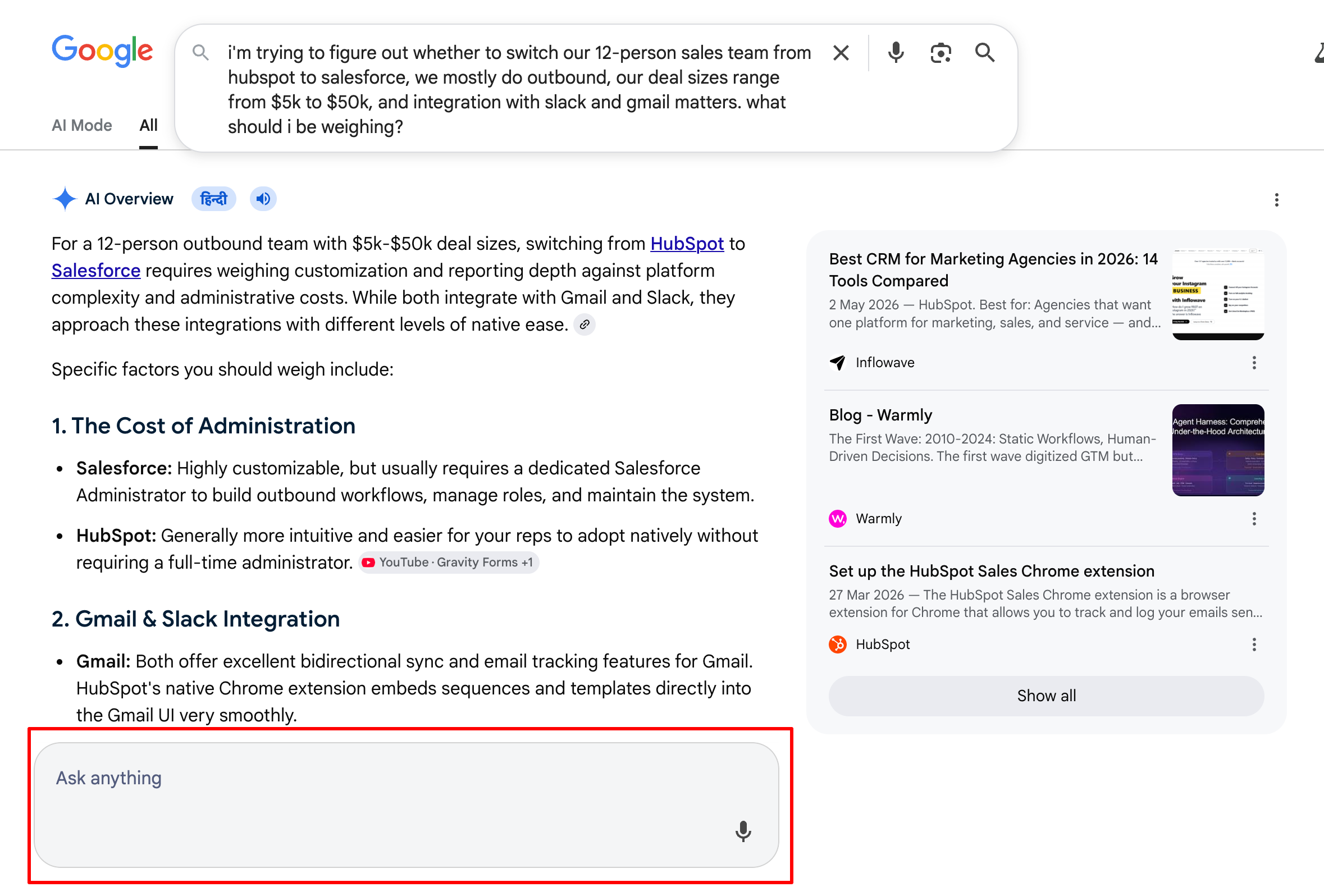
In Google’s press briefing, Liz Reid explained the reasoning: most users don’t want to have to choose between “more of a traditional page or an AI-forward search experience” before they start typing. The new box is designed so they don’t have to.
A few practical things this enables, all confirmed in the announcement:
- The box accepts longer, more conversational queries directly.
- It supports inputs across modalities: text, images, files, videos, and Chrome tabs.
- AI-powered suggestions help you formulate your question as you type, which Google says goes beyond autocomplete.
- Follow-ups from an AI Overview flow into AI Mode in the same box, without losing context.
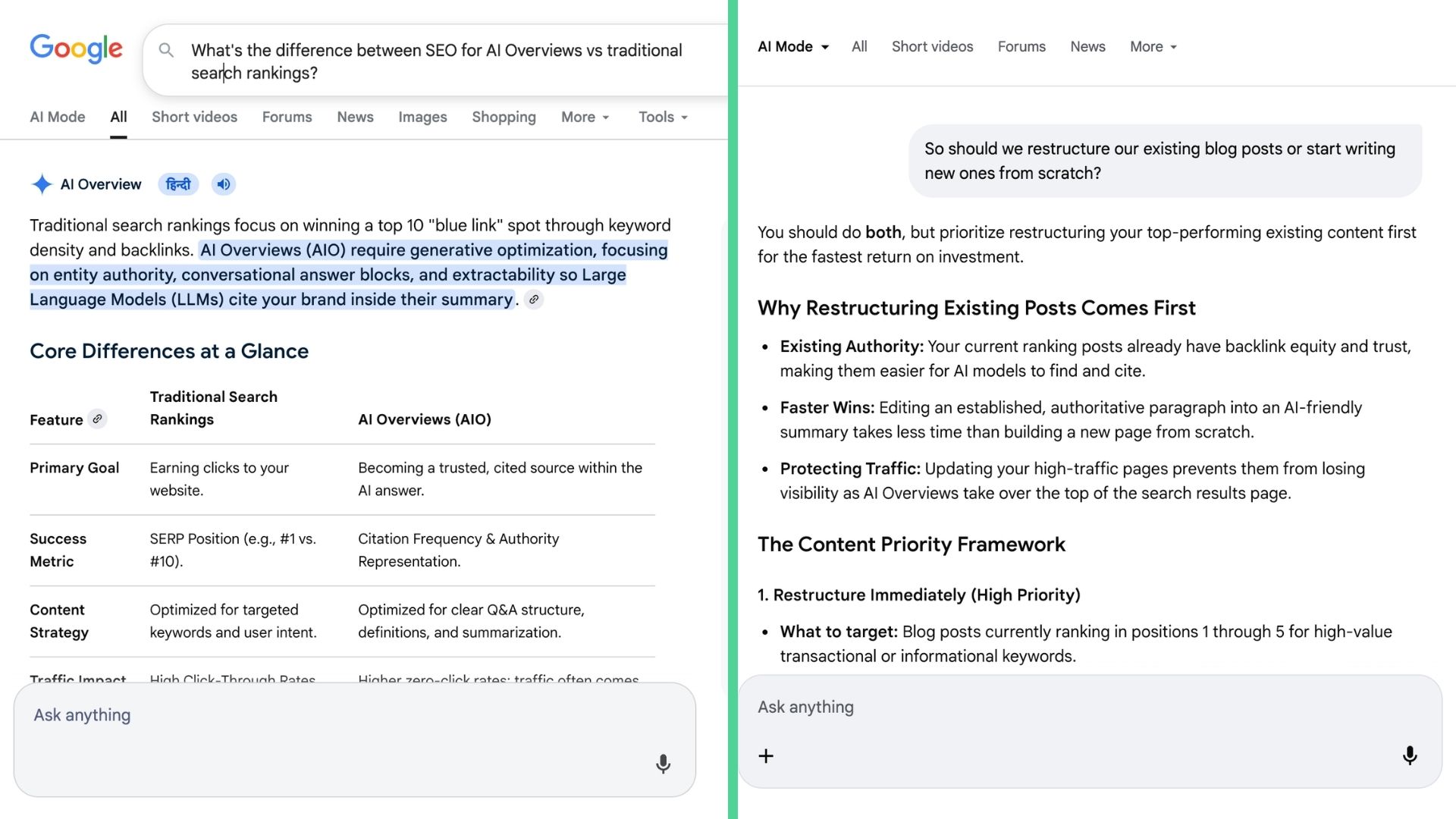
The intelligent Search box began rolling out on May 19, 2026, in every country and language where AI Mode is already available. The follow-up flow from AI Overview to AI Mode is live on desktop and mobile worldwide.
2. You can search with files, images, videos, and open Chrome tabs
The box now accepts more than just text.
Until now, if you wanted to search using something other than text, you had to use a separate tool. Google Lens for images. A different upload flow for files. Voice search lived in its own button. Each input type had its own entry point.
Google’s announcement states that the intelligent Search box now lets you “search across modalities, using text, images, files, videos or Chrome tabs as inputs.”
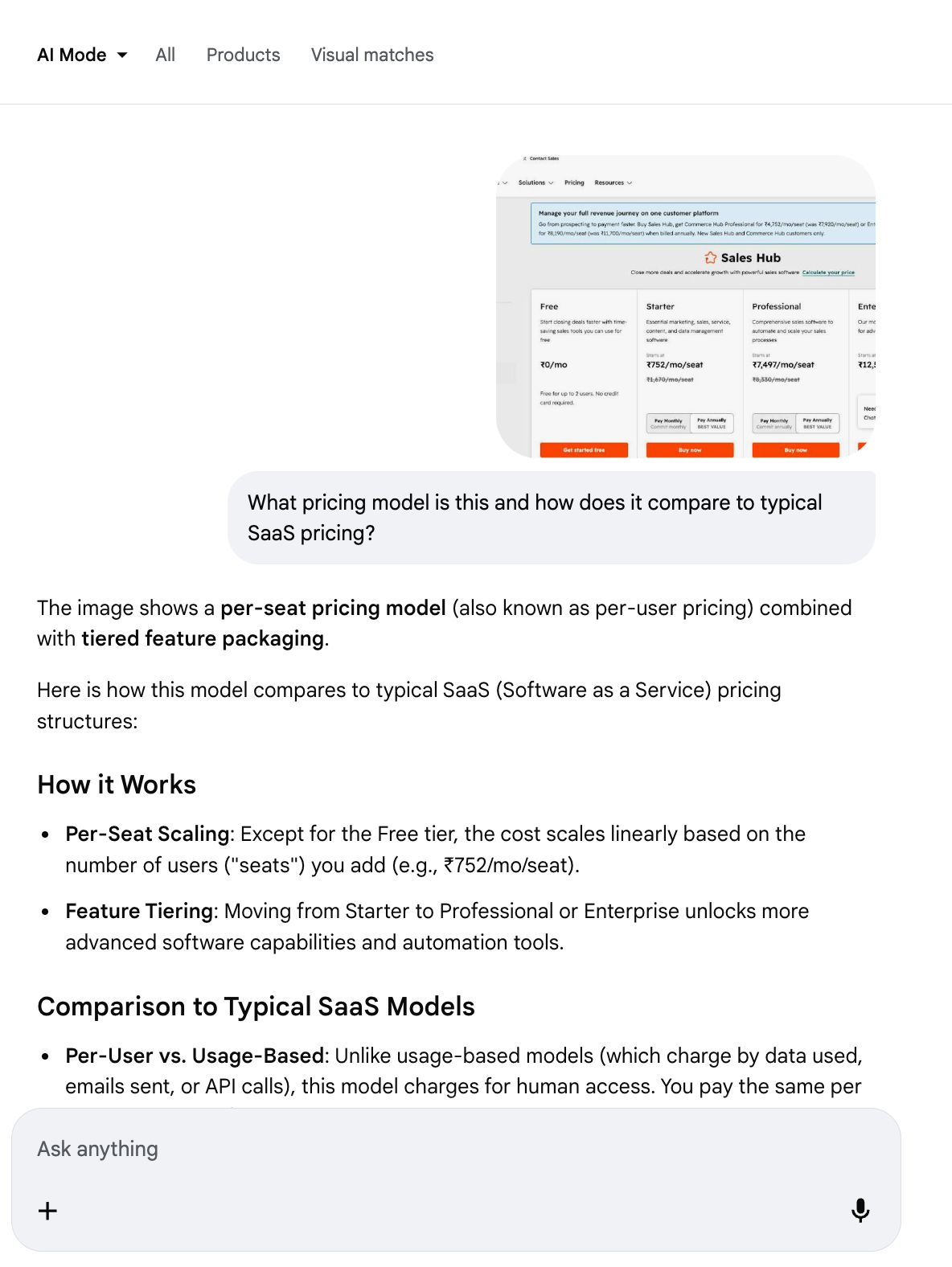
As soon as we upload any media or file, the search box turns into AI Mode.
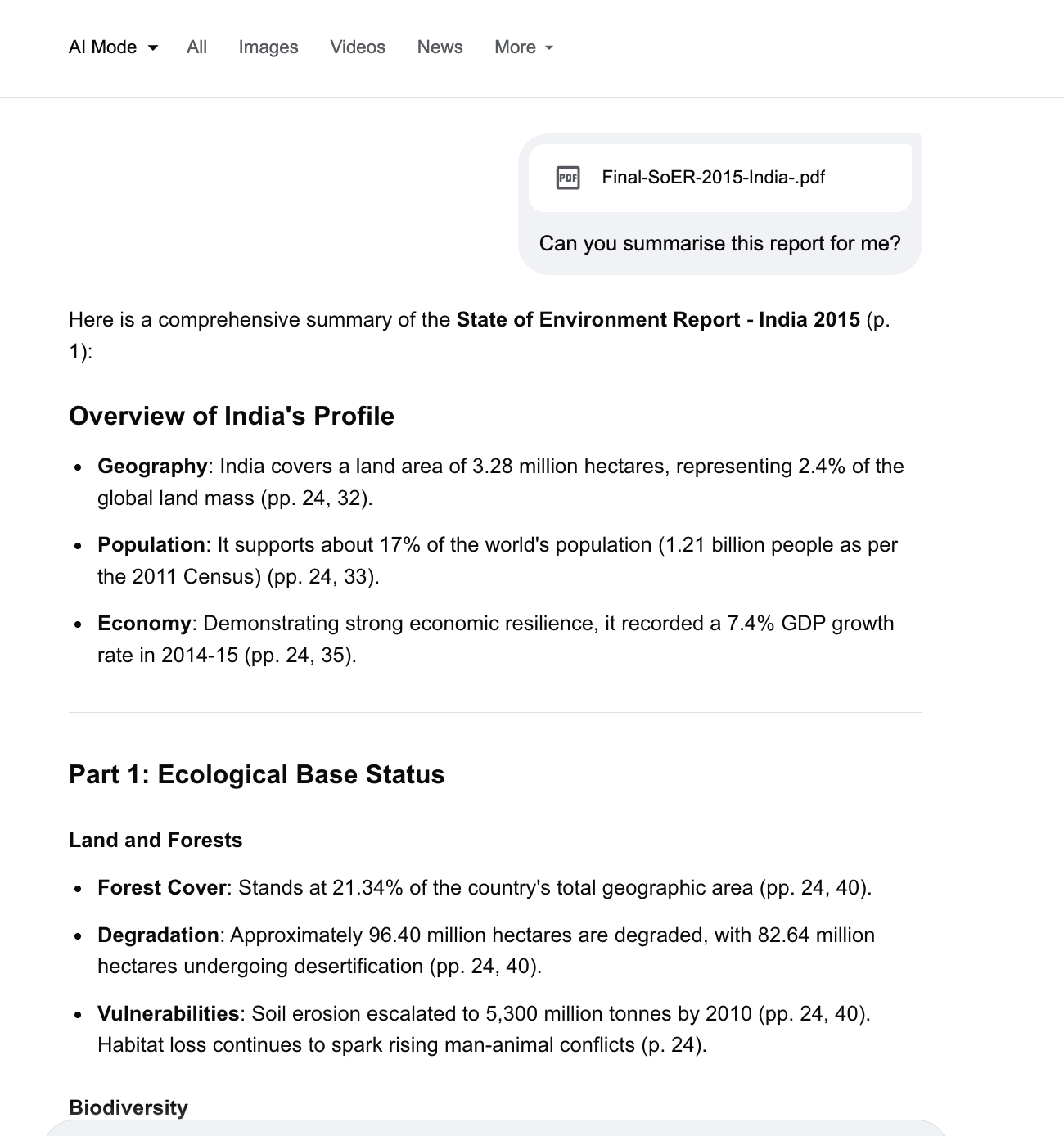
Google says: “You’ll continue to get a range of results from Search, just like you do today”, meaning multi-modal inputs feed into the same Search experience, not a separate tool.
This capability is part of the intelligent Search box rollout, which began on May 19, 2026, in every country and language where AI Mode is available.
3. Autocomplete is being replaced by AI-powered suggestions
Different kinds of help while you type.
For most of Google’s history, the suggestions that appeared as you typed in the search box were autocomplete, predictions of what you were about to type, based on what other people had searched for. They were trying to finish your sentence.
The intelligent Search box does something different. Google’s announcement says it is “designed to anticipate your intent” and “helps you formulate your question with AI-powered suggestions that go beyond autocomplete.” In Google’s press briefing, Liz Reid described these suggestions as going “beyond autocomplete.”
Per 9to5Google’s coverage of the launch, “Underneath the text box, you’ll have new shortcuts to access AI Mode, Talk (Search Live), and Create (Nano Banana in Google Lens). The ‘plus’ menu lets you upload images (Gallery + Camera) and documents (Files) to the query.”
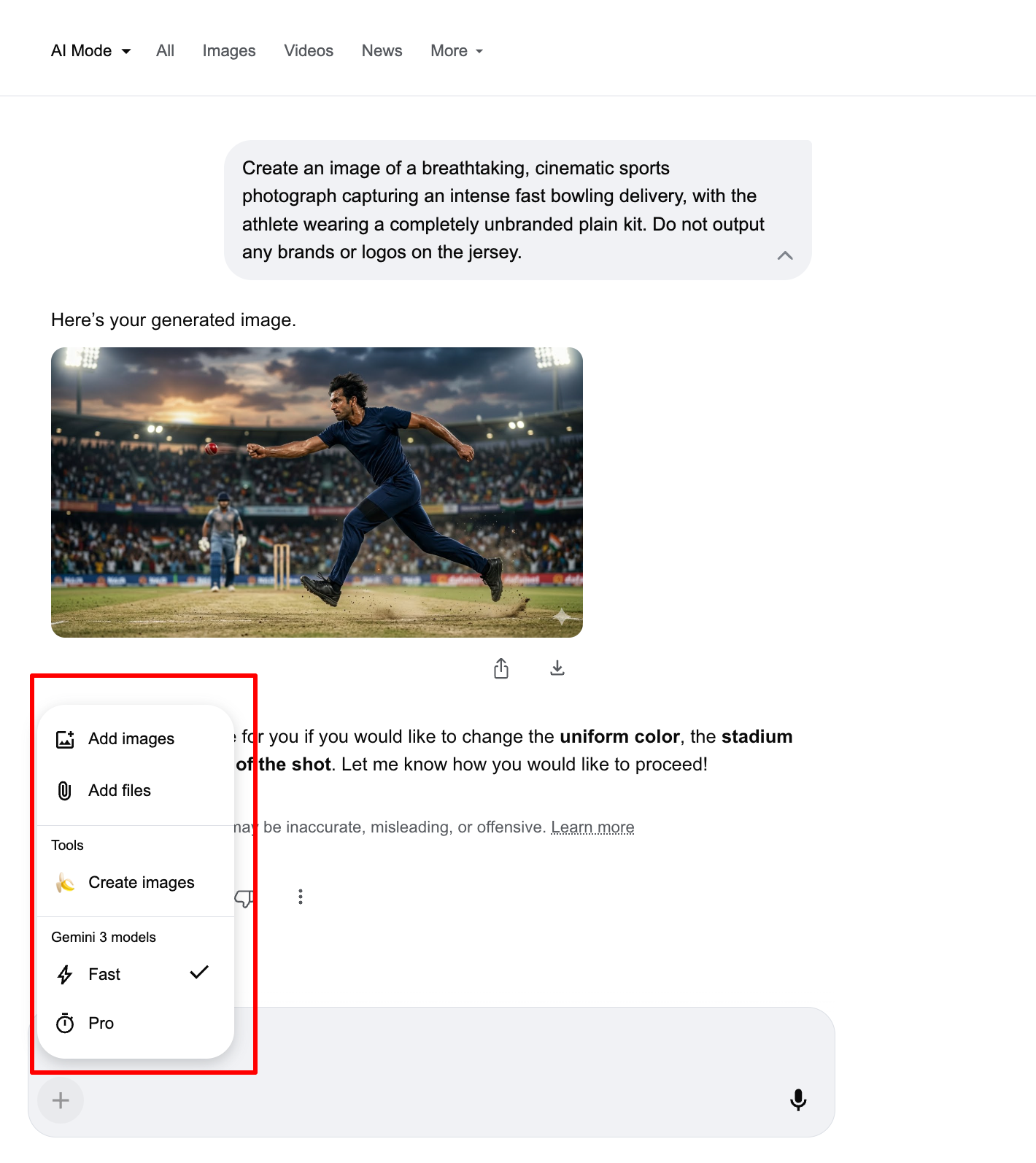
Google hasn’t published detailed examples of what these AI-powered suggestions look like beyond the general description, so the best way to see the difference is to try the same partial query in the new box and compare it to what classic autocomplete used to show.
4. Search runs in the background when you’re not searching
The first wave of “Search agents” lives inside the box.
Until now, search has been something you do. You open Google, you type, you read, you close the tab. The search ends when you stop searching.
Google’s announcement reframes this: “We’re entering the era of Search agents, where you can easily create, customize and manage multiple AI agents for your many tasks, right in Search. We’re starting with information agents. Operating in the background, 24/7, these agents intelligently reason across information to find exactly what you need at exactly the right moment.”
So a search you set up once can keep running on its own, across blogs, news sites, social posts, plus Google’s real-time data on finance, shopping, and sports.
Google’s announcement gives two example use cases:
- Apartment hunting: “you can brain dump all of the exact requirements you’re looking for, and your agent will continuously scan for you, notifying you when listings meet your needs.”
- Sneaker drops: “if you want to know the instant any of your favorite pro athletes announce a sneaker collab, your agent will let you know when a new drop lands so you don’t miss out.”
Per Business Insider’s coverage of the press briefing, the workflow goes further: “You can set the parameters, and the agent will come up with a plan and a list of the tools it needs to access to do the job. It will then track those changes and send you an alert once it finds them in stock.”
CNN’s coverage adds an example query users could prompt with: “Keep me updated when any of my favorite athletes announce sneaker collabs or signature drops.”
A few things worth flagging about how this changes search behavior:
The intent is no longer one-shot. You can describe what you want once, and Google keeps the query open until something changes. This is closer to how you’d brief a researcher or an assistant than how you’ve historically used a search engine.
The output is synthesized, not just delivered. Google’s announcement specifies the agent sends “an intelligent, synthesized update, with the ability to take action”, so the notification isn’t a raw link; it’s an interpreted update that may also include the next step.
The sources span more than just the open web. Google lists “real-time info on finance, shopping, and sports” alongside blogs, news, and social posts, so these agents are pulling from Google’s structured data feeds, not just crawling pages.
Availability: Information agents will launch first for Google AI Pro and Ultra subscribers this summer.
5. Search completes the task, not just finds it
Agentic booking moves from finding to doing.
Until now, Google Search has ended at the link. You asked a question, you got results, and the actual task, booking, calling, or reserving, happened somewhere else. Search was the discovery layer; everything downstream of that was your problem.
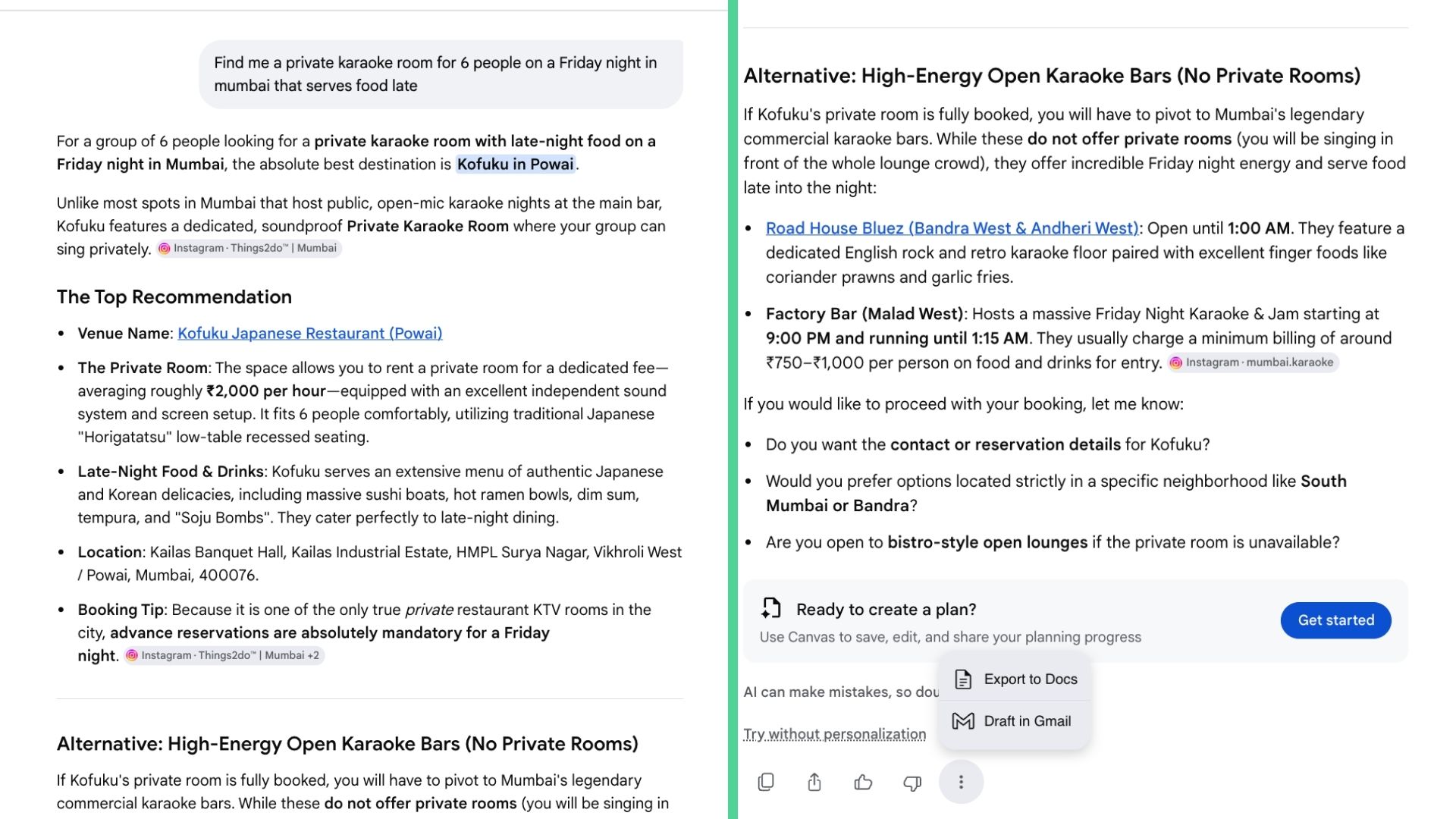
Google’s announcement reframes this. The intelligent Search box now does the booking step itself for a range of categories: “We’re also expanding agentic booking capabilities in Search to a wide range of new tasks, including local experiences and services. Just share your specific criteria, like finding a private karaoke room for six on a Friday night that serves food late, and Search brings together the latest pricing and availability with direct links to finish booking through the provider of your choice.”
And for some categories, Google’s announcement says it will call the business on your behalf: “for select categories like home repair, beauty or pet care, you can ask Google to call businesses on your behalf.”
6. The results page is now generated for your question
Generative UI: custom layouts, visuals, and simulations built on the fly.
For 25 years, every Google results page has looked roughly the same. Blue links. A few rich snippets. Maybe a featured answer at the top. The layout was static, Google’s job was to find the right pages and rank them inside the same template every time.
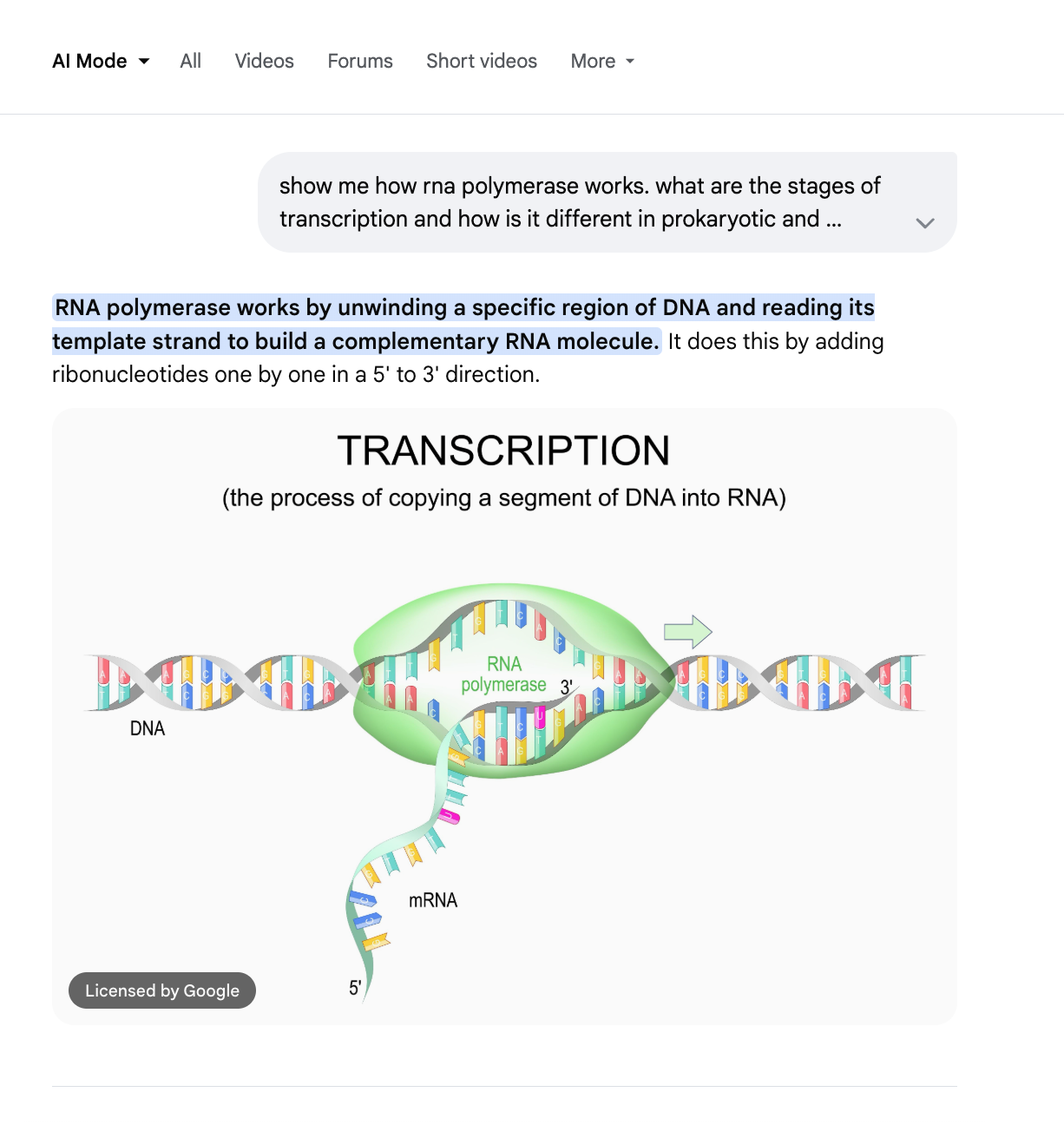
That template is no longer fixed. Google’s announcement: “We’re bringing the power of Google Antigravity and the agentic coding capabilities of Gemini 3.5 Flash right into Search. Search can build the ideal response, in the right format for your question, completely on the fly. So you can get custom generative UI, including visual tools and simulations, tailored precisely to your needs.”
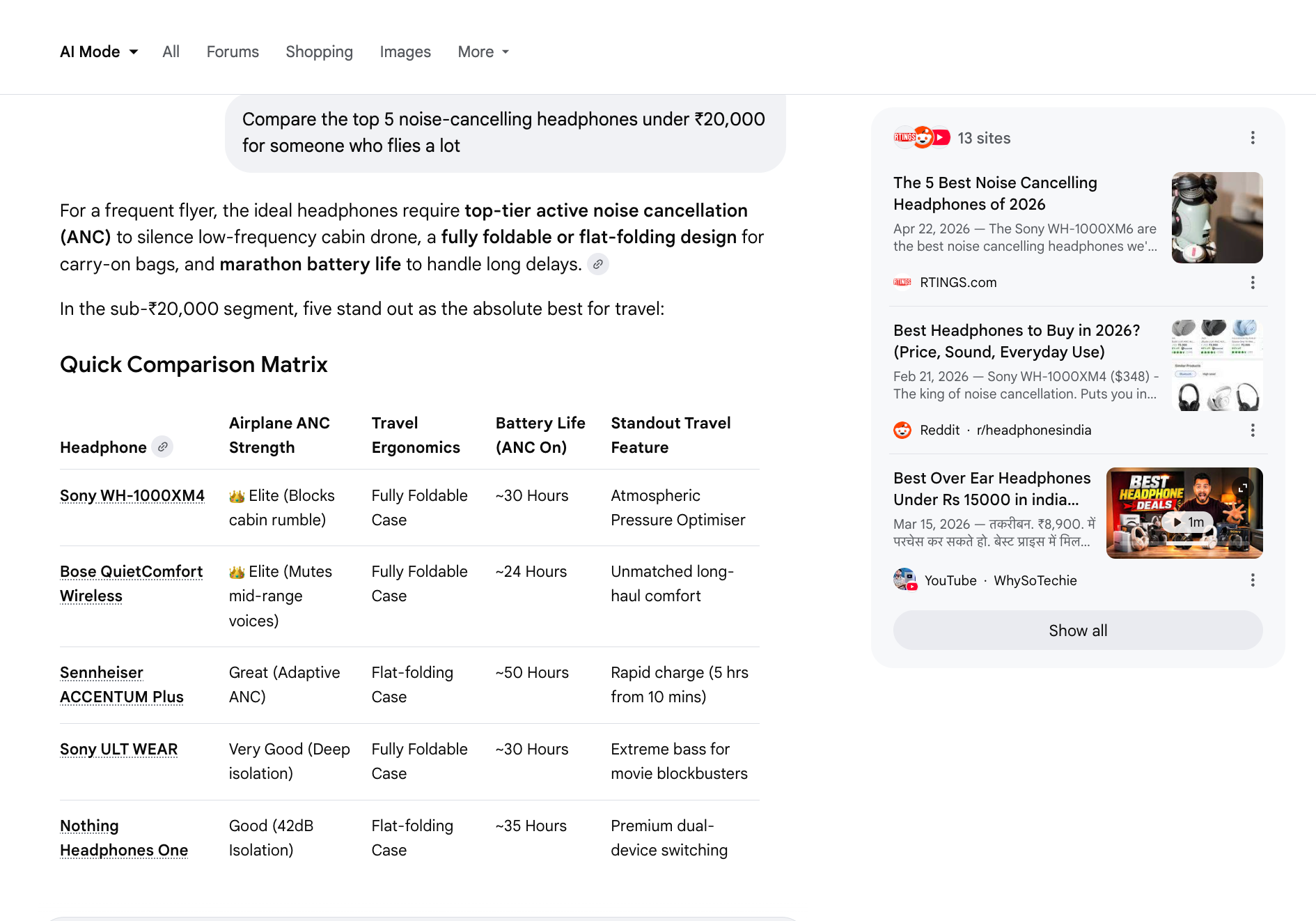
The official description of what that looks like: “Whether you want to wrap your mind around astrophysics or visualize how your watch works, Search can design custom layouts, assembling components (like interactive visuals, tables, graphs or simulations) in real-time.”
A few things worth flagging about how this changes search behavior:
The response format is no longer fixed. Google’s announcement says Search “can build the ideal response, in the right format for your question.” So a question about mortgage rates returns a calculator, a question about anatomy returns a visual, a question about a comparison returns a table, each generated specifically for that query rather than pulled from a pre-built template.
The components are assembled in real-time. The announcement lists “interactive visuals, tables, graphs or simulations” as the building blocks. These aren’t selected from a library of widgets, they’re generated by Gemini 3.5 Flash through Antigravity, Google’s agentic coding platform, in response to your specific question.
It’s positioned as free for everyone. Per Search Engine Journal: “Generative UI will be free for everyone in Search.” This is a deliberate distinction from the mini apps and information agents, which are gated to AI Pro and Ultra subscribers.
7. Search becomes a tool you return to
Mini apps turn one-off queries into persistent dashboards.
A search has always been disposable. You type a query, you read the results, you close the tab. The next time you need the same information, you search again. Nothing carries over.
Google’s announcement reframes this for ongoing tasks: “But often, you aren’t asking one-off questions, you have an ongoing task you find yourself searching for over and over, like planning a wedding or managing a home move. Search can go a step further, building you custom dashboards or trackers that you can continue to come back to and make progress on. You can think of these like mini apps for your own specific tasks.”
The official example from the announcement: “Say you’re looking to establish a new health and wellness routine. You can ask Search to build you a custom fitness tracker. Search will code it for you, tapping into fresh, real-time sources including reviews, live maps, and local data like the weather, so you get a tracker that works for you, helping you stay on track week after week.”
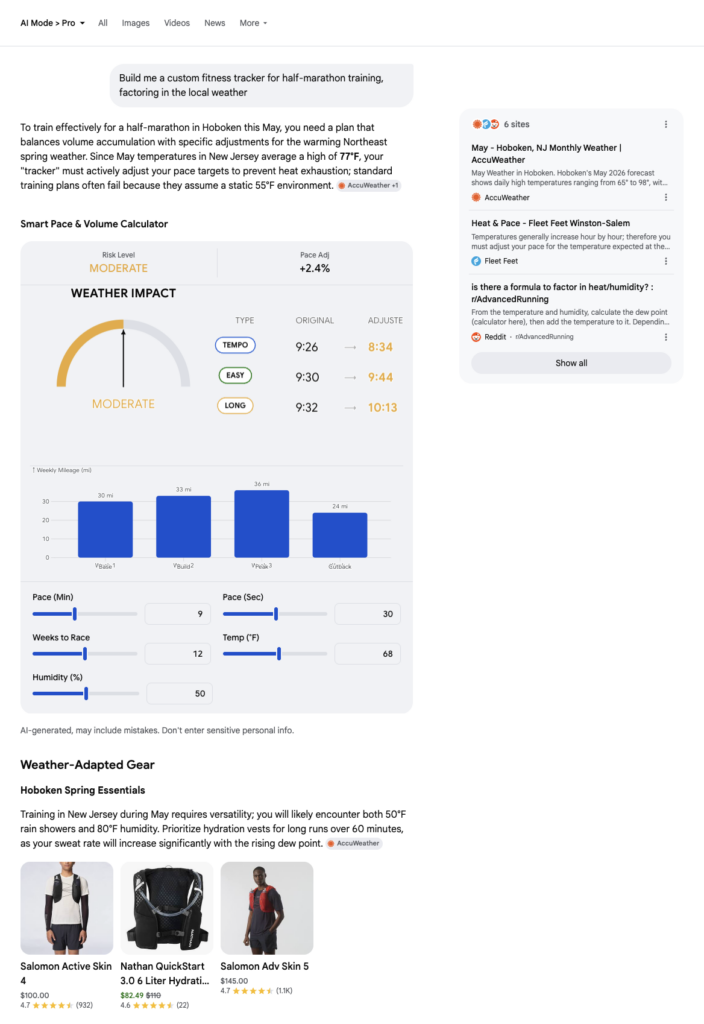
A few things worth noting about how this changes search behavior:
The output is software, not an answer. Google’s announcement says Search “will code it for you”, meaning the mini app is generated as a working interface, not as a written response describing what such an interface might look like. This is built on the same Antigravity platform that powers generative UI in Section 6, but tuned for persistence rather than one-off responses.
Real-time data feeds in continuously. The announcement lists “reviews, live maps, and local data like the weather” as the kinds of sources a mini app can tap into. So a fitness tracker doesn’t just know your routine, it knows today’s weather, your local conditions, and reviews for nearby gyms or trails.
You return to it instead of re-searching. This is the behavioral shift Google is naming explicitly: tasks like wedding planning or home moves involve dozens of related searches over weeks or months. Mini apps collapse those into one persistent surface you come back to.
8. Search knows your context, not just the world’s
Personal Intelligence connects your Google apps and now lives across AI Mode, the Gemini app, and Gemini in Chrome.
Google Search has historically known a lot about the world and very little about you. Your emails, your photos, your past purchases lived in other apps that didn’t talk to Search.
Personal Intelligence changes that. The I/O 2026 announcement put it this way: “For AI to be most helpful, it shouldn’t just know the world’s information, it should understand your context, too.”
Two rollouts are worth separating:
- Global (I/O 2026): Personal Intelligence in AI Mode is now live in nearly 200 countries and territories across 98 languages, no subscription required. Gmail and Google Photos connect today; Calendar is coming.
- US-only (March 2026): Per Google’s expansion blog, “We’re expanding Personal Intelligence in the U.S. across AI Mode in Search, the Gemini app and Gemini in Chrome.” This extends Personal Intelligence beyond Search, into the browser itself. Google
Gemini in Chrome with Personal Intelligence
Instead of asking a question in Search and letting Personal Intelligence inform the answer, you ask Gemini directly inside Chrome, and it uses your connected Google apps to tailor the response.
Google’s blog gives this example: “Looking for the perfect bag to match your new shoes? With Personal Intelligence, you’ll see a range of options that are tailored to your recent purchases as well as your preferred brands and style. The recommendations will even include subtle details, like purses with hardware that go with the new gold shoes.”
How control works
Per Google’s blog: “You choose if and when you want to connect apps like Gmail and Google Photos, and you can turn those connections on or off at any time.” And: “Gemini and AI Mode don’t train directly on your Gmail inbox or Google Photos library.”
Availability map: what’s live today, what’s coming this summer
| Feature | Status | Region | Cost |
|---|---|---|---|
| Intelligent Search box | Live (May 19, 2026) | Global (where AI Mode is available) | Free |
| AI Overview → AI Mode follow-ups | Live | Global | Free |
| Gemini 3.5 Flash in AI Mode | Live | Global | Free |
| Personal Intelligence (Gmail, Photos) | Live | ~200 countries, 98 languages | Free |
| Google Calendar in Personal Intelligence | Coming, no timeline | TBD | Free |
| Chrome tab attachment + side-by-side | Live | US-only | Free |
| Information agents | Summer 2026 | US-first | AI Pro / Ultra |
| Agentic booking + call-on-your-behalf | Summer 2026 | US-only | Free |
| Generative UI | Summer 2026 | Global (presumed) | Free |
| Mini apps (Antigravity) | “Coming months” | US-first | AI Pro / Ultra |
What this means for content and SEO teams
The behavioral shifts in Sections 1-8 add up to one practical question: how does your content show up when Search stops being a list of links?
The intelligent Search box, generative UI, information agents, and Personal Intelligence all push in the same direction. Search increasingly answers questions inside its own interface, with AI-generated summaries, custom layouts, and persistent dashboards. Users have fewer reasons to click through to source websites, and the data is starting to show it.
Per The Next Web: “If Google’s AI can synthesize information, build interactive tools, and dispatch background agents to track changes, the incentive for users to click through to source websites diminishes further. Referral traffic from Google Search has already been declining as AI Overviews expanded, and the new features are likely to accelerate that trend.”
This isn’t an extinction event for SEO Google still returns “a range of results” from its standard index, AI Overviews and AI Mode still cite sources, and 2.5 billion monthly users still see AI Overviews above blue links. But the success metric is changing. The question is no longer just “are we ranking?” It’s also “Are we being cited?”
Five practical implications, drawn from the announcement and the press coverage:
1. Citations in AI Overviews and AI Mode become a primary distribution channel. Google’s announcement explicitly says that as users go deeper into AI Mode follow-ups, “the links and supporting articles get even more relevant.” Being the article Google’s AI cites, not just the page that ranks, becomes the goal.
2. Content needs to answer the specific intent, not just the keyword. The intelligent Search box accepts conversational queries that are paragraphs long. Pages built to match a 3-keyword query won’t necessarily get pulled into a paragraph-long question. The unit of optimization shifts from keyword to intent.
3. Structure matters more, not less. AI Overviews and AI Mode pull from structured, scannable content, clear headings, defined sections, and explicit claims with sources. Long, unstructured prose is harder for an LLM to extract and cite.
4. Multi-modal content becomes searchable in new ways. The intelligent Search box accepts images, PDFs, and Chrome tabs as inputs. Visual content, data tables, and downloadable resources are no longer separate from search; they’re inputs that users bring to a query. Content libraries that include these formats have more surface area to be found.
5. Brand recognition becomes a moat. When a user asks Google to monitor sneaker drops or apartment listings, an information agent decides which sources to trust. Brands that are already known and cited have an advantage over those that are technically optimized but unfamiliar. Direct brand search and brand mentions in trusted sources become more important, not less.
What hasn’t changed about Content Marketing
A few things worth keeping in perspective:
The standard search index still exists. Google’s announcement: “You’ll continue to get a range of results from Search, just like you do today.” Blue links haven’t disappeared, they’ve moved further down the page.
AI Overviews cite sources. Every AI Overview and AI Mode response includes supporting links. The page still has to exist, be crawlable, and be authoritative enough to be cited.
Traditional SEO mechanics, crawlability, structure, authority, and intent matching still apply. They’ve just become table stakes rather than the whole strategy. The new layer on top is whether your content is the version Google’s AI chooses to summarize.
That layer is what Quattr helps content teams build for. If you want to see how your content is currently showing up across AI Overviews, AI Mode, and competing sources, or where the gaps are, that’s the work we do.

Quattr is an AI-native Search Visibility Platform founded in Palo Alto, California, built for mid-market and enterprise brands competing in the age of generative search. Recently recognized across G2's Spring 2026 reports with #1 rankings in AEO Results, Usability, and Relationship, Quattr helps brands win visibility across traditional search and AI-generated answer surfaces.
Quattr's AI agent, GIGA, evaluates content the way AI systems do, identifying gaps across structure, authority, internal linking, and discoverability to surface the highest-impact fixes. With capabilities like autonomous internal linking, E-E-A-T intelligence, and the new GIGA Landing Page Generator for keyword-matched, AI-search-ready pages, Quattr helps teams move from diagnosis to deployed changes without manual bottlenecks.