

Key Takeaway
No single source gives you a complete prompt list; triangulate across GSC, PAA, forums, and your own support/sales data.
Long-tail GSC queries (10+ words) are essentially prompts already; filter for them with a simple regex.
Stop tracking individual prompt rankings, too volatile, too personalized. Track visibility at the topic cluster level instead.
Support tickets and sales transcripts are your highest-signal source, and competitors can’t replicate them.
Gaps where rivals get cited but you don’t = confirmed demand, go there first.
Start with 30–50 prompts max, grouped by funnel stage, prioritize bottom-of-funnel first 30 well-chosen prompts monitored daily > 200 random ones checked occasionally.
Every week, roughly 700 million AI conversations happen across ChatGPT, Perplexity, Google AI Mode, and a dozen other platforms. Your brand is either part of those conversations, or it isn’t, and unlike traditional search, there’s no page two to fall back on. AI engines typically surface three to five sources per response. If you’re not among them, you’re invisible.
The problem isn’t tracking. Truth is, tracking is the easy part once you have the right prompts. The hard part is knowing which prompts to track in the first place.
Keyword research gave us infrastructure, Keyword Planner, search volume data, and difficulty scores. Prompt research has none of that.
OpenAI doesn’t publish query data. Google isn’t opening up AI Mode search behavior anytime soon. You’re working from inference, proxies, and pattern recognition rather than a clean first-party signal.
That doesn’t mean you’re flying blind. It means you have to be more deliberate about where you look and what you do with what you find. The teams getting this right aren’t waiting for a perfect data source. They’re triangulating across the sources they already have access to and building tracking systems that hold up even amid the noise.
This post covers exactly that: where to find prompts that reflect how your buyers actually query AI, how to filter signal from noise, and how to structure what you find into something you can act on.
Why Prompt Selection Is Different Than Keyword Research
Keyword research assumes a relatively stable, indexable query space. You find terms with volume, map them to pages, build content, track rankings. The feedback loop is slow but predictable. Prompts don’t work like that.
A prompt isn’t a query in the traditional sense. It’s a conversation turn, often embedded in a longer exchange, shaped by prior context, and filtered through whatever the AI knows about the user.
Ask ChatGPT the same question twice in different sessions, and you may get different brand recommendations both times. Rand Fishkin found a similarity score of just 0.081 when 142 respondents were asked to provide prompts for the same underlying query. That’s not a rounding error; it’s a fundamentally different content retrieval engine.
Query fan-out compounds this. When a user submits a prompt, AI engines don’t retrieve on that single string. They decompose it into multiple sub-queries, pull from different sources, and synthesize a response. This means the page that gets cited isn’t necessarily optimized for the exact prompt; it’s optimized for one of the sub-queries the model generated internally.
Then there’s personalization. AI assistants with memory, location context, or previous conversation history will surface different recommendations for different users asking identical questions. Traditional rank tracking assumes one result set per query. That assumption breaks completely here.
What this means practically: chasing individual prompt rankings is a trap. The volatility is real, the personalization is real, and the absence of reliable volume data means you’re often optimizing for noise. The teams doing this well have shifted their thinking from “where do I rank for this prompt” to “am I consistently visible across this topic cluster, and is what’s being said about me accurate.”
That’s the frame that makes prompt selection useful rather than theatrical.
Where to Actually Find Prompts Worth Tracking
There’s no single source that gives you a clean, comprehensive prompt list. Anyone selling you that is selling you false precision. What you can do is triangulate across several data sources, each with different strengths and blind spots, and build a prompt set that’s grounded in real user behavior rather than educated guessing.
The sources below are ranked roughly by signal quality. Start with what’s closest to your actual audience, then expand outward.
1. Google Search Console
GSC is the most underused prompt research tool available right now, and most teams are sitting on it without realizing what it contains.
The core insight: long-tail queries in Search Console increasingly look like prompts. As AI-assisted search behavior bleeds into Google, and as AI Mode data begins surfacing in GSC reports, the distinction between “someone Googling a long question” and “someone prompting an LLM” is collapsing. Queries of ten or more words, phrased in natural language, with clear intent signals? That’s conversation data, regardless of which input box it came from.
To surface it, go to Performance > Search Queries, add a filter, select Custom Regex, and enter:
^(?:\S+\s+){9,}\S+$
This returns queries of ten or more words. Drop it to five or six words if you want a broader set, use ^(?:\S+\s+){4,}\S+$ for five-plus word queries. What you’ll find when you run this on most established domains is striking: queries that read like someone asking a consultant a question, not someone typing two keywords into a search bar.
Real examples from practitioners running this filter look like: “Which sales enablement platforms are most widely adopted for enterprise pipeline analytics in France?” or “What are the best email deliverability platforms to reduce spam placement and improve inbox rates?” Those aren’t keyword searches. Those are prompts that happened to land in Google.
You can also filter specifically for question-based queries using:
\b(why|what|when|are|will|does|should|where|who|how|can|do|is)\b
Run both filters, export the results with impression data intact, impressions serve as your proxy for relative priority, and you have a prompt list grounded in actual search behavior on your domain.
A few things to keep in mind about this data.
First, it’s backward-looking. It shows you what people already found you for, not the full universe of what they’re asking.
Second, it skews toward queries where you already have some visibility. Gaps won’t appear here.
Third, the queries aren’t confirmed LLM prompts; they’re strong proxies. That’s enough to work with, but don’t treat it as ground truth.
The practical move: segment by page category using a secondary URL filter. Pull long-tail queries for your highest-converting page clusters separately. The prompts you find there are more likely to reflect genuine purchase-stage intent rather than top-of-funnel curiosity.
2. The Open Web — PAA, Forums, and AI Platforms
Once you’ve exhausted what GSC can tell you, the next layer is the open web, specifically the places where people ask questions in natural language without worrying about whether it ranks.
1. People Also Ask For
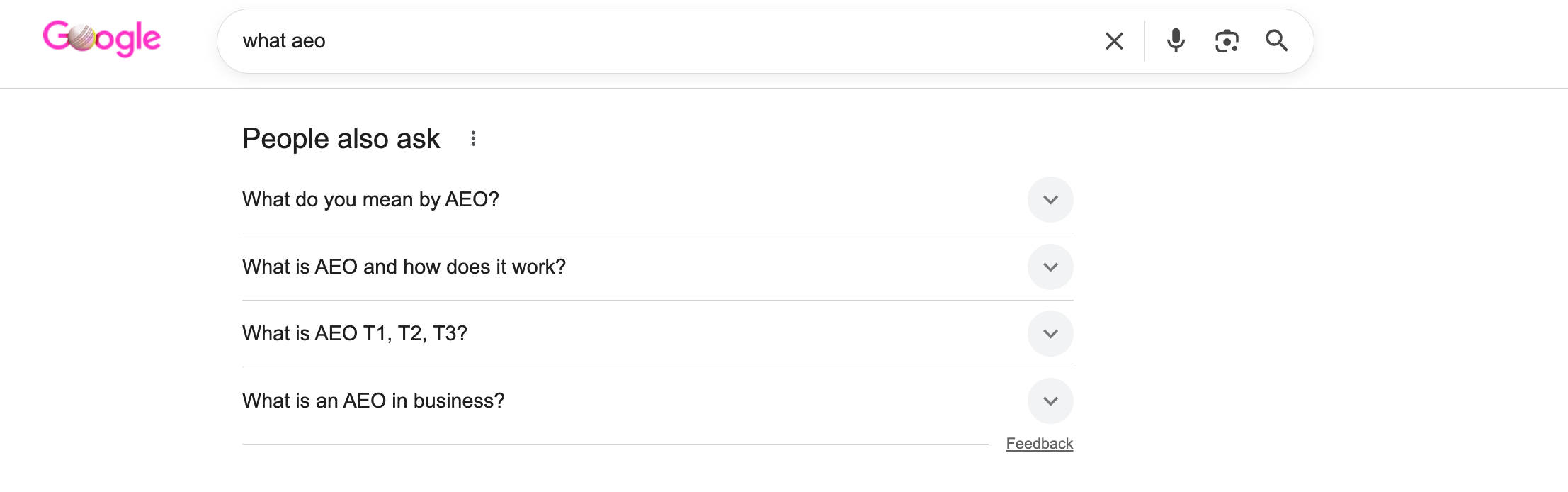
People Also Ask boxes are the closest thing Google has to a public prompt database. They’re algorithmically generated from real query patterns, phrased conversationally, and organized around the same intent clusters that AI engines use to fan out responses.
The practical workflow: start with your core topic, expand every PAA result, and document the tree of related questions that surfaces. Each expansion triggers new suggestions. Three or four levels deep on a competitive topic can surface dozens of prompt candidates you wouldn’t have thought to target.
The scaling trick is to run your existing GSC query list through a PAA extraction process. A list of 100 queries can expand to 400 or more relevant questions in a single pass.
What you’re capturing isn’t just more keywords; you’re mapping the sub-query landscape that AI engines are likely traversing when they decompose a user’s prompt. That’s the actual value of PAA for this use case.
2. Forums and community platforms
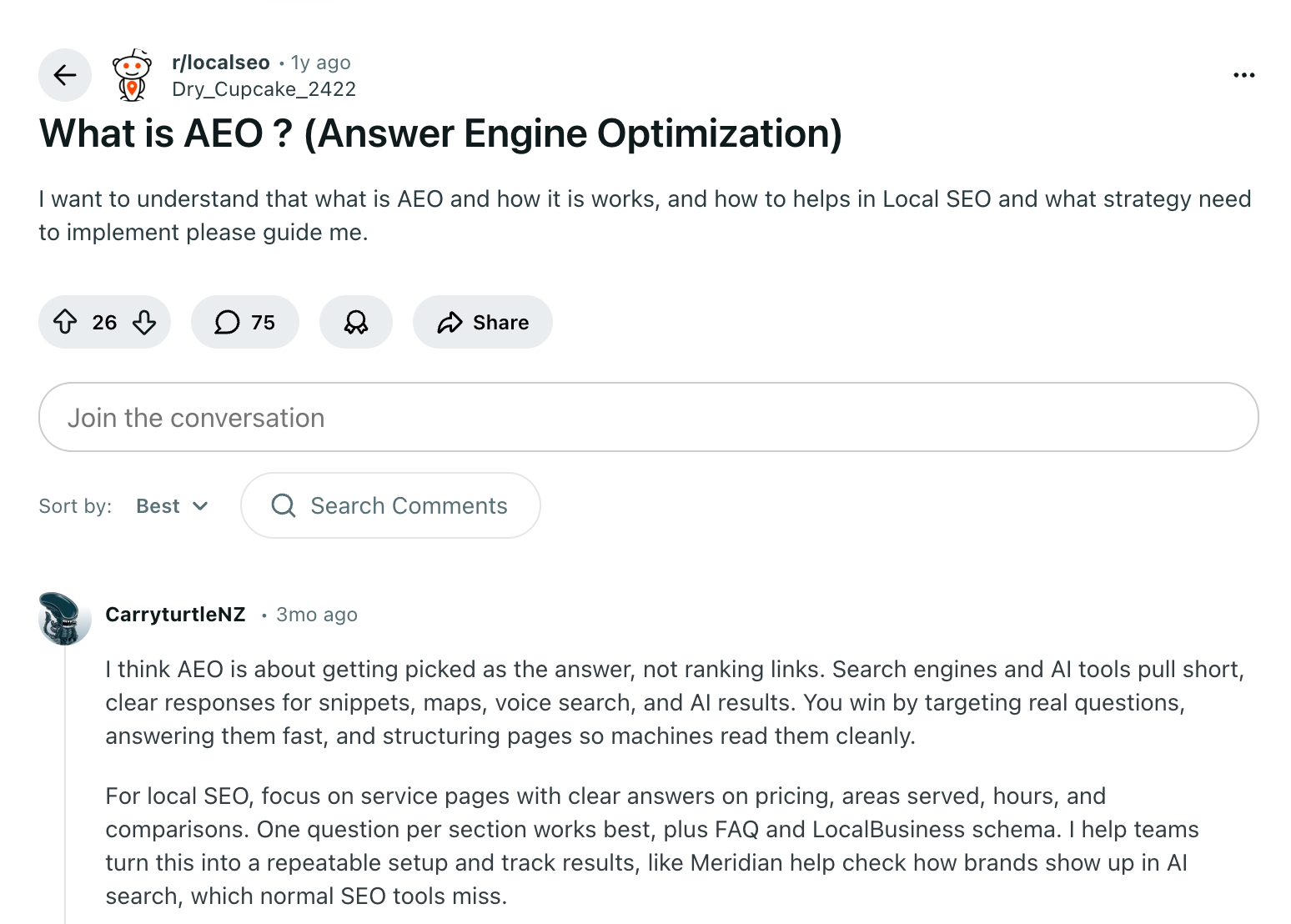
Forums give you something PAA doesn’t: raw, unoptimized language. On Reddit, Quora, niche Slack communities, and industry forums, people write the way they think, not the way they’d craft a title tag. That natural phrasing is exactly what shows up in LLM prompts.
A highly upvoted thread in a relevant subreddit is a signal that the question has genuine traction. The specific wording people use in their posts, the jargon, the framing, and the level of assumed context tell you how your audience actually talks about the problem your product solves.
Google surfaces forum content directly in search results through its Discussions and Forums feature. You can isolate it by appending &udm=18 to any search URL. This gives you a filtered view of community discussions around any topic without manually browsing subreddits.
3. AI platforms
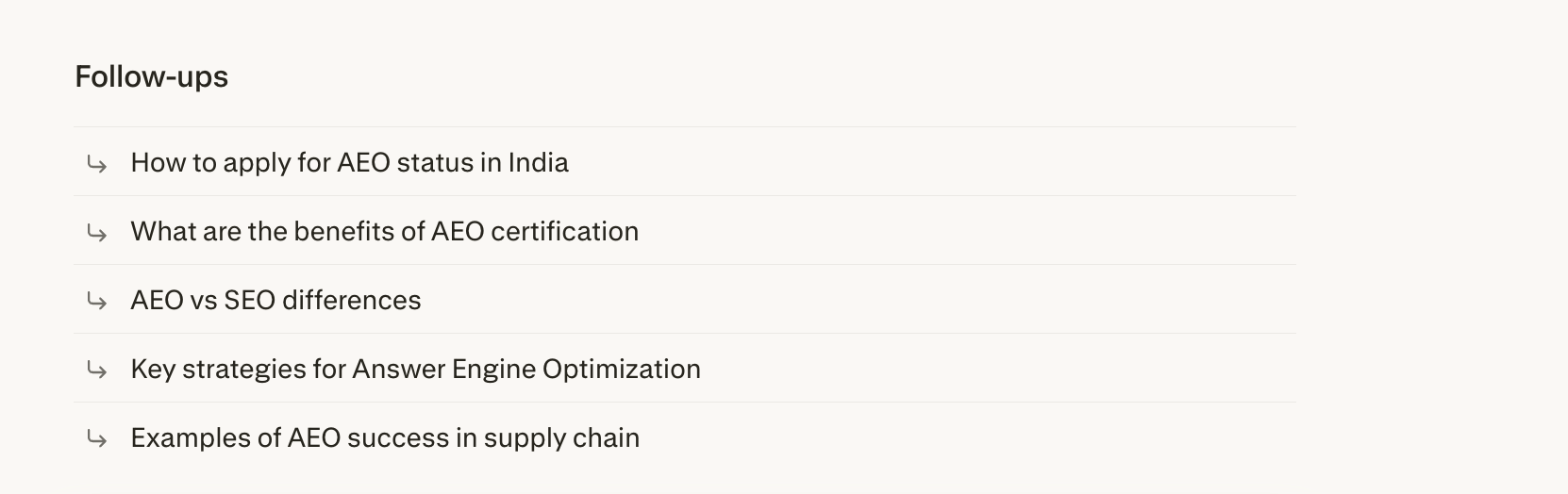
AI Search Engines themselves are an underused source. Perplexity appends related follow-up questions at the end of every response; these are AI-generated based on the original query and its results, not pulled from historical data, but they’re designed to reflect what a user would naturally ask next.
That makes them useful for mapping adjacent prompt territory. ChatGPT’s response patterns, the way it interprets and reframes questions, also reveal how AI engines chunk up intent.
If you ask an AI platform “what are the most common questions people ask about [your category],” you’ll get a structured list that reflects real search patterns, not perfectly, but directionally well.
The discipline here is not to treat any single open-web source as authoritative. Use them in combination. A question that surfaces in GSC long-tail data, shows up repeatedly in PAA, and mirrors the language in active forum threads is a high-confidence prompt candidate. One that only appears in one place is a hypothesis worth testing, not a certainty worth optimizing for.
3. Your Internal Data
This is the source most teams deprioritize because it requires coordination across departments. That’s exactly why it’s so valuable, your competitors aren’t mining it either.
Support tickets are the highest-signal source on this list. Every ticket is a real person describing a real problem in their own words, without any awareness of SEO. The phrasing is unfiltered. “Why does the sync keep breaking when I add a new user?” is a prompt. “How do I set up SSO for a team that uses both Google and Microsoft?” is a prompt.
These are documented, timestamped evidence of exactly how your buyers think about the problems your product solves.
Sales call transcripts give you a different angle on the same buyer. Where support tickets reflect post-purchase friction, sales transcripts capture pre-purchase evaluation. The questions prospects ask on calls, “how does this compare to what we’re using now?”, “Does it handle this edge case?” is the question they asked AI before the call, and will ask again before signing.
When CloudEagle worked on restructuring their commercial pages, the content gaps that surfaced weren’t discovered through keyword tools; they came from understanding how buyers were actually framing their evaluation questions. That grounding in real buyer language, applied across 33 pages, drove a 3x increase in AI Citation Share in 12 weeks.
4. Competitor and Gap-Based Discovery
Everything covered so far tells you what your audience is asking. This source tells you where you’re losing the conversation to someone else.
Competitor citation analysis works by reverse-engineering which prompts your competitors are winning. If a rival consistently appears in AI responses around a specific topic, their content is already structured in a way that AI engines find citable. The prompts driving those citations are worth knowing — not to copy their content, but to understand the territory you’re not covering and the framing you’re not using.
The inference method: when you see a competitor cited for a response, work backward from the page title, content structure, and topic angle to identify the prompt family it’s likely serving. A page titled “Best Help Desk Software for Remote-First Teams” is probably winning prompts around remote team support tooling, SMB help desk comparisons, and async customer service workflows.
Mention gap analysis takes this further. The prompts where multiple competitors are cited but your brand isn’t represent your most actionable visibility gaps. These aren’t speculative opportunities; they’re confirmed demand with confirmed competition. The question isn’t whether people are asking these questions. The question is why your content isn’t in the answer.
The two most common reasons are coverage and authority. Either you don’t have content that addresses the prompt directly, or you have content that addresses it but isn’t structured in a way that AI engines can extract and cite cleanly. Both are fixable. Neither shows up if you’re only looking at your own data.
There’s a subtler signal worth watching, too: the sources that get cited alongside competitors. The third-party sites, review platforms, and industry publications that appear consistently across AI responses in your category are the external authority signals that those platforms are leaning on.
If those sources mention your competitors and not you, that’s a content and PR gap that affects AI visibility regardless of how well your own pages are optimized.
Simpplr’s path to becoming the number one brand in organic traffic for employee intranet software wasn’t built on publishing more content than competitors; it was built on understanding where topical authority was thin and systematically filling it. Optimizing 200-plus pages and building content hubs around the right topic clusters reduced their paid reliance from 55% to under 30% while doubling non-brand organic traffic year over year. The competitive gap analysis told them where to focus. The content work closed the gap.
Build a Prompts Tracking Framework
Most teams stop at collection. They pull queries from GSC, scrape some PAA boxes, add a few competitor-inspired prompts, and end up with a spreadsheet of 200 items they don’t know what to do with. A list isn’t a strategy. A framework is.
The distinction matters because AI response volatility makes individual prompt tracking unreliable as a primary signal. Ask the same question twice, and you may get different citations, different brand mentions, different framing. If you’re making decisions based on whether a single prompt returned your brand in position two versus position four, you’re optimizing for noise. The signal lives at the cluster level, not the individual prompt level.
Grouping Prompts into Clusters
Prompt clustering is the structural move that makes tracking actionable. Group related prompts by shared intent, topic, or funnel stage, not by keyword similarity alone. A cluster around “enterprise content audit software” might contain fifteen prompts that approach the same underlying question from different angles: feature-specific variants, comparison framings, use-case-specific versions, persona-adjusted phrasings. Individually, each prompt is volatile. Collectively, the cluster tells you whether you’re consistently visible in that topic area or not.
A practical clustering framework for most B2B SaaS companies looks like this:
| Cluster Type | Focus | Example Prompt |
|---|---|---|
| Brand | Direct questions about your product | “What does [Product] do and who is it for?” |
| Comparison | Evaluation-stage competitive prompts | “How does [Product] compare to alternatives for mid-market teams?” |
| Feature/Capability | Specific functionality questions | “Does [Product] support SSO for enterprise accounts?” |
| High-Intent Transactional | Bottom-funnel use case prompts | “Is [Product] the right fit for a 50-person ops team?” |
| Category/Educational | Top-of-funnel topic authority | “What should I look for in an employee intranet platform?” |
Start with ten to fifteen prompts per cluster, not one hundred. You’re not trying to cover every possible phrasing; you’re trying to get a reliable directional read on whether your brand is part of the conversation in that topic area. Aggregate visibility across the cluster is the metric that matters. If you’re mentioned in responses to eleven of fifteen prompts in your comparison cluster, that’s meaningful. If it drops to four of fifteen after a content update by a competitor, that’s a signal worth acting on.
Start With the Clusters Closest to Revenue
The buyer stage should influence which clusters you build out first. Bottom-of-funnel comparison and feature clusters drive the AI citations that affect purchase decisions directly. A buyer asking “which project management tool is best for a distributed engineering team” is closer to conversion than someone asking “what is project management software.” Both matter for visibility, but they don’t matter equally for revenue. Focus your tracking and optimization effort accordingly, build the bottom-of-funnel clusters first, then expand upward.
Match Monitoring Frequency to Cluster Priority
Your monitoring schedule should match the cluster priority. Your highest-value comparison and feature clusters warrant daily or weekly checks. Educational and top-of-funnel clusters can run on a monthly cycle without losing meaningful signal. Running every prompt at the same refresh frequency wastes resources and creates noise in your reporting.
Keeping Your Framework Current
Finally, build in a review loop. Prompt relevance shifts as your product evolves, as competitors enter or exit topic areas, and as AI platform behavior changes. A quarterly audit of your cluster structure, retiring prompts that no longer reflect your product, and adding new ones that surface from ongoing GSC and support ticket analysis, keeps your tracking framework connected to reality rather than drifting into irrelevance.
The goal isn’t to track everything. It’s to track the right things consistently enough that you can see movement, diagnose causes, and take action. Thirty well-chosen, well-clustered prompts monitored daily will always outperform two hundred random prompts checked whenever someone remembers to look.
Use Quattr to Stop Managing AI Search in Multiple Tools
Most teams doing this work are stitching together GSC exports, spreadsheets, manual AI queries, and separate rank trackers just to get a fragmented picture of their AI visibility. Every handoff between tools is a place where signal gets lost, context disappears, and action stalls.
Quattr brings the entire workflow into one place, from surfacing prompt candidates to optimizing the pages that need to win those citations.
AI Citation Tracking — Monitor your brand visibility across ChatGPT, Perplexity, Google AI Overviews, and AI Mode in a single dashboard, grouped by topic cluster so you’re reading signal, not noise.
Prompt Discovery — Surface high-value prompt candidates directly from your organic performance data, mapped to funnel stage and intent, so you know where to focus first.
Content Optimization — Identify exactly which pages need restructuring to become citable sources for your target prompts, with specific, actionable recommendations rather than generic content scores.
Semantic Internal Linking — Build the topical authority signals that AI engines use to evaluate credibility, without manually auditing your entire site architecture.
Competitive Gap Analysis — See where competitors are winning AI citations you’re not, and get a clear view of the content and structural gaps driving the difference.
FAQs on Finding Right Prompts
Do I need to track prompts across every AI platform, or can I focus on one?
Start with two or three platforms that your buyers actually use. ChatGPT and Perplexity cover the majority of AI search behavior for most B2B audiences. Google AI Mode matters if your audience tends to use traditional search habits. Spreading thin across every platform early creates noise before you have a baseline.
How many prompts should I start with before expanding my tracking set?
Thirty to fifty total prompts across your priority clusters is enough to get a directional read. The temptation is to go wide immediately. Resist it. A smaller, well-chosen set monitored consistently will surface more actionable signals than a large set checked sporadically.
How do I know if my AI visibility is actually improving?
Track mention rate at the cluster level, not individual prompt positions. If you’re cited in 8 of 15 comparison prompts this month versus 5 last month, that’s movement. Pair it with share of voice against two or three named competitors to give the number context.

Quattr is an AI-native Search Visibility Platform founded in Palo Alto, California, built for mid-market and enterprise brands competing in the age of generative search. Recently recognized across G2's Spring 2026 reports with #1 rankings in AEO Results, Usability, and Relationship, Quattr helps brands win visibility across traditional search and AI-generated answer surfaces.
Quattr's AI agent, GIGA, evaluates content the way AI systems do, identifying gaps across structure, authority, internal linking, and discoverability to surface the highest-impact fixes. With capabilities like autonomous internal linking, E-E-A-T intelligence, and the new GIGA Landing Page Generator for keyword-matched, AI-search-ready pages, Quattr helps teams move from diagnosis to deployed changes without manual bottlenecks.