

Key Takeaways
- Prompt management means keeping every tracked question organized in one place and checking it on a regular schedule, not a one time export into a spreadsheet.
- Manually tracking AI visibility breaks down fast, since no person can check thousands of prompts across five AI engines every week by hand.
- A strong prompt list comes from combining several sources like Google Search Console long-tail queries, People Also Ask and forums, support tickets and sales calls, and competitor gap analysis.
- A prompt list only becomes useful once it’s organized, ideally grouped by intent, so you’re reading trends across clusters instead of reacting to one prompt bouncing around.
- Quattr tracks four core metrics, Citations, Share of Voice, Mentions, and Positive Sentiment, for you and every competitor, across every AI model.
- The Drilldown view lets you break performance down by competitor, prompt, cited URL, intent, geography, or whether a query is branded, so you always know exactly where a visibility gap is coming from.
Your best customer this quarter almost went with a competitor instead, and you’ll never know it happened. They asked ChatGPT which option to pick, got an answer, and acted on it, all before your sales team ever heard their name.
Here’s the part that should actually worry you. AI search is already helping your buyers decide, quietly, every day, and most brands have no idea if they’re the one getting recommended or the one getting skipped. Hoping your content ranks well enough isn’t a fix. Knowing which questions are being asked, checking the answers every week, and fixing the gaps before a competitor’s name shows up instead of yours, that’s the fix. Here’s how that actually works, and how Quattr makes it possible.
Why Prompt Management Matters
Checking a handful of prompts by hand is doable. Tracking them properly is a different problem, and it comes down to two real facts about how AI answers work.
AI answers aren’t consistent. Ask the same question twice and you can get a different answer, with different sources cited both times. That means one prompt checked once tells you very little, it could shift the next time for reasons that have nothing to do with your content.
There’s no prompt-level search data either. No platform publishes prompt volume the way Google Keyword Planner does for keywords, so there’s no shortcut to knowing which questions matter most. This means:
- Without a system built for this, real patterns get buried under random day to day shifts.
- A single prompt is noise, a group of related prompts tracked over time is signal.
- Manually checking five separate AI engines isn’t just tedious, it’s too scattered to track reliably by hand.
None of this is solved by trying harder or checking more often by hand. It’s solved by understanding what you’re actually managing in the first place, and that starts with knowing what prompt management really means.
What is Prompt Management
Generative Engine Optimization is the practice of trying to show up inside AI generated answers, the same way SEO is the practice of trying to rank in search results. Prompt management is the operational side of that, the actual process of keeping track of which questions your brand is being tested against.
In practice, it comes down to three concrete things: keeping a defined list of the prompts you’re tracking, checking how AI models answer them on a set schedule, and having enough data on each one to tell whether a change in the answer is real or just noise.
A prompt isn’t the same thing as a keyword and this isn’t just a wording difference. Ask an AI engine the same question twice and you can get two different answers, with different sources cited both times, since these systems don’t return identical results on every run.
There’s also no published prompt-level search volume anywhere, no platform shows how often a given question actually gets asked, the way keyword tools show search volume for keywords. That means prompt management can’t just borrow SEO’s playbook, since a chunk of that playbook depends on data that simply doesn’t exist for prompts.
What replaces it is a system, a real list of tracked prompts, grouped into clusters, checked on a set schedule, so a single volatile answer doesn’t get mistaken for an actual trend. That’s what prompt management actually is.
For any of this to work, the first step is getting your prompt list right. Everything downstream, the grouping, the tracking, the trend reading is only as good as the list you start with.
How to Build Your Prompt List
There’s no single source that hands you a clean list of prompts. The right approach is to pull from several places and let them confirm each other.
I. Google Search Console: Google Search Console is a very useful source. Long tail queries, the ten plus word ones phrased like a real question, already read like prompts, not keywords. Filtering your GSC data for these gives you a prompt list grounded in real search behavior on your own domain.
II. People Also Ask & Forum Platforms: People Also Ask boxes and forums like Reddit or Quora add the layer that GSC can’t. They show you the raw, unfiltered way people phrase a problem, which is closer to how someone actually talks to an AI chatbot than any keyword tool output.
III. Support Tickets & Sales Calls: Your own support tickets and sales call transcripts are the highest signal source of all. Every ticket is a real question from a real buyer, in their own words, with zero SEO instinct behind it.
IV. Competitor Analysis: Competitor and gap analysis close the loop. If rivals are getting cited for a topic and you aren’t, that’s confirmed demand you’re currently missing.
A good prompt list on its own won’t get you very far. It only pays off once it’s organized the right way, so tracking becomes the easy part instead of the hard one.
How Can You Organize Your Prompts Smoothly With Quattr
Once you know how you want your prompts grouped, setting that up inside Quattr takes a few minutes. Everything from picking your tracked domain to letting the system sort prompts by intent happens inside one simple setup flow. Here’s what that looks like, step by step.
Step 1: Pick Your Domain, Country and Device
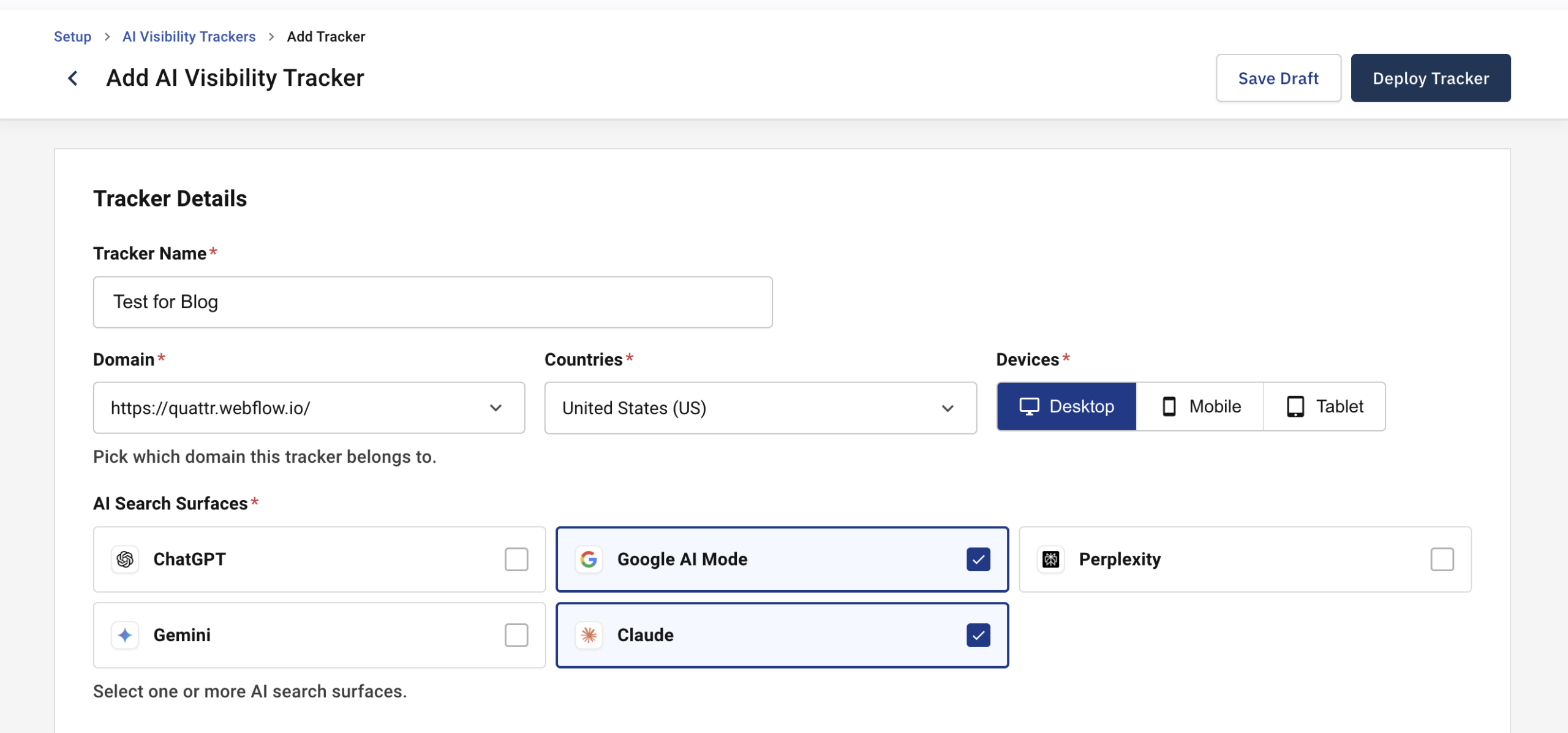
Choose which domain, country, and device you want tracked, then select the AI models to run it against, ChatGPT, Google AI Mode, Perplexity, Gemini, or Claude.
Step 2: Add Your Prompt List
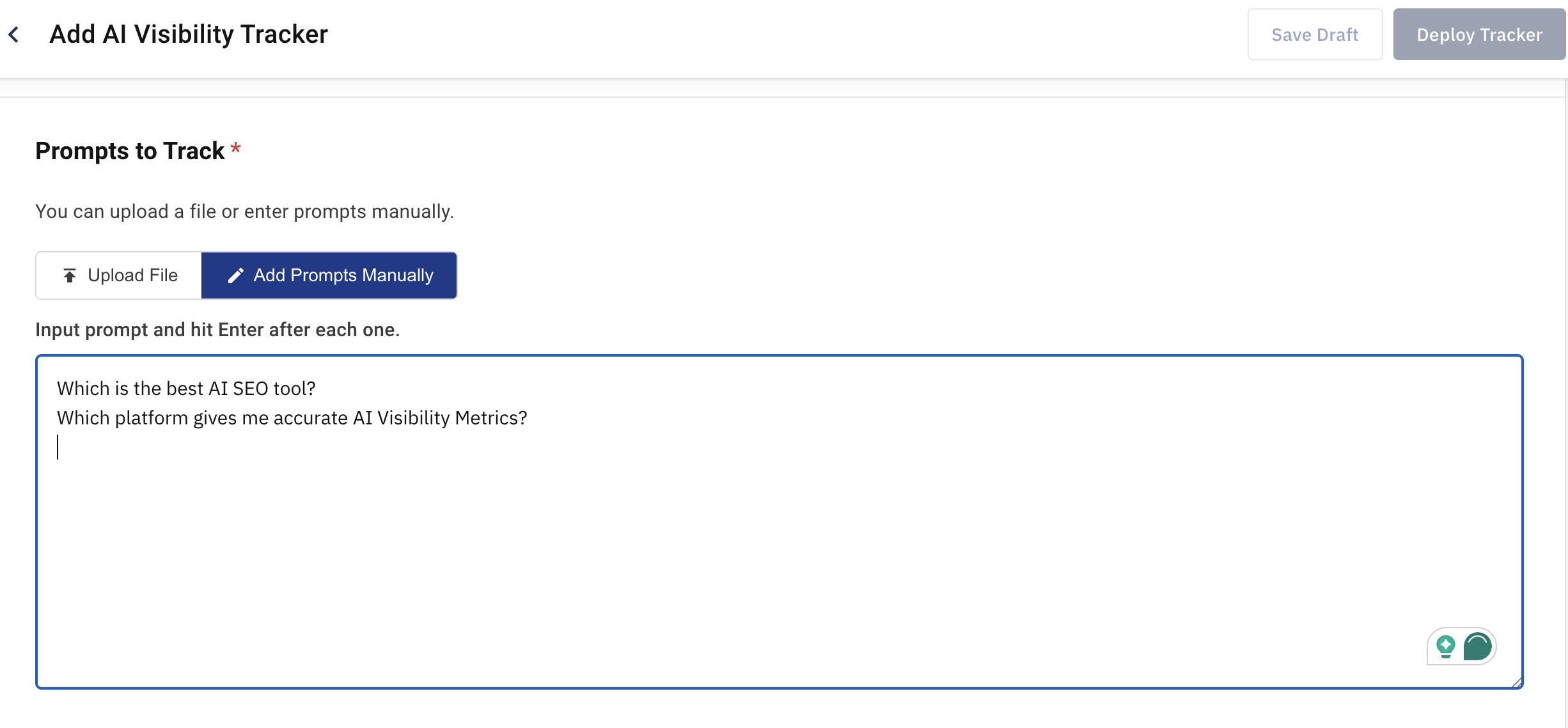
Upload a file or add your prompts in manually, one per line, no special formatting needed.
Step 3: Choose Your Tracking Schedule
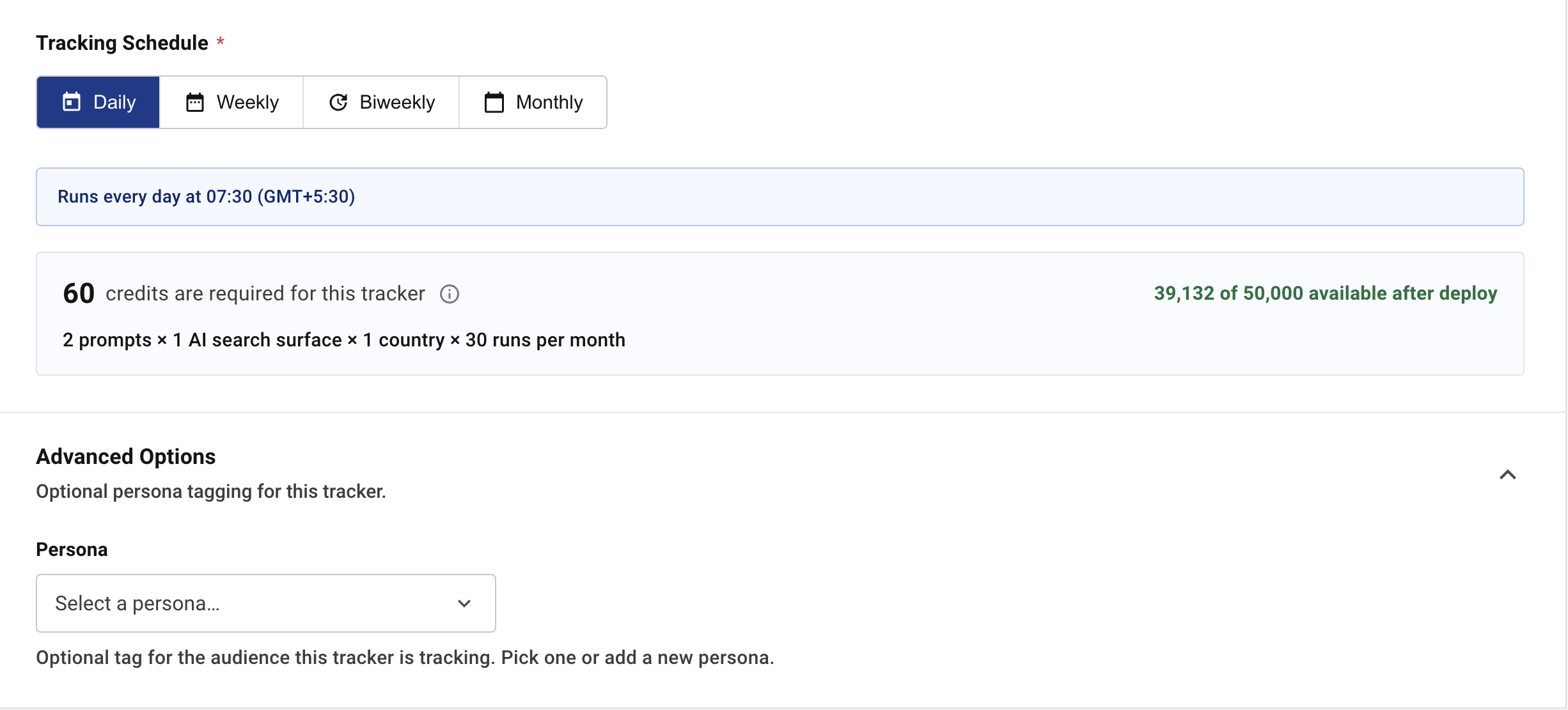
Pick daily, weekly, biweekly, or monthly, and set the day it should run. Before you commit, the dashboard shows exactly how many credits this tracker will use and how many you’ll have left on your plan. Under Advanced Options, you can also tag the tracker with an optional persona, useful if you want to track this prompt set against a specific audience segment.
Step 4: Deploy the Tracker
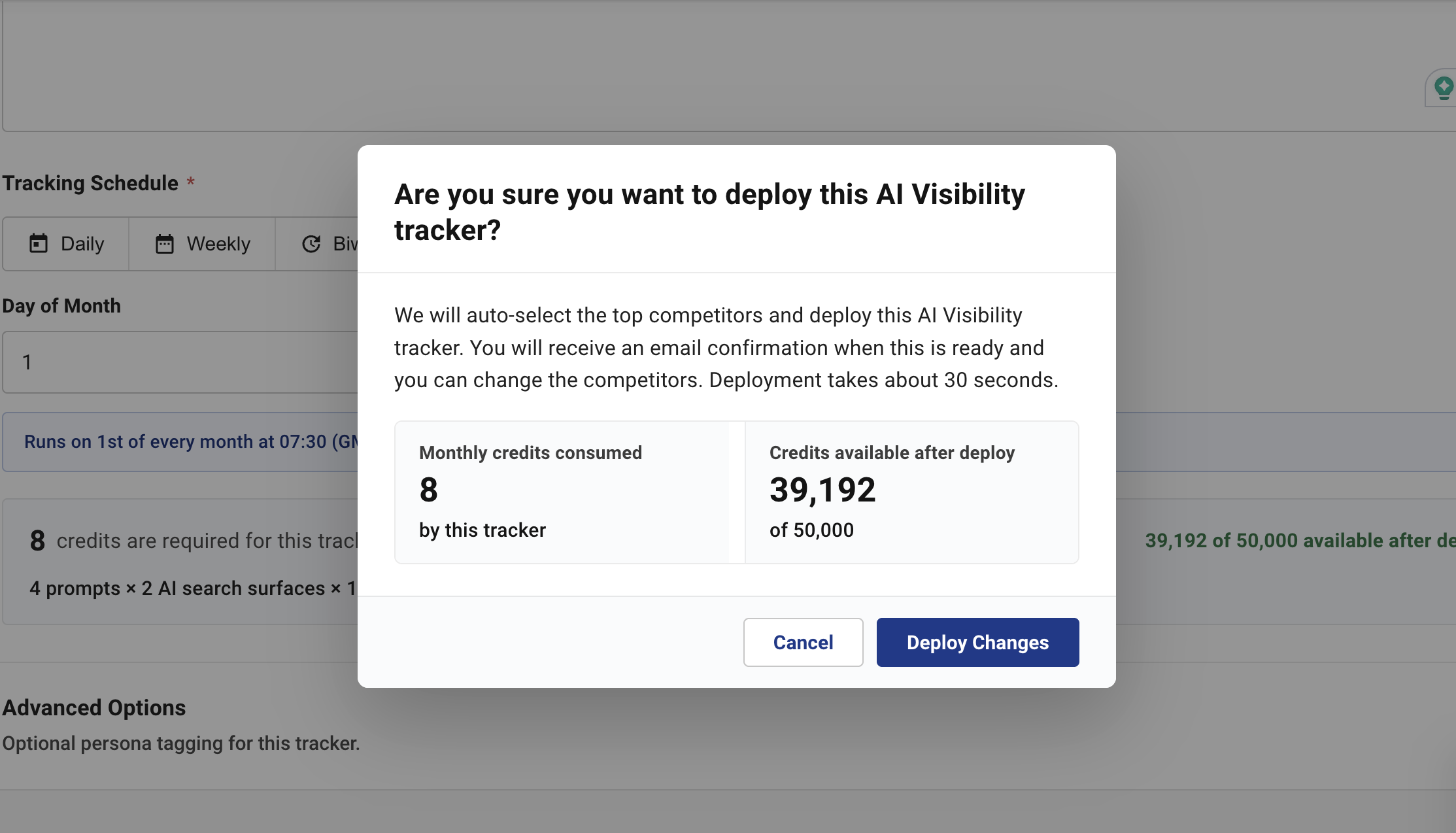
Quattr auto-selects your top competitors and deploys the tracker. You’ll get an email once it’s ready, and that’s when you can go in and adjust the competitor set or anything else.
Automatic Prompt Organization
Once a tracker is live, Quattr’s real organizing layer sits underneath the setup screen. Every prompt gets grouped automatically by intent, the reasoning behind the query rather than its exact wording, so you’re reading patterns at scale instead of evaluating every phrase on its own.
Prompts usually fall into three simple buckets. Transactional prompts come from someone close to buying. Informational prompts come from someone still learning about the topic. Navigational prompts come from someone looking for a specific page. Your content gets grouped the same way, so you can check how a whole category is doing instead of tracking every keyword one by one.
This also makes it easier to explain a drop in traffic or citations. When numbers fall, this structure shows whether it’s because of a shift in intent, a competitor gaining ground, or just a seasonal dip, instead of leaving you to guess.
How to Measure AI Visibility Performance with Quattr
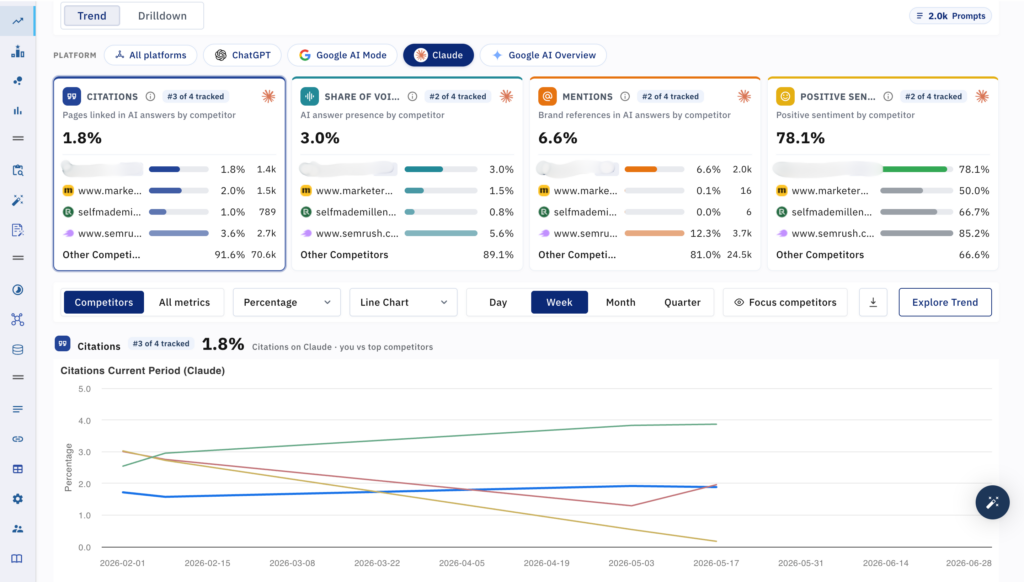
Once your tracker is live, everything you need to measure performance sits inside the Trend and Drilldown views, no separate reporting tool needed.
The Four Core Metrics
Every tracker measures the same four metrics, shown for you and every competitor you’re tracking:
- Citations, the percentage of pages linked in AI answers, per competitor.
- Share of Voice, how much of the AI answer presence you hold compared to competitors.
- Mentions, how often your brand gets referenced in AI answers, with or without a link.
- Positive Sentiment, what percentage of those mentions were positive.
Filter by Platform
Every metric can be viewed across “All platforms “at once, or narrowed down to a single one, ChatGPT, Google AI Mode, Claude or Google AI Overview, so you can tell whether a dip is happening everywhere or just on one engine.
Customize the Trend Chart
Below the metric cards, the chart has its own set of controls:
- Switch between Competitors view and All metrics view.
- Toggle between Percentage and raw count.
- Choose Line Chart or Bar Chart.
- Set granularity to Day, Week, Month, or Quarter.
- Use Focus competitors to isolate just the rivals you care about.
- Export the view or click Explore Trend to go deeper.
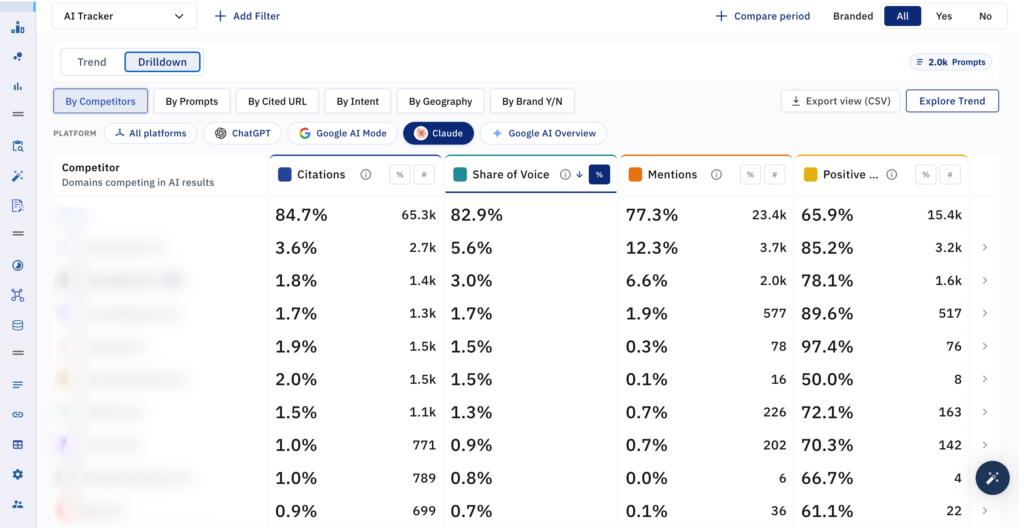
Drill Down by Competitor, Prompt, URL, Intent, Geography or Brand
Switch to Drilldown and the same four metrics turn into a full table, filterable by:
- By Competitors, to see exactly how each rival stacks up, row by row.
- By Prompts, to see performance for each tracked question.
- By Cited URL, to see which of your pages are earning citations.
- By Intent, to see performance grouped by why someone asked.
- By Geography, to break results down by market.
- By Brand Y/N, to separate branded from unbranded prompts.
Every column can be toggled between percentage and raw count, so you’re always reading whichever number fits the conversation. And nothing needs to be compiled by hand afterward, Export view pulls the whole table as a CSV whenever you need it outside the dashboard.
Stop Guessing. Start Seeing Exactly Where You Stand.
Every day you wait is another day of AI answers going out with your competitor’s name in them instead of yours. The brands winning in AI search right now aren’t smarter than you, they’re just watching the right numbers, every week, in one place, and acting on what they see before anyone else does.
Somewhere right now, a prospect is asking ChatGPT or Gemini exactly the question your product answers, and a competitor is getting named instead of you. That’s not a one time miss, it’s happening every single day, you’re not watching it closely. By the time it shows up in a quarterly report, it’s already cost you customers you’ll never know you lost.
The brands moving first are the ones building an AI visibility strategy before it becomes table stakes. The ones waiting are the ones playing catch up once everyone else already has one. Find out today where you stand with Quattr!
FAQs
A prompt is a full, natural language question someone asks an AI model, while a keyword is a shorter search term, and prompts don’t have fixed search volume data the way keywords do.
Enough to fill a few clusters of ten to fifteen related questions each, tracking one random prompt at a time won’t tell you much on its own.
Yes, Quattr lets you filter by whether a prompt includes your brand name or not, so you can separate discovery from reputation tracking.
That depends on the schedule you set, daily, weekly, biweekly, or monthly, based on how closely you need to watch a given prompt cluster.
It still gets tracked and reported individually, and you can assign it to a group as soon as you decide where it fits.
Yes, the By Competitors and By Prompts views in Drilldown show you that comparison directly, row by row.

Quattr is an AI-native Search Visibility Platform founded in Palo Alto, California, built for mid-market and enterprise brands competing in the age of generative search. Recently recognized across G2's Spring 2026 reports with #1 rankings in AEO Results, Usability, and Relationship, Quattr helps brands win visibility across traditional search and AI-generated answer surfaces.
Quattr's AI agent, GIGA, evaluates content the way AI systems do, identifying gaps across structure, authority, internal linking, and discoverability to surface the highest-impact fixes. With capabilities like autonomous internal linking, E-E-A-T intelligence, and the new GIGA Landing Page Generator for keyword-matched, AI-search-ready pages, Quattr helps teams move from diagnosis to deployed changes without manual bottlenecks.