
Quattr MCP at work · Search market share
Traffic dropped: was it you or the market?
Split the question with two reads: your clicks against the market's impressions, and your search market share against the competitors around you. If impressions rose while your clicks fell and your share held, the market is fine and the problem is your rankings. That is exactly what the video finds, in under two minutes.
The recording below is the whole workflow: 3 ordinary questions, asked in an AI chat with Quattr connected.
Traffic just dropped. Is it you, or the market?
◐ Recreated from an anonymized sessionSettle your next drop in three prompts
This run
In this video, it settles whether a traffic drop came from the market or from the site's own rankings.
What the run returned
The numbers set the scope of the problem; the decision names the work that moves it.
Run the same analysis in a Quattr-connected AI chat
Three prompts, copied exactly as written; the video shows what comes back.
Requires the Quattr MCP connection to read your organization's data. The prompt alone will not return your numbers.
- Prompt 1 Our traffic dropped last week. Did we lose ground, or did the whole market shrink?
- Prompt 2 Did we lose ground to any of our competitors?
- Prompt 3 Can you turn this into a report I can share?
How Quattr produced the answer
An ordinary question, answered from your own named sources.
Quattr MCP is the read-only bridge between your AI client and Quattr's connected search data and analytical tools. Agents and Skills turn those tools into repeatable search work.
How the Quattr MCP works → See these sources joined in one answer →
What makes traffic drop while the market grows?
Five causes; each with the sign that reveals it and the fix that moves it.
01Your rankings slipped
A few positions lost near the top of page one costs clicks even when everything else holds. You will see average position falling while impressions stay level or rise. The fix: list the pages whose positions moved, and work those pages rather than the whole site.
02An answer box moved in above you
When Google answers at the top of the page, the market's impressions keep growing while its clicks shrink. You will see click-through falling on the affected queries with positions unchanged. The fix: win the citation inside the answer, or target phrasings that still show plain results.
03A competitor took your spots
Share moves in pairs: when a rival climbs, somebody underneath gives up the positions. You will see your search market share falling while one competitor's rises over the same weeks. The fix: compare their winning pages against yours on the queries that flipped, and close the gap they opened.
04Demand shifted to queries you rank worse on
Total searches can grow while the growth lands on phrasings where you sit on page two. You will see impressions rising on queries with weak positions and falling on your strong ones. The fix: build or update pages for the phrasings the demand moved to.
05You are reading noise or a calendar quirk
Holidays, weekends and reporting lags make single weeks lie. You will see the drop vanish when you compare like-for-like days or add one more week. The fix: test the change day by day against the prior period before reporting it.
Transcriptmachine-transcribed · corrected for product terms
0Okay, traffic just dropped and before anyone starts pointing fingers, there's one question
6to settle.
7Is it us or is it the market?
10So that's exactly what I ask.
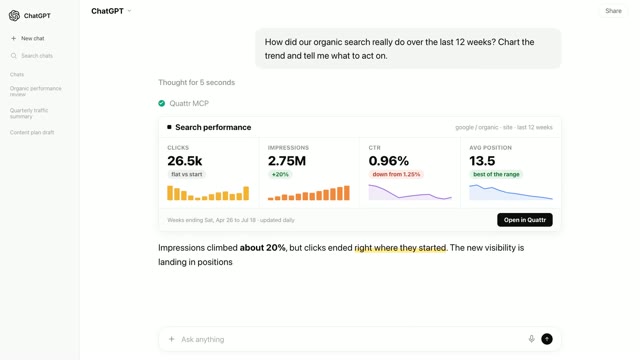
14It pulls last week and the week before through the Quattr MCP.
18Clicks, impressions and where we actually ranked.
24And here's where it gets interesting.
26Clicks are down almost 7% but look at impressions.
30They went up.
33So the market didn't shrink.
35If anything, more people saw us.
37What slipped was our position by about two and a half places.
45Which leaves the other half of the question, did we lose ground to anyone?
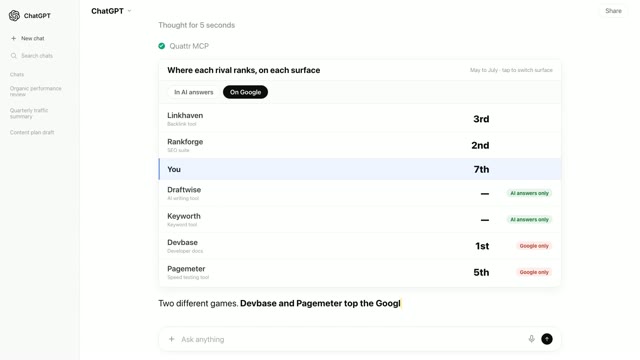
51It lines our share up against the competitors it tracks.
54Twelve weeks back.
59And there we are, that steady line near the bottom.
1:02Twelve weeks, barely a wobble.
1:05But look at the churn above us.
1:07One competitor slid more than a point off its peak and another one quietly picked it
1:11up.
1:14And then the part I always need anyway, something I can actually share.
1:21It pulls the whole analysis into a report.
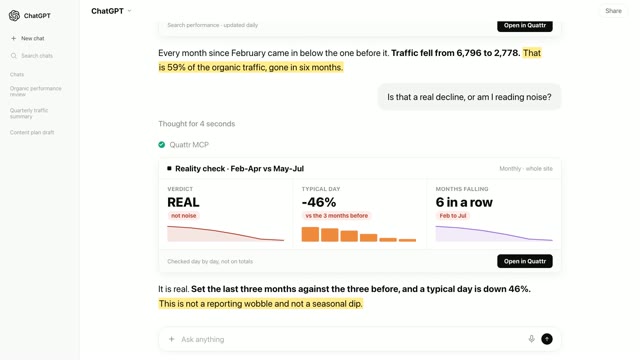
1:28Not the market and not lost share.
1:30Our own ranking slipped while the field reshuffled around us.
1:34That's the whole story in one document.
1:38That's the Quattr MCP.
1:40It settles the argument every traffic drop starts.
Frequently asked questions
Were the numbers in the video real?
This video is recreated from an anonymized session: the interaction is faithful to a real run on a connected account, and the figures shown have been changed or are illustrative rather than a customer’s own numbers.
Can the Quattr MCP run this check on my site?
Yes. Connect Quattr to your AI chat once, then paste the three prompts above: the week-over-week read, the twelve-week view against competitors, and the shareable report with the verdict.
Where does the market view come from?
Quattr tracks your search market share and your competitors' daily, alongside your own Search Console numbers. Because the two reads are separate, the whole market shrinking and you losing share are tested as separate claims rather than guessed from one graph.
Where do these prompts run?
In any AI chat that can use connectors (the standard is called MCP). The prompt never names Quattr; the connection is what routes the question to your data, which is why it reads like an ordinary question.
What data can the Quattr MCP read?
Search Console clicks, impressions and rankings, web analytics, paid search, search market share against competitors, AI visibility across assistants, and Core Web Vitals. Every answer is pulled live from the connected account, so the numbers match what your dashboards show.
Settle your next drop in three prompts
Connect Quattr once and the you-or-market check runs on your own clicks, the market's impressions, and your tracked search market share, verdict included.
Read-only · OAuth 2.1 · existing Quattr permissions · no API keys