








Quattr leads AEO, SEO, and content rankings on G2 Spring 2026. View our G2 badges →
Request demo
Request demo

Taxonomy Designer

An AI agent builds and runs your website taxonomy

Describe your site in a chat and Taxonomy Designer builds a version-controlled classification model. Once your team approves it, it runs on its own as a self-organizing taxonomy, the foundation GIGA, internal linking and your own agents work from.

Taxonomy Designer is turned on per account. Your admins with Taxonomy Designer access apply and deploy designs themselves.

Taxonomy Designer: an AI agent builds the model, your team approves, it runs every day In a chat, acme.example asks the Taxonomy Designer agent to organize its blog by product line. The agent builds a version-controlled classification model, Product lines v1.4: Blog's 11,990 average monthly clicks split into Capture 4,200, Match 3,300 and Close 4,490. Your team approves the version and it is deployed. From then on new pages are placed every day on their own, such as /blog/invoice-ocr-guide in Blog › Capture and /blog/year-end-close in Blog › Close. Illustrative data for a fictional site, acme.example. Chat with the agent Classification model v1.4 Organize the blogby product line Blog now splits byproduct line: Capture,Match and Close. You review it first. Category Clicks / mo Product lines Blog 11.99K Help center 8.6K Capture 4.2K Match 3.3K Close 4.49K Approved by your team Deployed Placed every day, on their own /blog/invoice-ocr-guide /blog/year-end-close Blog › Capture Blog › Close Model v1.4 built in a chat Approved by your team Placed every day
4.9/5on G2 · 67 verified reviewsG2 Users Most Likely To RecommendG2 Best Usability
  • Bluehost
  • Simpplr
  • Coursera
  • Gaylord Hotels
  • Housing.com
  • Men's Wearhouse
  • Eightfold.ai
  • HostGator

The agentic foundation for enterprise AI visibility

One self-organizing taxonomy that every report, link and agent runs on.

Taxonomy Designer · AI agent

A chat that builds a version-controlled classification model

Describe your site in a chat. The agent groups your indexed pages by what each one is about, names the categories and sorts your pages into them, even where /blog/ and /help/ URLs don't say the product. You save each design as a version.

Built on Claude, with a custom agent harness, tools, skills and industry templates.

Classification is high fidelity: by what each page is about, not by URL string matching.

High fidelity, tested across multiple domains.

Large sites are designed from a sample spread across the site's sections, and the tree says so.
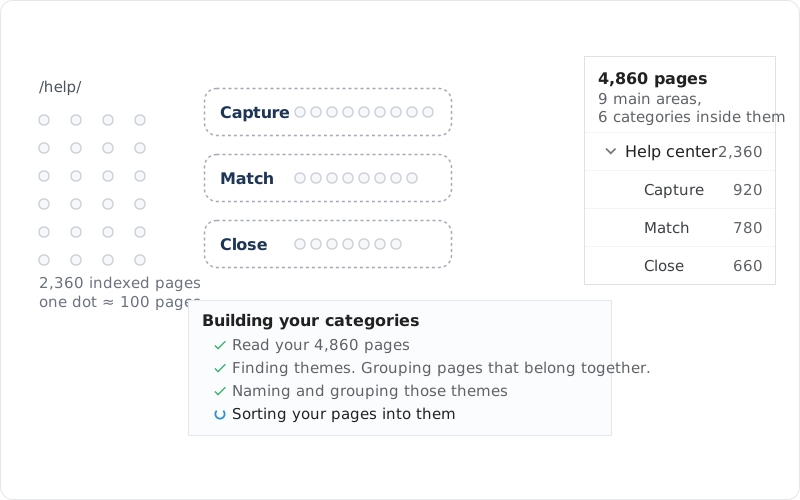
Taxonomy Designer groups help pages by the product they cover

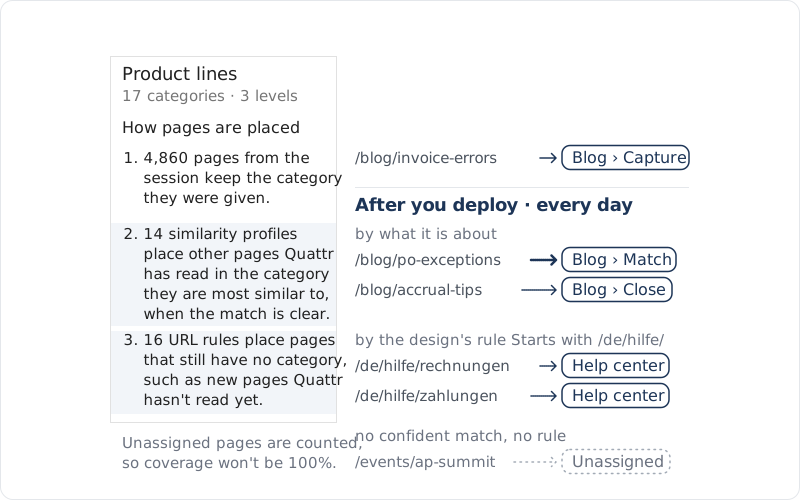
Once approved, it places new pages every day

Taxonomy Designer · self-organizing

Once your team approves and deploys a version, Taxonomy Designer classifies new and unassigned pages automatically, every day, by what each page is about and by the URL rules the design wrote. A page it can't place with confidence stays Unassigned and is counted.

Your taxonomy stays current without periodic manual projects, instead of drifting out of date.

Category changes come as a new version, and go live only when a person approves.

Pages that already have a category keep it as new pages are classified.

How a self-organizing taxonomy works
New pages classified every day after you deploy a taxonomy design

Checked before you call it ready

Taxonomy Designer · checks

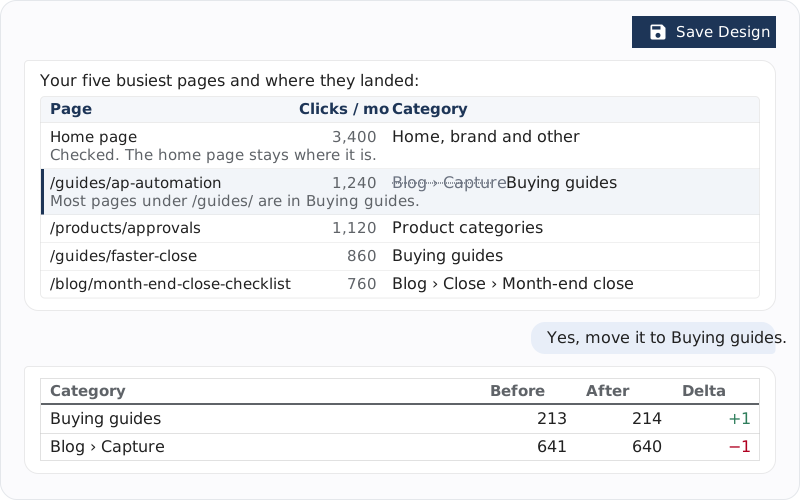
Before it calls a design ready, it reviews where your highest-traffic pages landed, flags any that look misfiled and moves them once you agree. It also lists the URL groups the design does not reach, with their pages and monthly clicks.

Findings say what they measured. A value nobody measured reads not measured, never zero.

Taxonomy Designer checks the busiest pages before a design is saved

Your team stays in control

Every version gets a person's review and approval. Beyond daily classification, your team decides: apply and deploy a saved design, change pages by hand, or ask the agent for a bigger change.

Three ways your team decides

Classify Pages · Apply Design

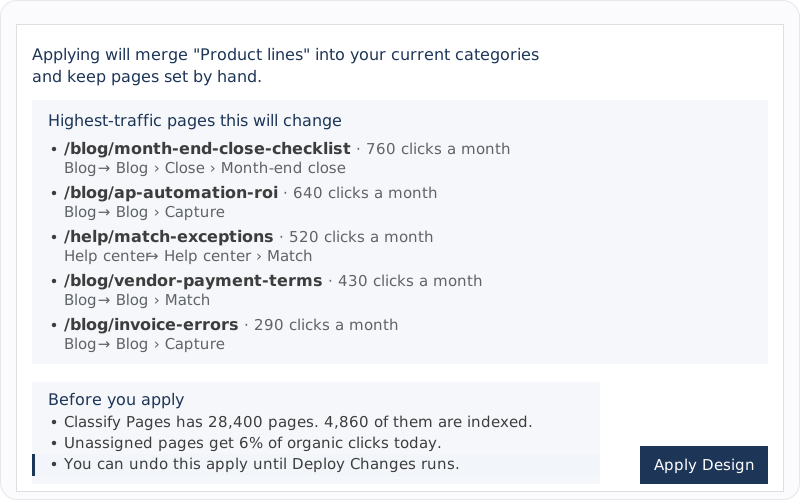
Applying a saved design shows the highest-traffic pages it would change. Merge it into your categories, classify only unassigned pages, or replace the whole taxonomy.

You can undo this apply until Deploy Changes runs.

Classify Pages · Deploy Changes

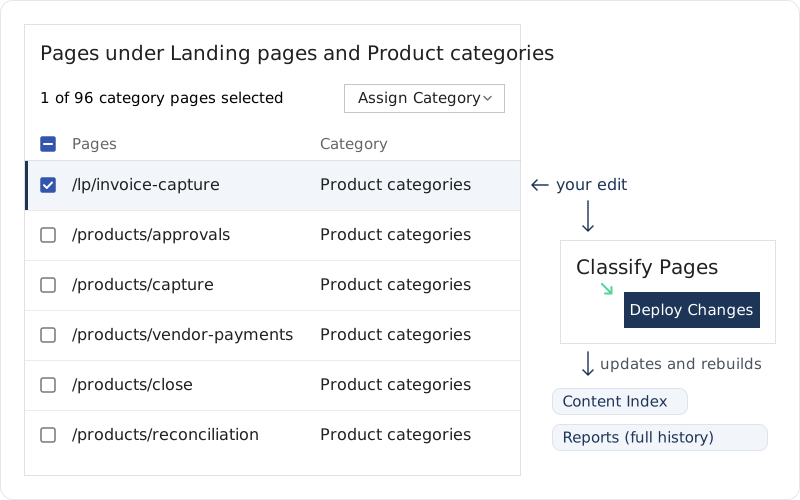
In Classify Pages, move pages between categories or create, rename and merge categories, then run Deploy Changes to make them live. Pages your team sets by hand keep their category.

An apply asks before changing pages set by hand, and recommends keeping them.

Taxonomy Designer · conversation

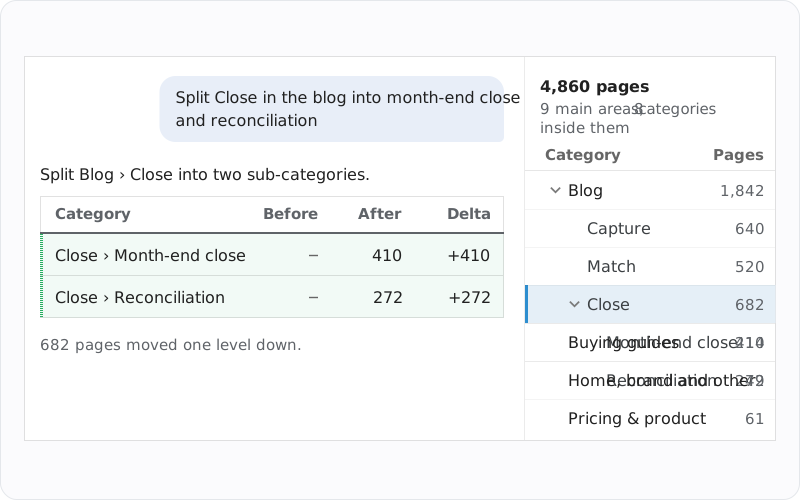
Ask the agent to merge, rename or move a category, or to move a misplaced page. Each edit shows Before, After and Delta, and the last change can be undone.

The agent edits a draft. Saving is your action, and the agent never applies or deploys.

Apply review: the busiest pages a taxonomy design would move
A page moved by hand in Classify Pages, then Deploy Changes
Taxonomy Designer: one request splits a category, with page counts

One taxonomy for GIGA, linking and your agents

Taxonomy Designer · agentic foundation

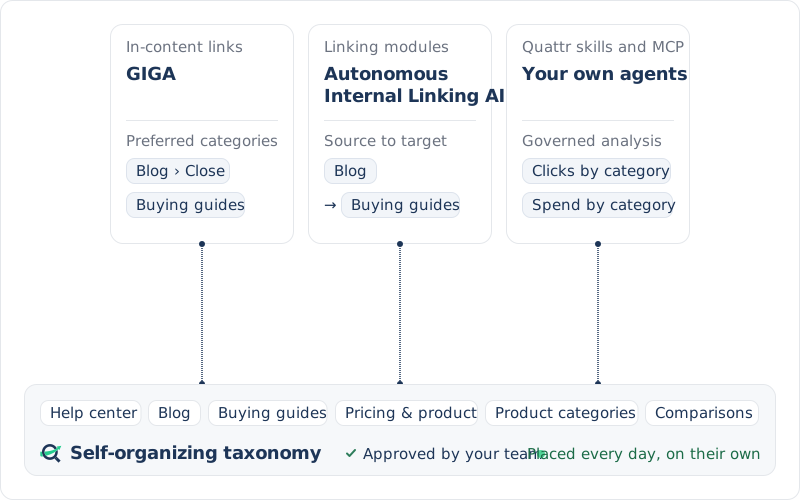
One self-organizing taxonomy feeds the agents that scale your AI search growth. GIGA takes its preferred categories from it, Autonomous Internal Linking AI picks module pages by category, and the agents you build with Quattr skills and the MCP ask by category.

Every version they work from is one your team approved.

One self-organizing taxonomy under GIGA, linking and your own agents

One taxonomy, every system that reads it

Manage Categories · everything downstream

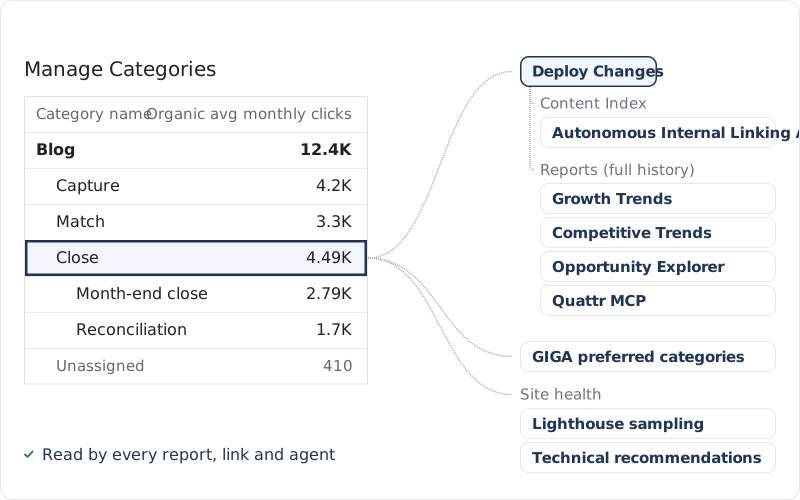
Applying writes each page's category to one record. Deploy Changes makes it live: it updates the Content Index and rebuilds the aggregates, so all your analytics use the new taxonomy on every date. Lighthouse planning, linking modules and your AI client read it.

Levels are Category, Sub-Category 1 and Sub-Category 2; pages nothing places stay Unassigned.

Also read by GIGA's preferred categories for in-content links, one or more at the category and sub-category levels, and Googlebot crawl coverage by category when your server logs are sent to Quattr.

One deployed taxonomy, read by every report, link and agent

Where categories become the unit of work

Past a few thousand pages, nobody picks pages one at a time. These three plan their work by category, so the fidelity of your categories decides what they link, test and crawl.

Three systems that plan their work by category

Autonomous Internal Linking AI

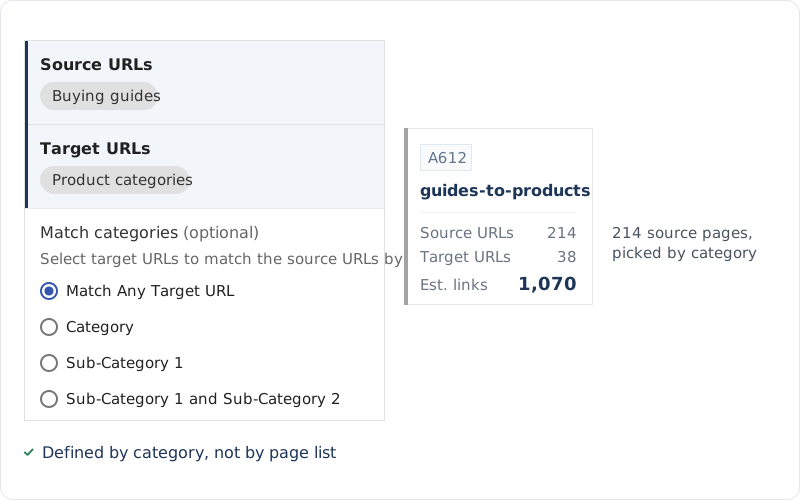
Autonomous Internal Linking AI picks module pages by category from the Content Index, which every deploy updates. Published links reach your pages without review of each link.

On a large site, the category list is the link plan.

Lighthouse

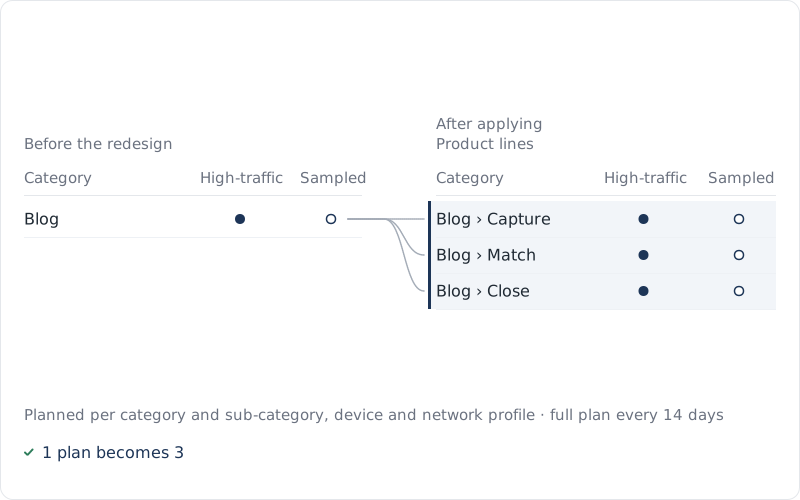
Each category and Sub-Category 1 pair with enough clicks gets its own plan: its highest-traffic pages plus a random sample, by device and network profile.

Its Fast, Medium or Slow speed grade is set per pair too.

When categories follow your page types, each page type with enough clicks gets its own plan.

Split a category at Sub-Category 1 and each part gets its own plan.

Content Index

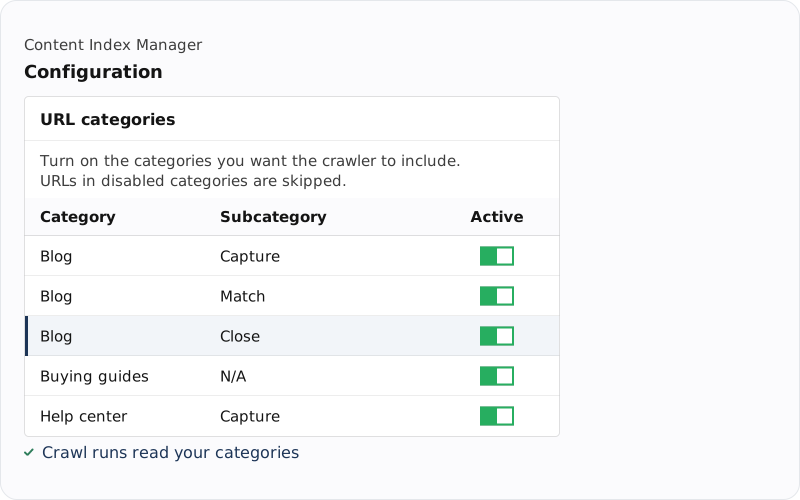
The Content Index crawls the categories you switch on in Category Setup, across all three levels.

When active, URLs in this category are included in crawl runs.

A linking module defined by two categories
Lighthouse plans tests per category pair
The Content Index crawls the categories you switch on

Ask your AI client by category

Quattr MCP · your AI client

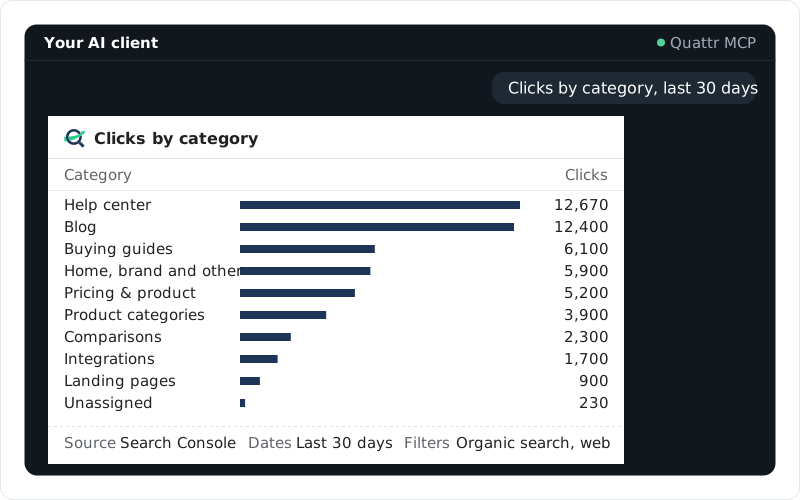
Through the Quattr MCP, ask for clicks, conversions, paid spend, Core Web Vitals or search market share by your categories. Answers come from governed analyses, and better categories make every category answer more accurate.

Each answer states its dates, filters and source, so your team acts with confidence.

After every deploy, category trends use your current categories on every date: like with like.

In a breakdown by category, pages without a category show as their own Unassigned row.

Quattr MCP
Clicks by category, asked in an AI client

Built for sites that keep growing

Taxonomy Designer · at scale

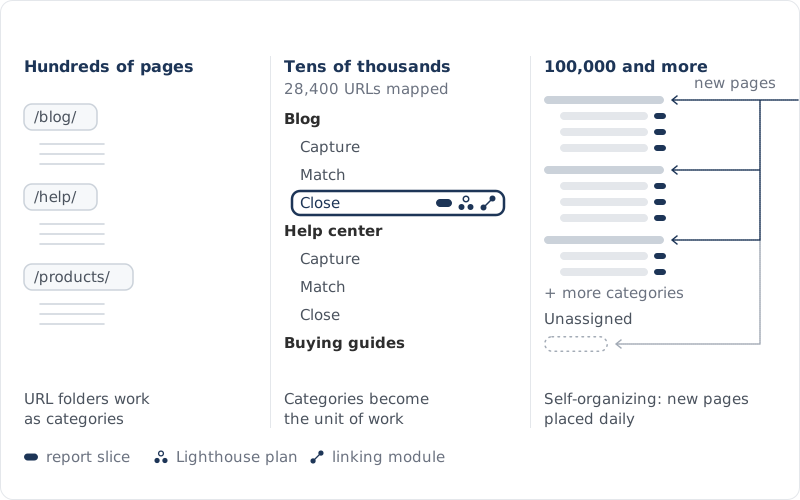
Hundreds of pages

URL folders work as categories, and a person can read every page.

Thousands

Folders stop saying what a page is about: /blog/ and /help/ hold every product line, so a report sliced by folder mixes them.

Tens of thousands

Categories become the unit of work. Lighthouse tests a few pages per category, and linking modules are defined by category, not page lists.

100,000 and more

New pages arrive every day, and a deployed design classifies them automatically. Pages it can't place with confidence stay Unassigned: the unassigned share is the number to watch.

Large sites are designed from a sample spread across the site's sections, and the tree says so. A page the design can't place with confidence, by what it is about or by a URL rule, stays Unassigned, so coverage won't be 100%.
Categories as a site grows from hundreds of pages to six figures

Filtering to a named category excludes unassigned pages. Complete category breakdowns show them separately as Unassigned.

More ways in

Taxonomy Designer · your structure

Tell it your categories

If you already know the structure you want, describe it, and it sorts your pages into those categories without inventing its own.

Taxonomy Designer · home

Pick up where you left off

Sessions and saved designs sit on the Taxonomy Designer home. Resume a session, or build on a design you saved earlier, found by its name.

Taxonomy Designer · saved designs

Saved designs say how they place pages

Save a design by name and its preview spells out how pages are placed and which stay without a category. Saving changes no report.

Designs are saved by name and change nothing until applied. Applying runs from Classify Pages, and Undo works until Deploy Changes runs.

4.9/5 on G2

Based on 67 reviews

  • G2 badge: High Performer, Enterprise
  • G2 badge: Best Usability
  • G2 badge: Best Support, Enterprise
  • G2 badge: Users Most Likely To Recommend
View our G2 badges

Bring one opportunity. See the whole system work it.

A real question, a page, a category, a market you want. Quattr brings together the context, the analysis, the prepared work, your review, and the measurement that follows.

Request a demo

No canned deck. No credit card. Your data stays yours.

or explore the interactive demo