Taxonomy Designer · first read
Read the gap first
Each session opens by counting your pages, those indexed for content analysis and those still unassigned, with their organic click share when known.
Understand the market, investigate performance, align on what to do, and learn from what shipped.
AI Visibility Trackingcitations, mentions, sentiment, competitive presenceAnalyses and reportsdecision-ready reads of your programSEO reportingGrowth Trends on Search Console, analytics and Google Ads dataRank trackingmodeled market share against competitors you choosePaid search optimizationpaid terms you already rank for, and cost per conversionImprove what already exists across content, linking, discoverability, and the site.
Optimize pagesrefreshes that preserve what worksInternal Linking AIautonomous site-wide linking, human controls keptTechnical SEOfixes weighted by the organic clicks they touch Platform use casesCreate what is missing for customers, search systems, and the teams running the program.
Create & publish pagescomplete pages in your design systemLanding Page Generatorlanding pages for AI search GIGA: AI search agent Watch how GIGA worksSelf-organizing taxonomy
Every day, Quattr places new pages in your categories. When your site outgrows them, Taxonomy Designer suggests the changes, and a person approves the new version before it goes live.
Taxonomy Designer is turned on per account. Your admins with Taxonomy Designer access apply and deploy designs themselves.










Self-organizing taxonomy · two levels
Once a version is deployed, new and unassigned pages are classified every day, by what each page is about, with no one involved. Category changes are suggested by Taxonomy Designer, an AI agent, in a redesign session, and go live only when a person approves.
Your taxonomy stays current without periodic manual projects, instead of drifting out of date.
Pages that already have a category keep it as new pages are classified.
Pages your team sets by hand keep their category.
Taxonomy Designer · first read
Each session opens by counting your pages, those indexed for content analysis and those still unassigned, with their organic click share when known.
Taxonomy Designer · checks
A category named like a leftovers bucket that holds a real share of clicks is flagged, so you check it before reports count it.
Why it matters
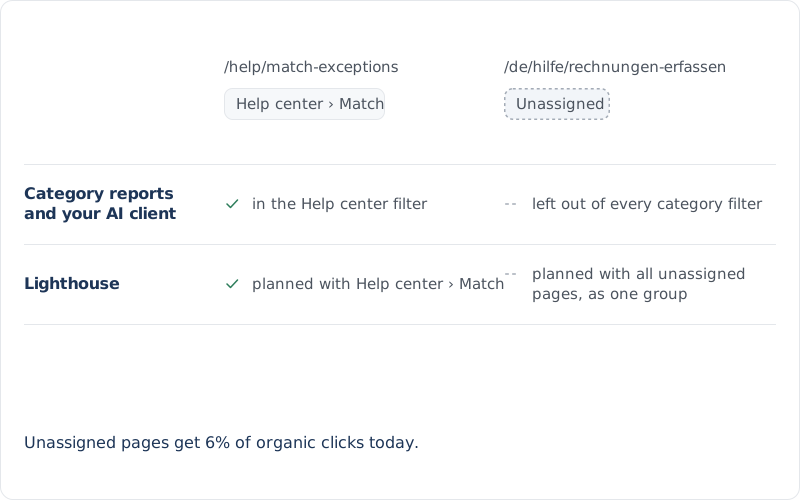
Any filter on a real category in Growth Trends, search market share, Opportunity Explorer or your AI client leaves unassigned pages out, and Lighthouse plans all of them as if they were a single category.
Filtering to a named category excludes unassigned pages. Complete category breakdowns show them separately as Unassigned.
Taxonomy Designer · checks
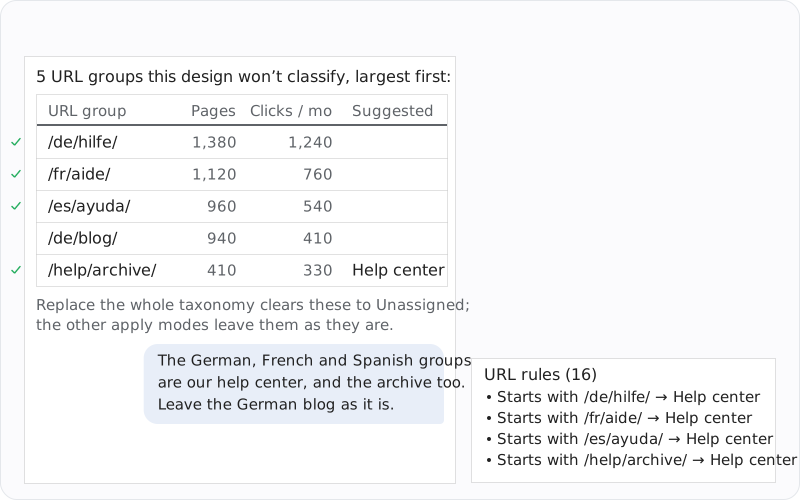
The agent groups the pages a design will not classify by URL prefix, largest first, with page counts, monthly clicks and a suggested category where the design's own pages agree. Confirm a group and it becomes a URL rule saved with the design.
Rules you confirm run first, and keep placing new pages after you deploy.
Taxonomy Designer · saved designs
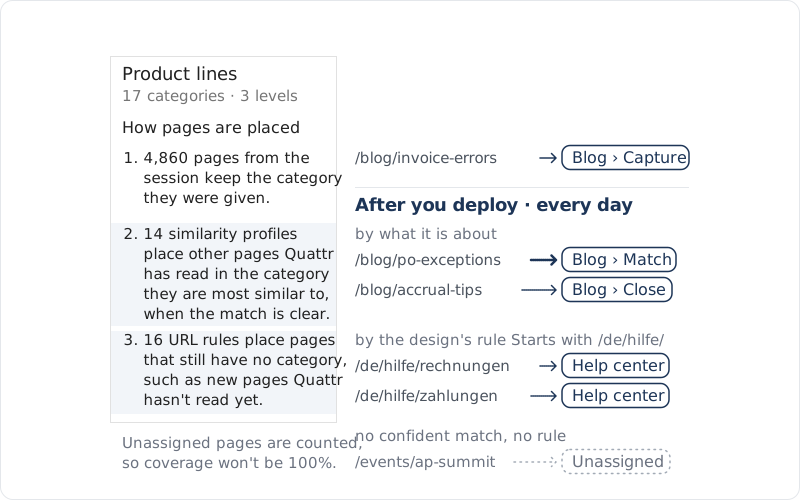
Pages from the session keep the category they were given. Other pages Quattr has read are placed by what they are about, when the match is clear. URL rules place pages that still have no category, such as new pages Quattr hasn't read yet.
A page none of them can place with confidence stays Unassigned, so coverage won't be 100%.
Apply a saved design with Only classify unassigned pages and every page that already has a category stays as it is. Pages that get a category for the first time are counted, so your team can spot-check them.
Classify only the pages without a category
Classify Pages · Apply Design
Pages in this design get the design's categories. All other pages stay as they are.
Classify Pages · Apply Design
Pages that already have categories stay as they are.
Classify Pages · Apply Design
This design becomes your taxonomy. Classified pages it doesn't include become Unassigned.
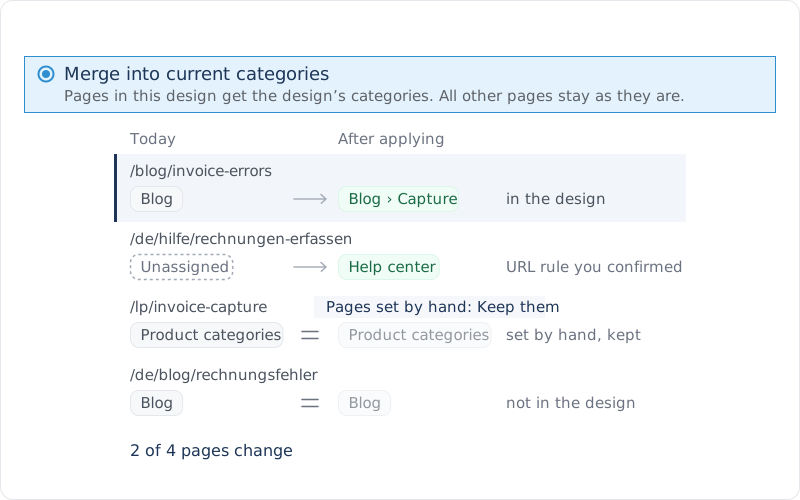
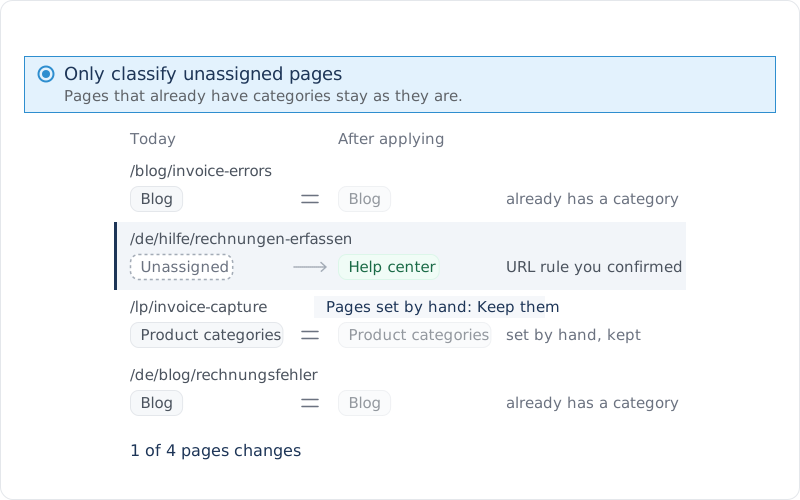
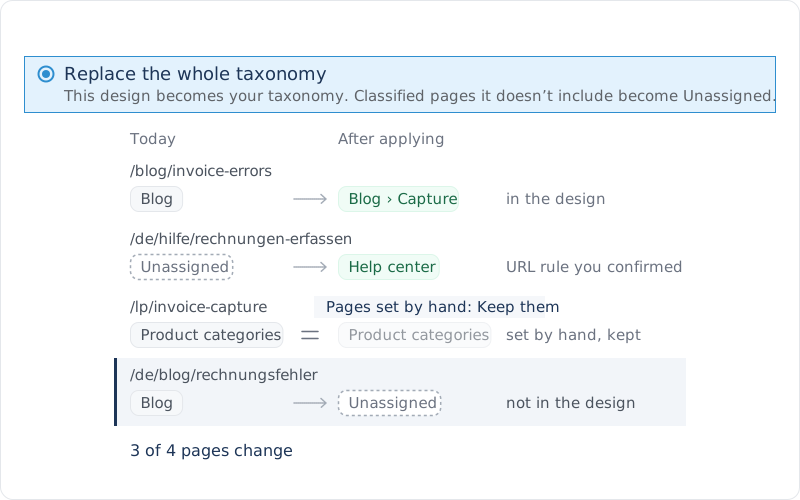
A page the design can't place with confidence stays Unassigned. Nothing is forced.
Only classify unassigned pages leaves every page that already has a category as it is. After you deploy, new pages are classified every day; pages nothing can place stay Unassigned.
A real question, a page, a category, a market you want. Quattr brings together the context, the analysis, the prepared work, your review, and the measurement that follows.
No canned deck. No credit card. Your data stays yours.