








Quattr leads AEO, SEO, and content rankings on G2 Spring 2026. View our G2 badges →
Request demo
Request demo

Taxonomy redesign

Fix a stale taxonomy once, and it stays current

Describe what's wrong in a chat, and Taxonomy Designer's AI agent drafts a new version from your current categories or your pages alone. Reports keep their current categories until your team applies it; once deployed, new pages are placed daily.

Taxonomy Designer is turned on per account. Your admins with Taxonomy Designer access apply and deploy designs themselves.

The agent's new taxonomy version beside the live one In a redesign session, acme.example asks the Taxonomy Designer agent to organize by product lines. The agent groups Blog and Help center by product line, and the changes become a new version, Product lines, beside the nine live categories. The new version is not applied and goes live only when a person approves it; reports keep running on the live version until then. After you deploy it, new pages are placed every day on their own, such as /blog/po-exceptions in Blog › Match. Illustrative data for a fictional site, acme.example. The agent suggests changes Organize by product lines Grouped Blog and Help centerby product line. New version Product lines Blog Help center +7 more Capture Match Close Capture Match Close Not applied a person approves Live version Help center Blog Buying guides Integrations Comparisons Landing pages Pricing & product Home, brand and other Product categories After you deploy · every day /blog/po-exceptions Blog › Match Reports run on the live version until a person approves the new one. New version Goes live when a person approves Reports run on the live version
4.9/5on G2 · 67 verified reviewsG2 Users Most Likely To RecommendG2 Best Usability
  • Bluehost
  • Simpplr
  • Coursera
  • Gaylord Hotels
  • Housing.com
  • Men's Wearhouse
  • Eightfold.ai
  • HostGator

Every edit shows the pages it moves

Taxonomy Designer · AI agent

In the chat, Improve my current taxonomy loads your live categories, and the agent renames, merges or moves them and moves pages between them as you ask. Full redesign reads your pages and proposes a new structure. Each edit returns Before, After and Delta.

Your current categories stay until you apply.

The agent suggests the changes; a person approves the new version before it goes live.
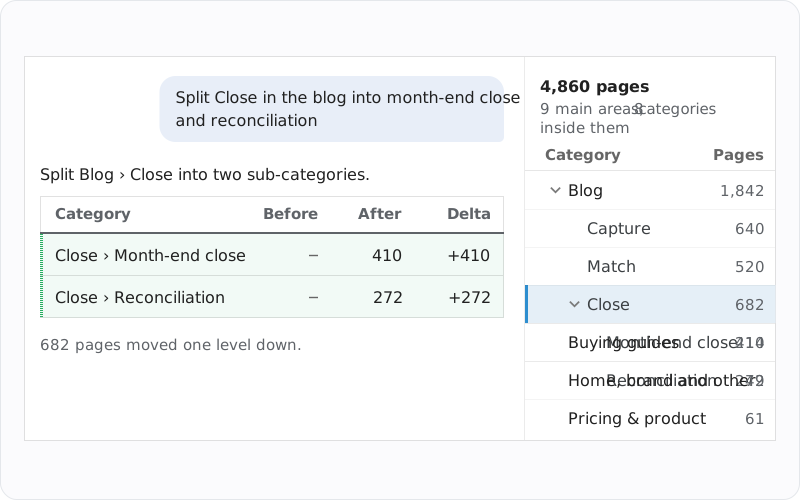
Taxonomy Designer: one request splits a category, with page counts

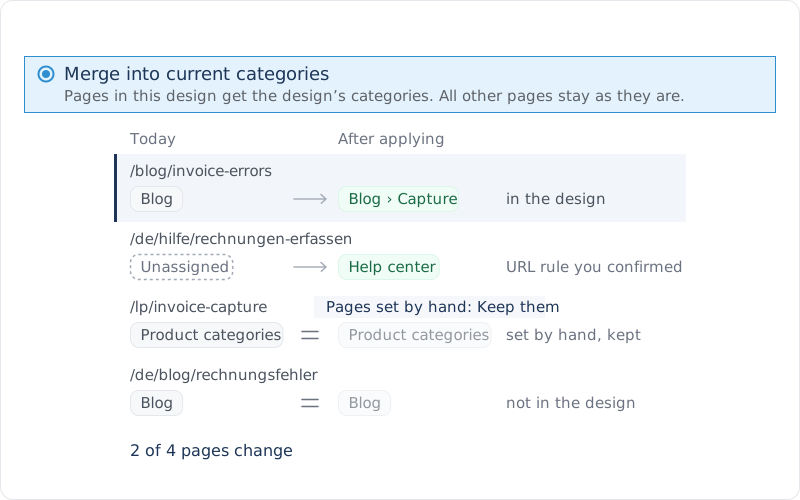
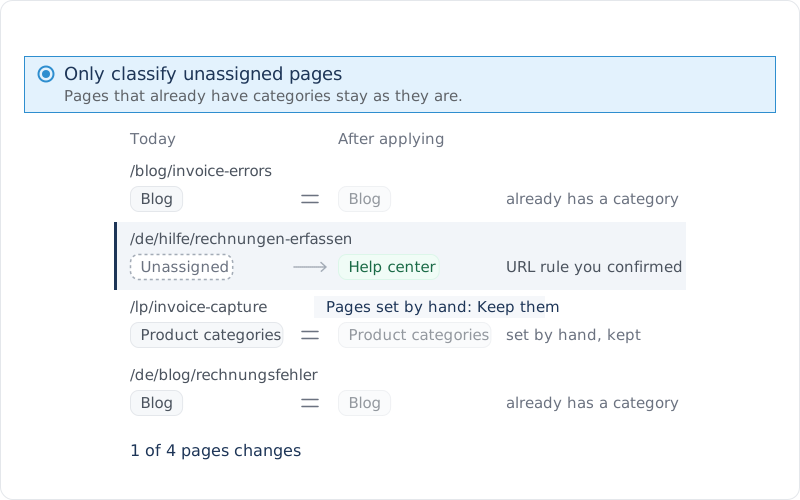
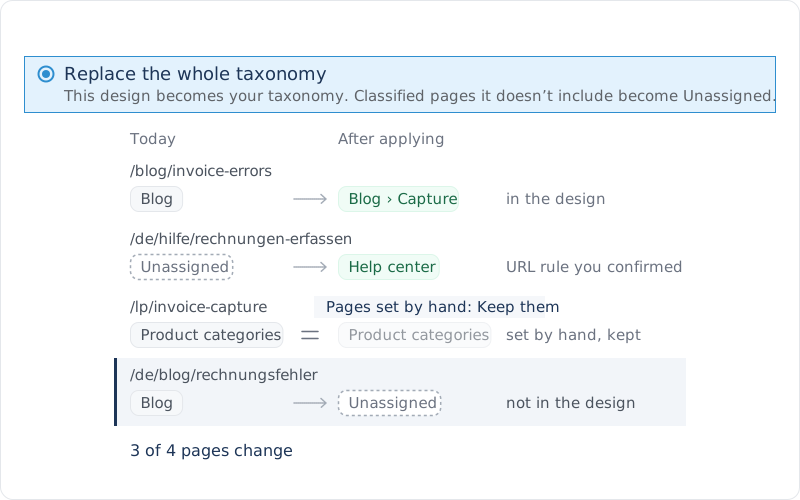
Choose how the new design lands

Choose how the new design lands

Classify Pages · Apply Design

Pages in this design get the design's categories. All other pages stay as they are.

Classify Pages · Apply Design

Pages that already have categories stay as they are.

Classify Pages · Apply Design

This design becomes your taxonomy. Classified pages it doesn't include become Unassigned.

Merge into current categories: what happens to four pages
Only classify unassigned pages: what happens to four pages
Replace the whole taxonomy: what happens to four pages

Pages your team set by hand: keeping them is the recommended answer.

See the busiest pages that would move

Classify Pages · Apply Design

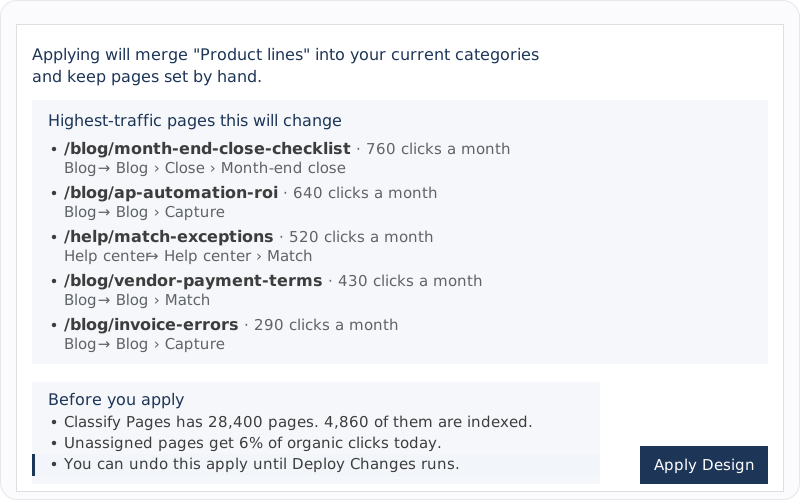
Before an apply, the review lists the five highest-traffic pages it would change, each with its monthly clicks and the move from its current category to the new one. The apply keeps running if you close the browser.

Only the most recent apply can be undone, and only until Deploy Changes runs.

Apply review: the busiest pages a taxonomy design would move

Find what a new design leaves out

Taxonomy Designer · checks

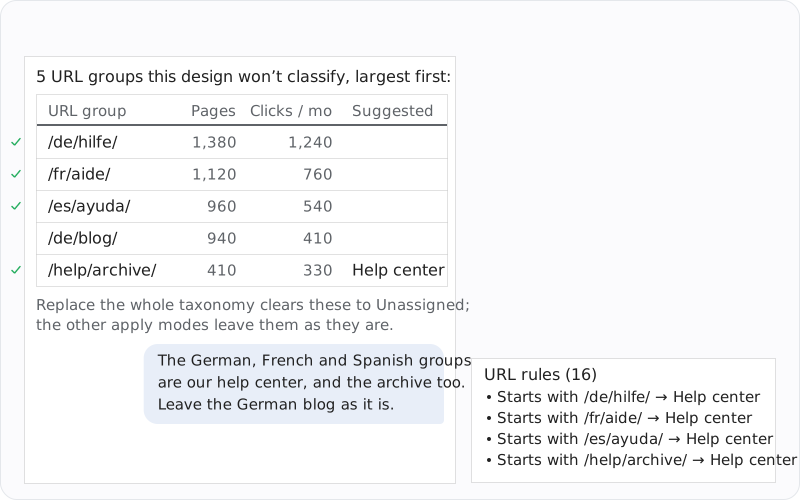
The agent lists the URL groups a design would not classify, largest first, with pages and monthly clicks. Replace the whole taxonomy clears those to Unassigned; the other modes leave them. Confirm a group and it becomes a URL rule saved with the design.

Confirmed URL rules are saved with the design and keep placing new pages after deploy.

URL groups a taxonomy design misses, confirmed as URL rules

Saved designs

Taxonomy Designer · home

Designs keep their names and history

Each saved design lists who saved it, how often, what it was based on, and whether it was applied or undone.

Classify Pages · Apply Design

Pages set by hand stay put

When an apply would change pages your team categorized by hand, it asks first, and keeping them is the recommended answer.

Lighthouse · test plans

Split where your page types differ

Lighthouse plans and grades each category and Sub-Category 1 on its own, so splitting a mixed category there gets each kind of page tested.

Internal linking · GIGA

Names other systems use

Linking modules and GIGA's preferred categories name categories exactly, so check them when a design renames one.

Applying changes Classify Pages; deploying makes the design live, and new pages are then classified automatically every day. Only the most recent apply can be undone, until Deploy Changes runs.

4.9/5 on G2

Based on 67 reviews

  • G2 badge: High Performer, Enterprise
  • G2 badge: Best Usability
  • G2 badge: Best Support, Enterprise
  • G2 badge: Users Most Likely To Recommend
View our G2 badges

Bring one opportunity. See the whole system work it.

A real question, a page, a category, a market you want. Quattr brings together the context, the analysis, the prepared work, your review, and the measurement that follows.

Request a demo

No canned deck. No credit card. Your data stays yours.

or explore the interactive demo