

Case Studies
How to Fix Broken Internal Links (Step-by-Step Guide)
Strategically Aligning Internal Authority Flow
Fixing broken internal links becomes important as your website grows and changes. When pages are updated or URLs change, some links stop working, which can confuse users and make it harder for search engines to crawl your site. This can reduce visibility and hurt the performance of key pages, even if your content is good. Keeping internal links updated helps maintain site structure, improve SEO, and protect your traffic and conversions.
What You Need to Know
Broken internal links don’t just create a poor user experience, they quietly damage your SEO. According to Semrush site audits, broken internal links are among the most common technical issues found on websites, often leading to wasted crawl budget and weaker page authority distribution.
When search engines hit broken links, they stop following that path, meaning important pages may not get indexed or ranked properly. For users, it creates dead ends, increasing bounce rates and reducing trust.
The key insight: fixing broken links isn’t just cleanup, it’s about restoring content connections, improving crawlability, and ensuring your most valuable pages continue to receive traffic and authority.
What Are Broken Internal Links?
Internal links are hyperlinks that connect one page of your website to another, helping users navigate and helping search engines understand your site structure. A broken internal link happens when one of those links points to a page that no longer loads or cannot be accessed. Instead of reaching the intended content, visitors typically see a 404 error or another type of error page.
Broken internal links usually happen when:
A page has been deleted or unpublished
A URL was changed without updating existing links
The page was moved to a new location
There is a spelling mistake or formatting error in the URL
A redirect was not properly set up after a URL update
Even small changes to your site can create broken links if they aren’t carefully managed.
Why Broken Links Are a Serious SEO Problem?
Broken links create a frustrating experience for users who expect helpful content but instead land on error pages. This often increases bounce rates and reduces trust in your website’s credibility.
They can negatively affect SEO because search engines view frequent errors as a sign of poor site maintenance. Over time, this can weaken rankings and reduce overall organic visibility.
Broken links also waste crawl budget, as search engine bots spend time accessing dead URLs instead of indexing valuable pages. This slows down the discovery of new or updated content.
They interrupt the natural navigation flow of your website and block users from reaching important pages. When key product or conversion pages are affected, it can directly impact leads and revenue.
How to Find Broken Internal Links (And Understand the Broken Link SEO Impact)
If you want to reduce the broken link SEO impact, the first step is identifying where those errors exist. There are several practical ways to uncover broken internal links, depending on the size of your website.
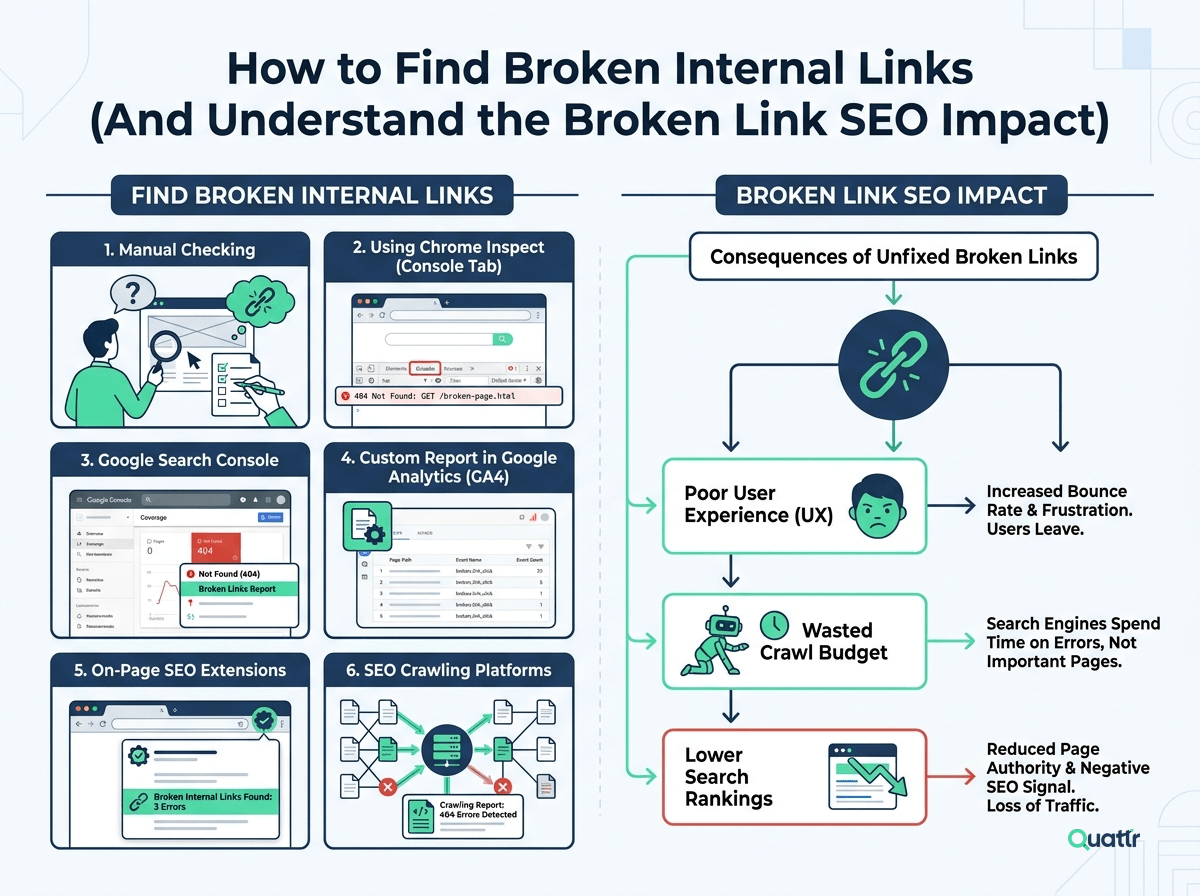
1. Manual Checking
Technically, you can review pages one by one and click every internal link to confirm it works. While possible for small sites, this approach becomes unrealistic and time-consuming for large or enterprise websites.
2. Using Chrome Inspect (Console Tab)
In Google Chrome, you can right-click on a page and select “Inspect,” then open the Console tab. Any 404 errors that appear there may signal broken internal links connected to that page.
3. Google Search Console
Google Search Console highlights pages returning 404 errors under indexing or page reports. When you see these errors, it often means internal links are pointing to URLs that no longer exist.
4. Custom Report in Google Analytics (GA4)
You can create a custom report to filter pages triggering 404 errors. GA4 also tracks error responses in the “Pages and Screens” report, helping you identify problematic URLs.
5. On-Page SEO Extensions
Some Chrome extensions provide instant page-level analysis, including link validation. These tools quickly scan a page and flag internal links that lead to error responses.
6. SEO Crawling Platforms
For large-scale audits, an SEO platform is the most efficient solution. A full-site crawl can filter URLs with 4xx status codes and reveal which pages are linking to them.
Once you identify a 404 page with inbound internal links, those links are considered broken. From there, you can update, redirect, or remove them to minimize the overall broken link SEO impact and restore proper link flow across your site.
How to Fix Broken Links?
After identifying broken internal links, the next step is resolving them properly to reduce SEO damage and restore link equity. In most cases, you can solve the issue in three main ways: redirecting, updating, or removing the link.
Sometimes fixes require developer support, especially for site-wide changes. However, modern SEO tools now allow teams to detect and resolve internal link issues at scale without waiting in long dev queues.
Let’s break down the main solutions.
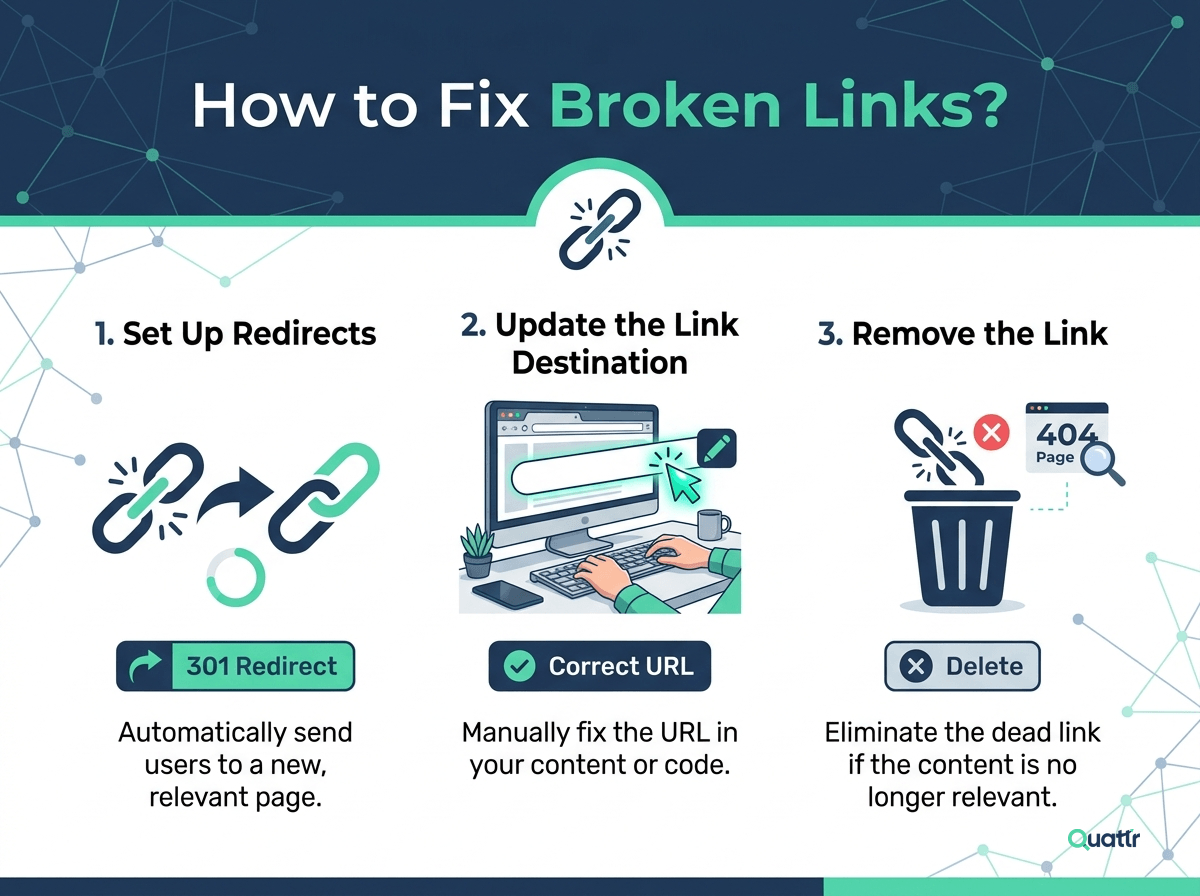
1. Set Up Redirects
Adding a redirect ensures that users and search engine bots are automatically sent to the correct page instead of hitting a 404 error. Once implemented, the redirect works everywhere that old URL exists across your site, making it an efficient fix. For server-level implementation, see how to set this up with .htaccess files.
2. Update the Link Destination
If the page still exists under a new URL, simply replace the outdated link with the correct one. This is also the best solution when the issue is caused by a typo or formatting error in the original link.
3. Remove the Link
If the linked page is no longer relevant and there’s no suitable replacement, removing the hyperlink may be the cleanest option. This prevents users and crawlers from reaching a dead end.
Fixing Internal Links at Scale
For larger websites, manually editing links is not practical. Using advanced SEO crawling and automation tools allows you to identify 4xx errors, locate all inbound links pointing to them, and apply bulk fixes efficiently, ensuring your internal linking structure stays clean as your site grows.
How Quattr’s AI Improves Internal Linking at Scale?
Quattr’s AI-powered internal linking helps you strengthen your site’s authority flow without relying on manual audits. It analyzes your existing content structure, identifies weak or missing internal link connections, and surfaces opportunities to strategically link high-value pages. By improving how authority moves across topic clusters and conversion-focused pages, Quattr helps enhance crawlability, reinforce site hierarchy, and support stronger organic visibility at scale.
Explore Quattr's Intelligent Internal Linking Now!
Request a DemoFAQs
What’s the risk of content ‘invisibility’ as my website grows?
As sites expand, critical product and conversion pages get buried, missing authority flow and search visibility—even if they target high-intent visitors.
How does internal linking authority flow impact SEO and conversions?
Internal links channel both user and search engine attention. They influence which pages get discovered, indexed, and ranked—and drive users to high-value conversion points.
What are the three key signals of impactful internal linking?
Relevance (semantic and intent alignment), Authority (credibility to lift other pages), and Demand (real search volume or business importance).
How does Quattr’s AI balance relevance, authority, and demand?
Quattr’s system analyzes your entire content network using semantic relationships, current internal strength, and real-time demand to direct links where they deliver the most impact.
What business outcomes come from aligning these three signals?
Underperforming content gains new authority and rankings, new pages are boosted from trusted hubs, and over-linked top pages no longer hog all the equity.
About The Author

About Quattr
Quattr is an AI-native Search Visibility Platform founded in Palo Alto, California, built for mid-market and enterprise brands competing in the age of generative search. Recently recognized across G2’s Spring 2026 reports with #1 rankings in AEO Results, Usability, and Relationship, Quattr helps brands win visibility across traditional search and AI-generated answer surfaces.
Quattr’s AI agent, GIGA, evaluates content the way AI systems do, identifying gaps across structure, authority, internal linking, and discoverability to surface the highest-impact fixes. With capabilities like autonomous internal linking, E-E-A-T intelligence, and the new GIGA Landing Page Generator for keyword-matched, AI-search-ready pages, Quattr helps teams move from diagnosis to deployed changes without manual bottlenecks.

Read More


Ready to see how Quattr
can help your brand?
Try our growth engine for free with a test drive.
Our AI SEO platform will analyze your website and provide you with insights on the top opportunities for your site across content, experience, and discoverability metrics that are actionable and personalized to your brand.