


Case Studies
How Many Internal Links Per Page is Best for SEO?
Ideal Number of Internal Links for SEO
How many internal links per page is too many and how many are not enough?
Internal linking can quietly boost rankings, improve crawlability, and strengthen topical authority. But overdo it, and you risk dilution and poor user experience. In this guide, we’ll break down what really matters for SEO and how to get the balance right.
Table of Contents
7.
8.
9.
10.
How Many Internal Links Per Page is Best for SEO?
A practical benchmark is around 2 to 5 internal links for every 1,000 words, with an overall range of 150 to 200 links per page, depending on your website’s architecture and scale.
That said, SEO isn’t about chasing a fixed number. The real value comes from linking contextually to relevant pages, guiding users naturally, and strengthening your site structure so search engines can better interpret content relationships and importance.
Balancing Link Quantity and Quality in Internal Linking
When it comes to internal links per page, balance is everything. Adding too many internal links can hurt SEO and user experience. A page filled with links looks spammy, distracts readers, and weakens the link equity passed to each page.
On the other hand, adding too few internal links is also a problem. Important pages may not get discovered by search engines, leading to orphan pages, and users may leave your site without exploring related content. A smart internal linking strategy focuses on relevance, not just numbers.
Focus on Page Type and Purpose
A long, detailed pillar page with 3,000 words can naturally include more internal links because it covers many subtopics. But a short 500-word blog post should only include a few highly relevant links.
For example, adding 25 internal links to a short article feels excessive. But adding 25 helpful, contextual links in a complete guide can improve topical authority and user experience.
How to Evaluate Your Internal Links
First, check engagement. Use tools like Google Analytics to see which internal links users actually click. If no one clicks a link, it may not be useful.
Second, review your anchor text. Avoid generic phrases like “click here.” Instead, use descriptive and keyword-relevant Anchor Text Optimization that clearly explains what the linked page is about.
Third, check the destination page. Every internal link should lead to valuable, related content that matches the promise of the anchor text.
How Many Internal Links Is Too Many For SEO?
There is no strict "too many" number for internal links. Instead of focusing on a specific count, prioritize user experience. Each link should be natural, relevant, and provide genuine value by guiding users to related content. Overloading a page with links is a mistake. The website can appear spammy and harm usability. While Google's old "100 links per page" guideline is obsolete, the principle of not excessively diluting authority is still valid. The optimal number of internal links is therefore determined by strategic value and user benefit, not an arbitrary numerical limit.
Contextual Reasoning for Internal Links
Search engines like Google don’t just see a link, they analyze the surrounding content. This is called semantic relevance. A contextual internal link inside a related paragraph is far more powerful than a random footer link.
Follow the “next best click” rule. Ask yourself: what would the reader want to learn next? Then link to that page. This improves content discoverability, strengthens site structure, and boosts SEO performance.
Quick Checklist for Smart Internal Linking
Make sure the link matches user intent.
Link within the same topic cluster to maintain strong site architecture.
Guide users logically to the next step, whether it’s deeper information or a conversion page.
Ensure the anchor text clearly describes what users will find on the next page.
From Hard Caps to Smart Context: The "Reasonable Surfer" Evolution
To truly grasp the modern approach to internal linking, we must first look back. For a long time, the SEO world operated under a guideline, often misattributed as a hard rule from Google, that a page should have no more than 100 links.
This number originated from the early days of search when crawl technology was less sophisticated and bandwidth was a more significant consideration. Google’s crawlers had finite resources, and limiting the number of links on a page was a practical way to ensure they could discover and index a site's content without getting bogged down.
This "100-link rule" became deeply embedded in SEO lore. While it was initially a technical recommendation to manage crawl budget, it was often misinterpreted as a quality signal. The thinking was that exceeding this number would result in a penalty or, at the very least, a dilution of PageRank so severe that it rendered the links ineffective.
However, search technology has evolved exponentially since then. Google’s crawling and rendering capabilities, powered by Caffeine and services like Googlebot's Web Rendering Service (WRS), are vastly more powerful. They can process complex JavaScript and handle pages with significantly more links without issue.
Recognizing this evolution, Google officially retired the 100-link recommendation years ago. John Mueller of Google has repeatedly stated that the number of links itself is not the issue. Instead, the focus has shifted to a more qualitative and intelligent concept often referred to as the "Reasonable Surfer" model.
This model, an update to the original PageRank patent, posits that the value passed through a link is proportional to the likelihood that a user would actually click on it. A prominent, editorially placed link within the main body of the text is far more likely to be clicked than a tiny link buried in a massive footer. Therefore, that in-content link is considered more valuable and passes more "authority" or "equity."
This philosophical shift is the cornerstone of modern internal linking strategy. It forces us to ask different questions. Instead of "Are there too many links?" we should ask, "Are these links useful? Do they add value? Do they logically guide the user to the next step in their journey?" This aligns perfectly with the principles of E-E-A-T (Experience, Expertise, Authoritativeness, Trustworthiness).
A well-structured internal linking profile demonstrates expertise by connecting related concepts and showcases trustworthiness by providing users with easy access to supporting information. It’s no longer about counting links; it’s about making every link count.
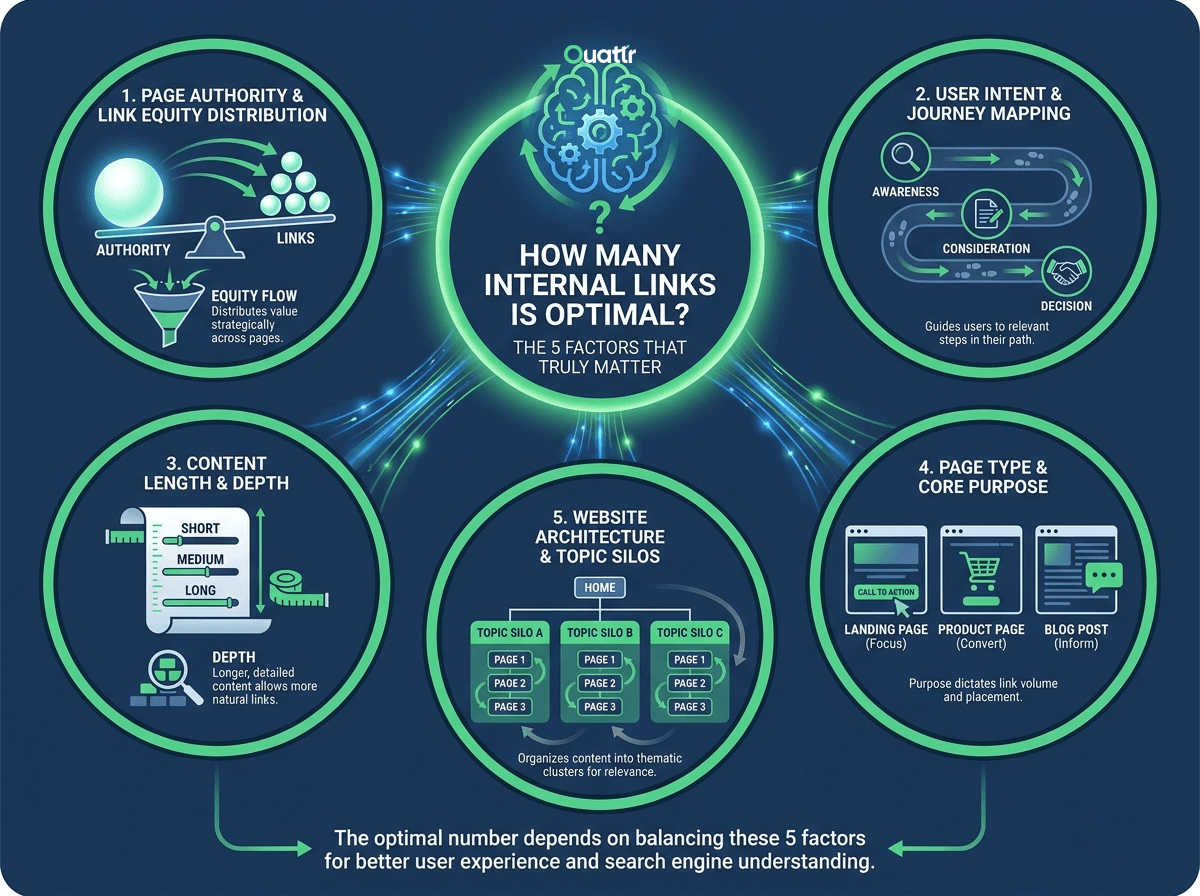
How Many Internal Links is Optimal? The 5 Factors That Truly Matter
If a fixed number is the wrong approach, what is the right one? Based on past internal linking experiments and my discussions with in-house SEO experts and practioners, the ideal number of internal links is not a static figure but a dynamic outcome based on a confluence of strategic factors.
Before adding a single link, an expert SEO or content strategist analyzes the page's role within the larger ecosystem of the website. Understanding these core factors allows you to move from arbitrary rules to an intentional, high-impact linking architecture. Here are the five most critical elements to consider when determining how many links for SEO and user experience are appropriate for your page.
1. Page Authority and Link Equity Distribution
Not all pages are created equal. A page's authority, often conceptualized through metrics like Google's PageRank (which is still used internally) or third-party scores like Ahrefs' URL Rating (UR) or Moz's Page Authority (PA), determines its capacity to pass value through links. A high-authority page, such as a well-researched cornerstone article that has attracted many external backlinks, has more "link equity" to distribute.
Think of it like a full reservoir. This page can support a greater number of outbound internal links without excessively diluting the value passed through each one. Conversely, a new, low-authority page has very little equity to pass.
Overloading it with internal links would be like trying to water a large garden with a thimble, each link would pass a negligible amount of value. Therefore, be more liberal with links on your strongest pages to help lift other relevant pages, and be more conservative and highly targeted with links on your weaker pages.
2. User Intent and Journey Mapping
What does the user want when they land on this page, and where might they want to go next? Answering this question is paramount. Every link should serve a purpose in the user's journey. For a blog post on "What is Content Marketing?" (Informational Intent), a user's next logical steps might be to learn about "Content Strategy Frameworks" or "How to Write a Blog Post." Internal links to these resources are incredibly valuable.
On a SaaS pricing page (Transactional Intent), the user's journey might lead to a "Feature Comparison" page, a "Request a Demo" form, or the "FAQ" section. Adding links that deviate from this path, such as a link to a tangential blog post, could distract the user and hurt conversion rates.
Map out the ideal user flow from your page and use internal links as the signposts to guide them. The number of links becomes a function of how many logical, value-adding next steps exist for that specific user at that specific moment.
3. Content Length and Depth
There is a direct and logical correlation between the length of a piece of content and its capacity to house internal links naturally. A sprawling 3,000-word ultimate guide on a topic has far more opportunities to embed relevant, contextual links than a brief 500-word news update. Cramming 25 internal links into a short article would look spammy, feel forced, and provide a terrible user experience. The text would be a sea of blue, making it difficult to read.
In a long-form guide, however, 25 links might be perfectly appropriate, with each link pointing to a resource that elaborates on a specific sub-topic mentioned in the main piece. A general rule of thumb, though not a strict rule, is to consider adding one contextual link for every 100-150 words of text. This helps maintain a natural feel and ensures that links are sufficiently spaced out. The key is that the content's depth justifies the number of links provided.
4. Page Type and Core Purpose
The function of a page is a primary determinant of its linking structure. The number of internal links per page will vary dramatically based on its template and objective.
i. HTML Sitemap: Its sole purpose is to be a directory of links for search engine crawlers. It is expected to have hundreds, or even thousands, of links.
ii. Blog Post: Its purpose is to inform and engage. The focus is on high-relevance contextual links and perhaps a "Related Posts" module. The link count will be moderate.
iii. eCommerce Category Page: Its purpose is to facilitate product discovery. It will have links to subcategories, product pages, and faceted navigation filters, often resulting in a high link count.
iv. Homepage: Its purpose is to direct traffic to the most important sections of the site. The link count is typically moderate but every single link is highly strategic and points to a key landing page.
Never apply a single linking standard across your entire site. Instead, create guidelines based on page templates, acknowledging that a product page and a legal disclaimer page have fundamentally different requirements.
5. Website Architecture and Topic Silos
Effective internal linking reinforces your website's structure. A well-architected site is often organized into "topic silos" or "clusters," where a main pillar page covers a broad topic and is linked to and from several cluster pages that cover related sub-topics in greater detail.
When linking, you should primarily add links to other pages within the same topical silo. This practice concentrates link equity within a specific subject area, sending a powerful signal to Google that you have deep authority and expertise on that topic.
While cross-silo linking is acceptable when highly relevant to the user, the majority of your links should support their local neighborhood. This architectural consideration influences how many relevant linking opportunities are even available on a given page. A page in a well-developed silo will have many logical pages to link to; a page on an orphaned topic will have few.
A Practical Framework: How Many Links for SEO by Page and Industry
Theory is essential, but execution is what drives results. To bridge the gap between understanding the factors and implementing a strategy, let's break down practical linking guidelines for common page types and industries. Remember, these are not immutable laws but informed starting points. Your own data and testing should be the ultimate arbiter. The central question of how many internal links per page is best answered with context-specific frameworks.
Page-Type Breakdown: Linking for Purpose
Each page template on your site serves a distinct user need, and its linking profile should reflect that purpose. Applying a one-size-fits-all approach is a recipe for mediocrity.
i. Blog Posts & Articles: This is where contextual, editorial links shine. For a standard 1,000-1,500 word article, aiming for 5-15 highly relevant in-content links is a solid benchmark. These should point to other articles, supporting definitions, or pillar pages to build topic clusters. In addition, a "Related Posts" module at the end can add another 3-5 links, enhancing user engagement and time on site.
ii. eCommerce Product Detail Pages (PDPs): These pages are complex. They often contain 20-60+ links, but their nature varies. Essential links include breadcrumbs (for hierarchy), links to size charts or shipping info, and structured data links. The most strategic links are in "Related Products," "Customers Also Bought," and "Complete the Look" carousels, which are designed to increase Average Order Value (AOV). The key is to keep the user within the buying funnel.
iii. eCommerce Category Pages (PLPs): These are the champions of high link counts, often featuring 50-200+ links. The bulk of these come from links to individual product pages and, most significantly, from faceted navigation (e.g., filter by size, color, brand). It is critical to manage faceted navigation for SEO, often using `rel="nofollow"` or robots.txt disallows on certain filter combinations to conserve crawl budget and avoid creating low-value, duplicate pages.
iv. SaaS Feature/Solution Pages: The goal here is to guide a user through a consideration funnel. A typical page might have 10-25 internal links. These should strategically connect related features, point to relevant case studies or whitepapers, link to the pricing page, and provide access to technical documentation or a knowledge base. The linking structure should mirror the customer's journey from problem-aware to solution-ready.
v. Homepage: This is your site's strategic control center. Less is more. Aim for 20-50 powerful links that direct users and link equity to your most important pillar pages, product categories, or "money" pages. Every link on the homepage should be a deliberate choice. Avoid cluttering it with links to minor pages.
vi. HTML Sitemaps: This is the one page type where link quantity is the primary feature. An HTML sitemap exists to provide crawlers with a clear path to every important page on your site. It is not designed for user navigation and can easily contain hundreds or thousands of links. Its purpose is purely technical.
Industry-Specific Considerations: Linking for Business Goals
The competitive landscape and business model of your industry also heavily influence the ideal linking strategy.
i. eCommerce: The primary goals are product discovery and conversion. Internal linking should create a seamless shopping experience, guiding users from category pages to product pages and to the checkout. The risk is "leaking" users away from the funnel with distracting links to blog posts from a product page.
ii. SaaS: The objective is lead generation and user education. The sales cycle is often longer. Internal links should build a web of trust and authority, connecting informational blog content to solution-oriented landing pages, case studies, webinars, and finally, a "Get a Demo" or "Start Free Trial" CTA.
iii. Publishing/Media: The core metric is user engagement—keeping eyes on pages to maximize ad revenue. The strategy involves a high density of internal links through "Related Reading," "Most Popular," topic tags, and author pages to keep users clicking from one article to the next, increasing pageviews per session.
iv. Affiliate Marketing: The goal is to funnel traffic to pages that generate revenue. Internal linking is tightly controlled, creating clear pathways from informational content to "Best X for Y" review pages and product comparisons ("money pages"), and then out to the merchant via an affiliate link.
v. Corporate/B2B Services: The goal is to establish authority and capture qualified leads. Linking should reinforce expertise by connecting service pages with insightful blog posts, team bios (showing experience), case studies (proving results), and contact forms. It's about building a narrative of competence and trust.
Location, Location, Location: Strategic Placement of Internal Links
Once you've determined the appropriate number of links for a page based on its purpose and context, the next critical question is where to place them. The location of a link on a page is a powerful signal to both users and search engines about its importance. An intelligent distribution of links across different page elements is crucial for a balanced and effective SEO and user experience strategy.
High-Value Real Estate: Main Navigation and Header Links
The links in your site's main header navigation are the most prominent on your entire website. They appear on virtually every page and are immediately visible to users. Because of this site-wide placement and high visibility, these links are perceived as extremely important by search engines. They pass significant authority and signal which pages you, the site owner, consider to be the pillars of your website. This area should be reserved for your top-level service pages, product categories, solutions, or about/contact information. Keep it clean and focused; a cluttered navigation menu with dozens of dropdown items can be overwhelming for users and may dilute the authority passed to each link.
The Powerhouse: In-Content Contextual Links
If the main navigation links are your site's highways, contextual links are the local roads that give a neighborhood its character and utility. These are the links placed directly within the body of your content. They are the gold standard for SEO. Why? Because they are surrounded by relevant text (the context), and the anchor text used can be highly specific. A link from a sentence about "enterprise-level keyword tracking" to your page on that topic, using that exact phrase as anchor text, is an incredibly strong relevance signal. This is where you build topical authority and guide users to dive deeper into subjects. The majority of your strategic, page-by-page linking efforts should be focused on identifying and adding these valuable contextual links.
Supporting Roles: Sidebar and Right Rail Links
Sidebars are traditionally used for secondary navigation or engagement modules. This is an excellent place for "Popular Posts," "Recent Articles," or links to high-value downloadable content like an ebook. While these links are not as powerful as contextual links (as they lack the immediate surrounding context and are often repeated across many pages), they are still valuable for the user journey. They provide users with an "escape hatch" to find other interesting content if the current page doesn't fully meet their needs. From an SEO perspective, they help distribute link equity, albeit in a more generalized way than in-content links.
The Foundation: Footer Links
The footer serves as a utility belt for your website. It's the place for important but less-trafficked links that need to be accessible from anywhere on the site. This includes your privacy policy, terms and conditions, careers page, contact information, and perhaps links to major social profiles or secondary site tools. Because these links appear on every page, their individual SEO value for ranking specific keywords is low due to site-wide repetition. Google understands that these are boilerplate navigational links, not editorial endorsements. Their primary purpose is user experience and administrative accessibility, not building topical relevance.
UX and SEO in Harmony: Breadcrumbs and Faceted Navigation
Breadcrumb navigation is a must-have for any site with a clear hierarchy (e.g., eCommerce, large B2B sites). It's a trail of links, typically at the top of the page, showing the user their path from the homepage to their current location (e.g., Home > Men's Clothing > Shirts > T-Shirts). Breadcrumbs are fantastic for both UX, as they orient the user, and SEO, as they create a clean, hierarchical linking structure that reinforces your site's architecture. Faceted navigation, as discussed earlier, is a powerful user tool but can be a technical SEO challenge. Each filter option is a link, and careless implementation can create thousands of low-value, thin-content URLs that waste crawl budget. Careful use of `nofollow` attributes, canonical tags, and parameter handling in Google Search Console is essential to harness the UX benefits without creating an SEO problem.
Design vs. SEO: Carousels, Image Links, and Text Links
How you present a link also matters. A simple, blue, underlined HTML text link is the clearest and most direct signal for search engines. However, design often calls for more visual elements like image carousels for related products or graphical buttons for CTAs. Google is much better at understanding these today, as long as the images have descriptive alt text and the links are implemented in standard tags.
The main consideration is user visibility. If a carousel contains 10 links but only 3 are visible without a click, there's a debate about whether Google gives full weight to the hidden links. For your most important internal links, prioritize visibility and clarity. A static, visible text link will always be your safest and most effective bet.
Advanced Internal Linking Best Practices
Beyond manual placement, advanced techniques can help you scale and optimize your internal linking strategy for maximum impact. These methods move beyond simple page-to-page links and leverage data and automation. Tactics include implementing hub-and-spoke automation with scripts that ensure all cluster content links back to its pillar page, or developing algorithmic link scoring models that prioritize link opportunities based on relevance and page authority.
Another powerful technique is enhancing your breadcrumb navigation with `BreadcrumbList` structured data, which explicitly communicates your site's hierarchy to search engines. For sophisticated sites, dynamic linking based on user segmentation can personalize the experience, showing different calls-to-action or related articles to new versus returning users.
To implement these strategies, you need to start with a robust audit. Here is a mini-workflow for conducting an advanced link audit:
i. Crawl and Export Data: Use a tool like Screaming Frog to crawl your entire website. Export all internal link data, including source URL, destination URL, anchor text, and link position (e.g., content, navigation).
ii. Integrate Performance Metrics: Combine your crawl data with data from Google Search Console (clicks, impressions per page) and your backlink tool of choice (e.g., Ahrefs URL Rating). Import it all into a platform like Google BigQuery or a spreadsheet.
iii. Query for Opportunities: Run queries to identify critical issues and opportunities. Look for "orphaned pages" (pages with few or no incoming internal links), pages with low authority but many outgoing links, and opportunities to improve anchor text for key pages.
iv. Visualize and Strategize: Use data visualization tools to map your site's link architecture. This can reveal weak topic clusters that need strengthening or silos that are not well-integrated.
When scaling these advanced methods, be wary of common pitfalls. Over-automation can lead to contextually poor links that harm user experience. Dynamic linking, if not implemented carefully, can create jarring inconsistencies for users. Finally, don't get lost in the data; always ensure your technical optimizations align with the primary goal of serving the user's intent.
The Final Verdict: Finding Your Ideal Number of Internal Links
Managing internal links across large websites can be complex and time-consuming. Quattr’s internal linking AI help identify linking gaps, suggest relevant contextual links, and optimize anchor text automatically. Instead of guessing how many internal links per page are ideal, you can use data-driven insights to strengthen site architecture, improve crawlability, and boost SEO performance with confidence. Book your demo now!
Unlock Untapped SEO Potential With Quattr's Internal Linking
Request a DemoFAQs
What is the maximum number of internal links per page?
Google has no official limit, but excessive linking (50+ on short content) can appear spammy. Quality and relevance matter more than quantity.
How many internal links should a homepage have?
20-50 strategic links to key landing pages. Focus on your most important categories, products, and conversion pages rather than comprehensive linking.
Should every page have internal links?
Yes, except for standalone pages like "Thank You" or legal disclaimers. Every content page should link to relevant resources to improve user experience.
What's better: contextual links or navigation menus?
Both serve different purposes. Contextual links within content pass more SEO value, while navigation provides essential site structure and user experience.
How often should I update internal links?
Review quarterly or when publishing new content. Add links to fresh content and remove links to outdated or deleted pages to maintain link equity flow.
About The Author

About Quattr
Quattr is an AI-native Search Visibility Platform founded in Palo Alto, California, built for mid-market and enterprise brands competing in the age of generative search. Recently recognized across G2’s Spring 2026 reports with #1 rankings in AEO Results, Usability, and Relationship, Quattr helps brands win visibility across traditional search and AI-generated answer surfaces.
Quattr’s AI agent, GIGA, evaluates content the way AI systems do, identifying gaps across structure, authority, internal linking, and discoverability to surface the highest-impact fixes. With capabilities like autonomous internal linking, E-E-A-T intelligence, and the new GIGA Landing Page Generator for keyword-matched, AI-search-ready pages, Quattr helps teams move from diagnosis to deployed changes without manual bottlenecks.

Read More


Ready to see how Quattr
can help your brand?
Try our growth engine for free with a test drive.
Our AI SEO platform will analyze your website and provide you with insights on the top opportunities for your site across content, experience, and discoverability metrics that are actionable and personalized to your brand.