


Case Studies
Related Content
Image SEO: How to Optimize Images for Better Rankings and Performance
Learn All About Image Optimization for Search Engines & How to Rank Images for SEO

Struggling to get your images to rank in search results? You’re not alone, as image SEO is often overlooked despite the web becoming increasingly visual and search behavior shifting toward images. With image searches growing rapidly, optimizing your visuals properly can drive significant traffic, build trust, and improve overall SEO performance, making it essential to get it right.
What You Need to Know
Image SEO isn’t just about adding pictures it’s about making them searchable, fast-loading, and contextually relevant. Use descriptive file names, optimized alt text, proper formats, and compression to improve rankings and page speed.
Focus on user experience and discoverability optimized images can drive traffic from Google Images, enhance engagement, and support overall SEO performance.
What is SEO Image Optimization?
Image SEO involves improving the way images are used on your website so both the visuals and the pages they belong to can appear higher in organic search results and attract more traffic.
Key practices include adjusting image size and compressing files, using clear and descriptive file names, and adding meaningful alt text to describe each image.
This approach helps search engines better discover and interpret your images, increasing the chances of showing them for relevant searches. At the same time, optimized images load faster and enhance user experience, which are important factors for both search rankings and visitor satisfaction.
When do Images Appear in Search Results?
Images appear in search results when they closely match the user’s intent and add value to the query. Search engines prioritize visuals for queries that are descriptive, visual in nature, or require quick understanding, such as products, tutorials, locations, or concepts.
They are more likely to show up when images are properly optimized with relevant file names, alt text, and surrounding content that clearly explains the context. Strong page authority, fast-loading visuals, and structured content also increase the chances of images being featured across search surfaces like Google Images, Lens, and standard SERPs.
Why Images Matter for SEO?
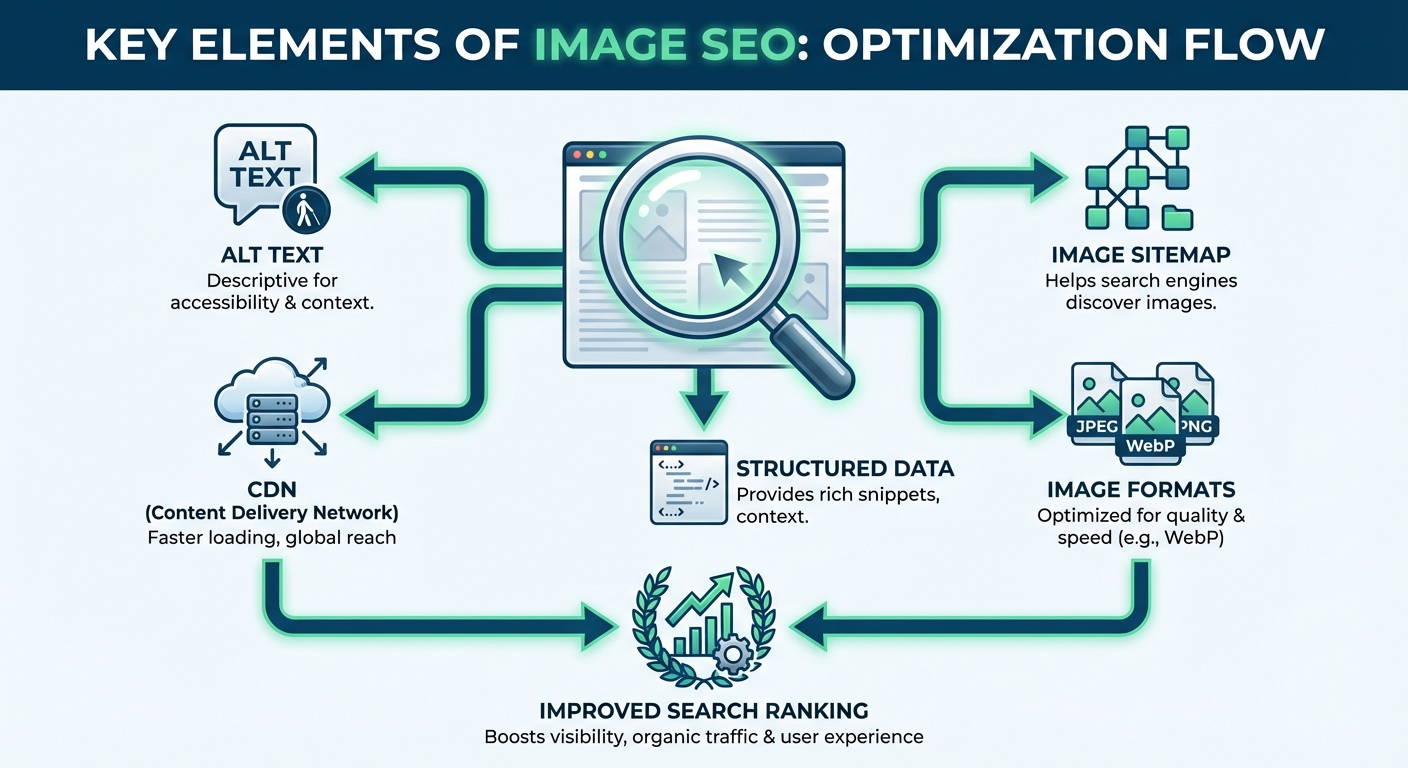
Optimizing images plays a crucial role in improving overall website performance and visibility. Large, uncompressed visuals can slow down your pages significantly, which affects both user experience and search rankings since speed is a key factor in how search engines evaluate your site.
Images also make content easier to consume. A well-structured page with relevant visuals keeps users engaged longer, reduces bounce rates, and is especially important for ecommerce, where clear product images help build trust and influence purchase decisions. They also support accessibility by helping screen readers interpret content more effectively.
From a search perspective, properly optimized images can appear in both Google Image results and regular search listings. By using relevant file names,optimized alt text, and contextual content, you increase the chances of your visuals being discovered, bringing in additional organic traffic beyond traditional text-based results.
As search evolves beyond traditional results, images and visual content are also becoming part of AI-driven discovery. Optimizing your visuals alongside your content increases the chances of being picked up across these systems. If you’re looking to expand beyond SEO and understand how to get cited in AI responses, explore this guide on LLM Seeding, which breaks down how content gets surfaced in modern AI search experiences.
How to Optimize Images for Web?
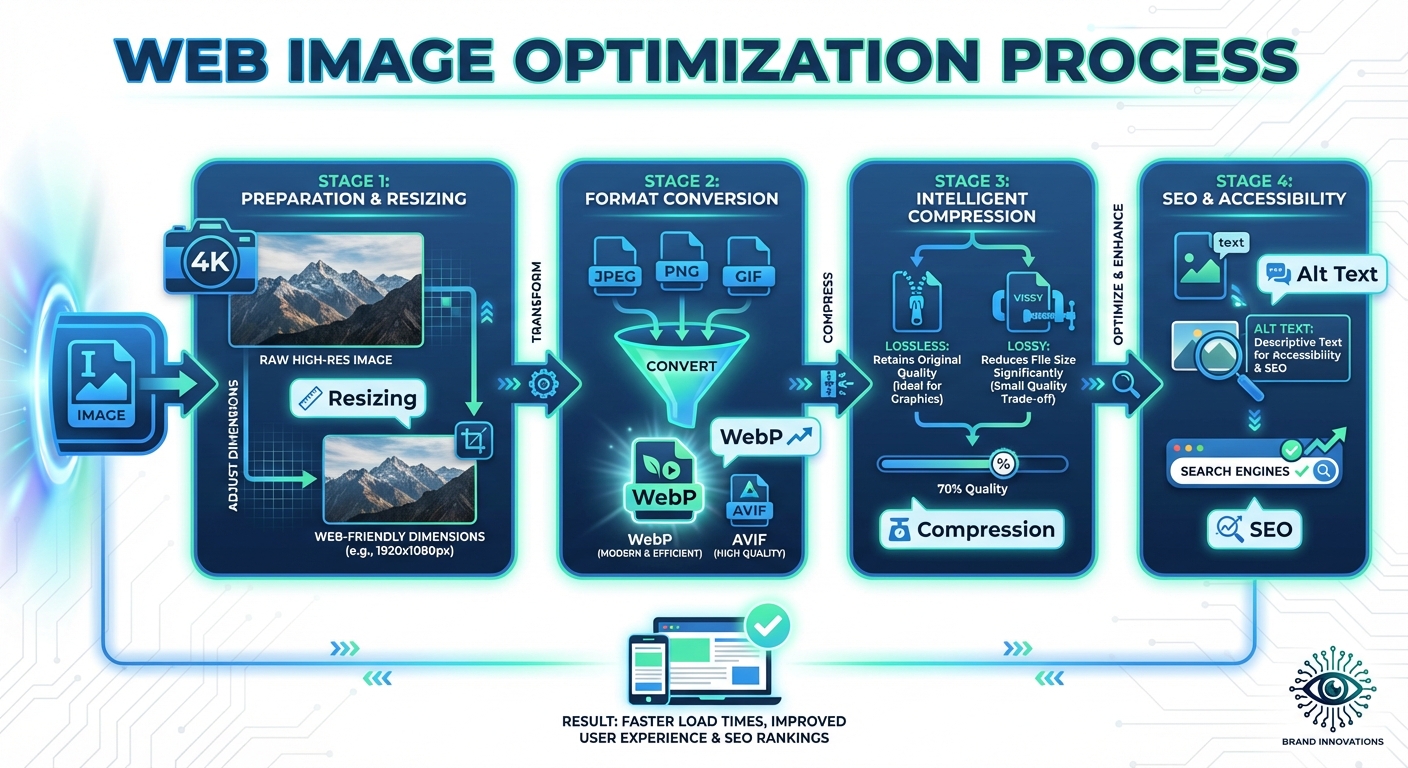
We have understood what image optimization is for SEO and why it is essential. The next question is how you do it. Image optimization for SEO has various aspects. In the sections below, we discuss how to optimize your imagery for SEO and web.
1. Choose or Create Images That Add Value
Start by selecting visuals that genuinely support your content goals. Product photos can highlight features, graphics can simplify complex ideas, charts can present data clearly, and screenshots can guide users step by step. For websites with multiple images to showcase, you can also embed photo gallery on website to present related visuals in an organized, engaging format. Wherever possible, create original images instead of relying on stock visuals, as unique assets provide more value to users and increase your chances of ranking. If you use third-party images, always ensure you have the proper usage rights.
2. Select the Most Suitable File Format
Different image formats serve different purposes. SVG works best for icons and logos because it scales without losing quality. WebP is ideal for most web images due to its smaller file size and efficient compression. If those aren’t feasible, JPEG is suitable for standard images, PNG works well for detailed visuals or transparency, and GIF is useful for simple animations.
3. Use Clear and Descriptive File Names
Search engines rely on file names to understand image content. Instead of generic names like IMG1234.jpg, use descriptive and concise names that reflect the image content. Separate words with hyphens and avoid overly long or keyword-stuffed names. If your site supports multiple languages, adjust file names accordingly for each version.
4. Add Meaningful Alt Text
Alt text is a written description embedded in your image code that helps both search engines and accessibility tools understand the image. Write concise descriptions that explain the image in context, keeping them under 125 characters. Avoid unnecessary phrases and ensure only functional images have alt text. Important information should also be included in the visible content, not just in alt attributes.
5. Resize Images Appropriately
Large images can slow down your website, so resizing them to match your layout is essential. Most web images do not need to exceed 2500 pixels in width, but the ideal size depends on your design and use case. For example, product images may require higher resolution for zoom features, while thumbnails can be much smaller.
6. Compress Images Without Losing Quality
Compression reduces file size while maintaining acceptable visual quality. Tools like TinyPNG, Squoosh, or GIMP allow you to adjust compression settings. Lossy compression typically provides better size reduction, while maintaining a quality range of around 75 to 85 and a resolution of 72 DPI ensures a good balance between performance and clarity.
7. Implement Responsive Image Scaling
Responsive images automatically adjust to different screen sizes, ensuring they display properly on mobile, tablet, and desktop devices. This improves user experience and reduces unnecessary loading time, as users only download images suited to their device.
8. Enable Lazy Loading
Lazy loading ensures images are only loaded when they appear in the user’s viewport. This improves initial page load speed by prioritizing above-the-fold content. You can implement this by adding a loading attribute to your image tags, but avoid applying it to images that appear immediately when the page loads.
9. Create an Image Sitemap
An image sitemap helps search engines discover and index your visuals more efficiently. It lists image URLs associated with your pages, ensuring important images are not missed during crawling. This is particularly useful for websites with a large number of visual assets.
10. Use a Content Delivery Network (CDN)
A CDN stores your images across multiple global servers, delivering them from the nearest location to the user. This reduces latency and significantly improves load times, especially for international audiences.
11. Enable Browser Caching
Browser caching allows images to be stored locally on a user’s device for a set period. When users revisit your site or navigate between pages, cached images load instantly instead of being downloaded again, improving speed and performance.
12. Optimize On-Page Elements
Your on-page SEO also impacts image visibility. Use clear title tags and meta descriptions, as these help search engines understand the context of your images. Well optimized pages increase the likelihood of your visuals appearing in search results.
13. Add Structured Data Markup
Structured data provides additional context about your images, helping search engines display rich results. For example, recipe or product pages can include images alongside ratings, pricing, or preparation details, increasing visibility and click-through rates.
14. Optimize Open Graph Tags for Sharing
Open Graph tags control how your images appear when shared on social platforms. By specifying the correct image, title, and description, you ensure your content looks appealing and consistent across channels, improving engagement.
15. Regularly Audit Image Performance
Use SEO tools to identify issues such as broken images, missing alt text, slow-loading pages, or blocked resources. Fixing these problems ensures your images remain accessible, optimized, and aligned with SEO best practices.
By following these steps, you make your images easier for search engines to understand and faster for users to access, which ultimately improves both visibility and overall site performance.
SEO Best Practices for Optimizing Images for the Web
When optimizing images for web, here are some basic best practices:
1. Employ a CDN to offer your photographs quickly to visitors worldwide.
2. Delete any extraneous picture data.
3. Trim the white area and reconstruct it using CSS to provide the padding.
4. Upload the photographs in the appropriate sizes.
5. Instead of inserting text within photos, use web fonts; they appear better when resized and take up less space.
6. Where feasible, use lossless compression.
7. If you require animation, use GIF.
8. If you want excellent detail and resolution, choose PNG.
9. For general photographs and screenshots, use JPG.
10. In some circumstances, lazy-loading pictures may be desirable for speedier first-page rendering.
Scale Image Optimization for Website with Quattr
Optimizing images is no longer just about compression or alt text, it is about making your visuals discoverable, fast, and contextually aligned with search intent. From file naming to structured data, every step contributes to better visibility in search and improved user experience.
With Quattr’s AI SEO Suite, you can streamline this entire process by identifying optimization gaps, aligning images with the right keywords, and ensuring your pages are fully optimized for both traditional search and AI-driven discovery. It helps you move beyond manual fixes and build a scalable, data-driven image SEO strategy that consistently drives traffic.
Looking for a fast-track solution to SEO image optimization?
Request a DemoFAQs
What is Image Optimization SEO?
Image optimization SEO ensures that your website's images are correctly optimized for search engine optimization (SEO) purposes. This includes optimizing image file size, filename, Alt text, caption, title, and description while ensuring that the image is appropriately responsive and optimized for page load speed.
Why Optimize Image for Web?
Optimizing image for web helps keep the website’s page size small so it can load faster. Additionally, it plays a vital role in increasing organic search traffic, and improving the user experience.
How to optimize your images for visual search?
Optimizing images for visual search involves utilizing image optimization tools to ensure that images are correctly compressed and sized while tagging them with relevant keywords. Additionally, make sure to add relevant metadata (alt text) to each image that explains the image content.
About The Author

About Quattr
Quattr is an AI-native Search Visibility Platform founded in Palo Alto, California, built for mid-market and enterprise brands competing in the age of generative search. Recently recognized across G2’s Spring 2026 reports with #1 rankings in AEO Results, Usability, and Relationship, Quattr helps brands win visibility across traditional search and AI-generated answer surfaces.
Quattr’s AI agent, GIGA, evaluates content the way AI systems do, identifying gaps across structure, authority, internal linking, and discoverability to surface the highest-impact fixes. With capabilities like autonomous internal linking, E-E-A-T intelligence, and the new GIGA Landing Page Generator for keyword-matched, AI-search-ready pages, Quattr helps teams move from diagnosis to deployed changes without manual bottlenecks.

Read More


Ready to see how Quattr
can help your brand?
Try our growth engine for free with a test drive.
Our AI SEO platform will analyze your website and provide you with insights on the top opportunities for your site across content, experience, and discoverability metrics that are actionable and personalized to your brand.