Yours, read with your permission
Server logs as an MCP data source
Request a demo Play this question →
- Hours to nightly, always stamped
- OAuth 2.1 · read-only
- Claude, ChatGPT, Cursor, VS Code
- Bots · status codes · paths
- Shipped by Logpush, bot-filtered
Asked in your assistant
Did anything actually fetch the page we want cited?
This source, on its own
- Bot fetches1.24M
- Unique pages reached18,430
- Served non-2007.1%
this source stops here
- ✕Did humans see these pages?bot-filtered feed
- ✕Was the content in the HTML?requests, not renders
- ✕Is this GPTBot genuine?no published ranges
- ✕Which pages are worth fixing?no traffic data
The same question, routed wider
- ✓ Server logs fetches, status codes, bots
- ✓ Site crawl whether the page is indexable
- ✓ AI visibility whether answers cite it
- ✓ Search Console what the page earns
What comes back
- Fetched by GPTBotyes
- Indexableno
- Citations since0
Illustrative
- Setup~15 minutesA Logpush job to the ingest endpoint. Longer than an OAuth click.
- ScopeRead-onlyThe MCP reads the stream you ship. It writes nothing back.
- Sources behind itEightLogs alone work. Seven more join when connected.
- Tools58 across 11 categoriesFour cover logs; the assistant routes to them.
What a log-file MCP server does
An MCP server is the connection between your assistant and a system that holds data. Connect one for your logs and your assistant can read what your origin actually served: which crawler asked for which URL, when, and what status code came back. Every other source infers crawler behaviour. This one records it.
That makes logs the rung underneath everything else. A page no crawler fetched cannot be indexed, cited or ranked, and a report built on the assumption that it was fetched is wrong in a way no amount of analysis above it will reveal.
Connect server logs in about fifteen minutes
Two minutes in your assistant, then a Logpush job that takes about fifteen.
- 01 Add the endpoint Paste it into your client's MCP settings. One server, every source, there is no per-source endpoint to manage.
https://mcp.quattr.com/mcp - 02 Sign in with Quattr OAuth 2.1 in the browser. The session is bound to your organisation and scoped read-only; no API key is created or stored in your client.
- 03 Point Logpush at the ingest API Create an HTTP destination job filtered to search and AI crawler user agents, add the bearer token and stream name, and prove ownership. The first batch lands within half an hour.
https://logs-api.quattr.com/v1/ingest
What you can ask on day one
Plain questions, not query syntax. Each one runs against the log stream alone, nothing else has to be connected first.
-
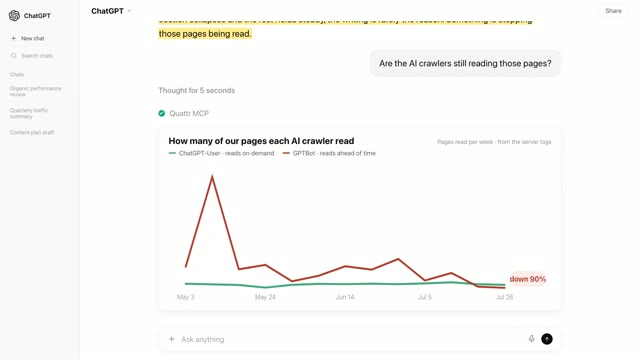
Which AI crawlers fetched us last month, and how many unique pages did each one reach? -
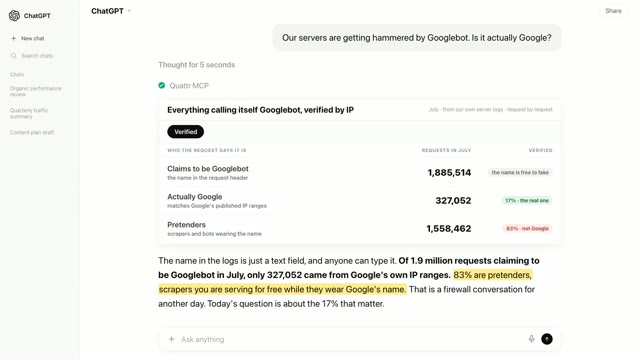
Are any requests claiming to be Googlebot coming from outside Google's ranges? -
What are crawlers spending fetches on that returns a non-200? -
Did GPTBot stop fetching anything it used to fetch regularly? -
Which sections of the site do crawlers reach least often?
The server-log tools it exposes
-
ai_crawler_analysisFetches, status codes and unique pages per AI crawler, over time or as a single total. R1 Reachable -
bot_verificationRequests claiming to be Googlebot, split into IP-verified and unverified. R1 Reachable -
crawl_budget_wasteDeep, parameterised and non-200 URLs that crawlers spend their visits on. R1 Reachable -
indexation_gap_diagnosisPages flagged not-indexable, with the reason, for the URLs crawlers actually reached. R1 Reachable
You never name one of these. The assistant routes the question; the reference is public so an answer can be checked against what it was built from.
Where Server logs reads, what it assumes beneath, and what it cannot reach. Filled rungs are measured; hatched rungs are taken on faith.
- R5 Rewarded out of reach Nothing this source records reaches up here.
- R4 Represented out of reach Nothing this source records reaches up here.
- R3 Referenced out of reach Nothing this source records reaches up here.
- R2 Retrieved out of reach Nothing this source records reaches up here.
- R1 Reachable reads here Your origin recorded the request. Measured, not inferred, and there is nothing beneath it to assume.
A reading at any rung is only as trustworthy as the rungs beneath it. Logs sit on the bottom rung, so nothing is assumed underneath. That is the whole reason a log answer is the one worth trusting first, and the reason it can say so little on its own.
Where a single-source log MCP stops
Not at a feature the vendor forgot. At the edge of what a request log records.
- Can this page be used at all? A 200 says bytes were served. Whether the page is indexable, canonicalised somewhere else or blocked in robots is structure, and structure is not recorded in a request log. needs Site crawl
- Did the fetch become a citation? Logs prove an answer engine took the page. Whether it appeared in an answer, on which prompts, and whether a rival was cited instead is observed on the engines themselves. needs AI visibility
- Which of these pages matter? Every URL in a log looks alike. Ranking a fix list by what the problem costs needs impressions and clicks, which are recorded on Google's side rather than yours. needs Search Console
- Did a slow response cost us? The log carries the response time a crawler received. What a real visitor experienced on that template, and whether it was slow enough to lose them, is measured separately. needs Lighthouse / CWV
Seven more sources answer what server logs structurally cannot
Every source is one you already own or one Quattr collects for you. Connect none of them and the log answers still work. Connect any of them and a fetch stops being a line in a file.
- Site crawl Quattr Whether the URL a crawler reached was allowed to be used: indexability, canonicals, redirect chains and how deep it sits. per crawl schedule
- AI visibility Quattr The other end of the crawl. Which fetched pages answer engines went on to cite, and which were taken and never used. ~1 day behind
- Search Console yours What each fetched URL is worth. Impressions and clicks turn an undifferentiated list of paths into a fix list ordered by cost. 1 to 2 days behind
- GA4 or Adobe yours What happened to the humans your logs were filtered to exclude, including whether the pages crawlers favour are the pages that convert. loads nightly
- Google Ads yours The paid destinations worth checking first. A landing page you buy traffic for that serves redirects or errors is spend leaking before the visit starts. ~1 day behind
- Rank tracking Quattr Whether a crawl change coincided with a change in standing, so a fetch pattern can be read against the ground you hold rather than in isolation. ~1 day behind
- Lighthouse / CWV Quattr What a visitor experienced on the templates crawlers were served quickly. Crawler response time and human page experience are different measurements. varies by site
- The ladder that orders them R1 Reachable → R2 Retrieved → R3 Referenced → R4 Represented → R5 Rewarded. A broken lower rung invalidates every reading above it. The method →
Quattr MCP compared with a standalone log MCP
A category comparison, not a claim about any one vendor. A standalone connector is a good piece of software doing a narrower job; the table is here so you can tell which situation you are in before installing anything.
| Dimension | A standalone connector | Quattr MCP | When it matters |
|---|---|---|---|
| Log coverage | All traffic, every field in the dataset, queried directly and in near real time. | The bot-filtered stream you ship, read as governed analyses rather than as raw rows. | If you need to query human traffic or arbitrary fields, the observability tool is the one. |
| Other sources | None. One server per source; your assistant holds several unrelated connectors. | Seven more behind the same endpoint, joined on the URL and on your segments. | The moment the question is whether a fetch mattered rather than whether it happened. |
| How a question is answered | Your assistant composes the query, then interprets the rows it gets back. | The question is routed to a governed analysis that states its scope and returns a verdict. | When a plausible-looking query silently excludes the bot you were asking about. |
| Significance | Not offered. A crawl dip and a crawl collapse look alike in a chart. | Changes are tested before they are called changes, and undecidable ones are reported as undecidable. | Weekly crawl monitoring, where volume moves on its own all the time. |
| What a URL means | A path string. The log knows the request, not the page behind it. | The same path joined to indexability, rankings, citations and the traffic it earns. | Whenever the output has to be a fix list rather than a count. |
| Segmentation | Filters on fields present in the log, such as path prefix and user agent. | Your own taxonomy, product lines, page groups, templates, built during onboarding. | When "which section" means a business grouping, not a path pattern. |
| Time to first answer | Minutes. Authorise the account and query the logs you already store. | About fifteen minutes to configure Logpush, half an hour for the first batch, once the account is set up. | Honestly, this row favours the standalone tool when you want an answer today. |
| Cost | Free with the account you already have. | Included with a Quattr subscription. No separate MCP product, no separate bill. | If you are not a Quattr customer, the standalone tool is the one you can use this afternoon. |
Rows describe a category, checked against publicly documented behaviour. Named-vendor claims live on the comparison pages, dated. If a row is wrong or out of date, it is a defect, tell us and it changes.
What server logs themselves will not tell you
- Logs here are a bot-filtered feedThe recommended Logpush job filters to search and AI crawler user agents, so this is the bot slice you chose to ship. Human traffic, and any crawler outside that filter, are not in it by design.
- Absence is not proof of absenceA request served at the CDN edge may never reach the stream, and a bot missing from the data may simply be missing from your filter. The answer says your logs do not have it, which is a weaker claim than saying it never came.
- Requests are not rendersA 200 proves bytes were served, not that the content a crawler needed was in them. A client-rendered page can return a healthy status while the response a bot received was effectively empty.
- Verification covers Googlebot onlyGoogle publishes ranges that let a claimed Googlebot be checked against the requesting IP. Other operators are reported as unverified rather than as genuine or as fake, because the check does not exist.
Freshness, permissions and what is stored
- Freshness
- Hours to nightly, depending on how your logs are shipped. Every card carries the ingestion time rather than assuming it.
- Scope
- Read-only. The MCP reads the stream you send and writes nothing anywhere.
- Sign-in
- OAuth 2.1 in the browser for the assistant. Log shipping uses its own bearer token, held on the platform side.
- Tenancy
- Sessions are bound to your organisation. A session cannot reach another tenant's logs.
- Your prompts
- Your assistant sends the question to the server to route it. It is not used to train anything.
- Ingestion
- Logpush posts gzipped NDJSON to the ingest API, ownership is proved at setup, duplicates are dropped automatically, and three years of history is standard.
Origin event to answered card for Server logs, with the stage each stated limit attaches to.
- lag enters
- data leaves
- modelling begins
- 01 Request hits your origin
- data leaves: Requests served at the CDN edge never enter. Absence here is a weaker claim than absence of the request.
- 02 Logpush filters to bot user-agents
- data leaves: Human traffic leaves here. This is the bot slice you chose to ship, by design.
- 03 Gzipped NDJSON posts to the ingest API
- lag enters: Hours to nightly depending on shipping. Every card carries its ingestion time.
- 04 Ownership proved, duplicates dropped
- 05 Joined to your URL taxonomy
- modelling begins: A 200 proves bytes were served, not that the content a crawler needed was in them.
Four nested sets. Logs own only the second, and the outer set is bounded by your own filter, which is what makes a missing bot a weaker finding than a missing visit.
The outer set is bounded by your Logpush filter, not by the web. So a page absent from the logs may still have been reachable, absence of a bot request is a weaker claim than absence of a visit, where the analytics set is bounded by the visit itself.
Who can connect it, and what it costs
The MCP is included with a Quattr subscription. There is no separate MCP product and no separate bill. If your organisation already uses Quattr, log shipping is usually configured during onboarding, and the MCP is a new doorway to a stream you are already sending.
Shipping is the work here. A Logpush job, a token issued by us, and the taxonomy that turns a path list into a fix list all come before the first answer. If all you want is to query logs you already store, a standalone observability MCP is the honest recommendation, and it is the simpler answer as well as the faster one.
Learn to read the numbers yourself
- topic AI crawler readiness The three-roles model, switch semantics, and what blocking each bot actually costs.
- topic The Reachable sweep Ranking technical issues by traffic at risk instead of by error count.
- metric Verified against spoofed Googlebot How the check works, what it proves, and what an unverified request is not.
- report The AI bot activity report What belongs in it, and why a fetch count on its own is not a finding.
Questions people ask before connecting
Do I have to send you all my traffic?
No. The recommended setup filters at your CDN to search and AI crawler user agents, so the stream is bot traffic only. Human requests never leave your infrastructure.
How do logs actually reach Quattr?
A Cloudflare Logpush job posts gzipped NDJSON to our ingest API with a bearer token you are issued. Setup takes about fifteen minutes and the first batch arrives within half an hour.
Can it verify that a bot is really who it claims?
For Googlebot, yes, by checking the requesting IP against Google's published ranges. Other crawlers are reported as unverified, because the check depends on the operator publishing ranges to check against.
What if we are not on Cloudflare?
The ingest API takes gzipped NDJSON over HTTP from any shipper that can post it, so the pattern is the same. The exact configuration differs per CDN and is worked out at onboarding.
Can the MCP change anything on my site or CDN?
No. It reads the stream you send. Nothing in the connector can alter a Logpush job, a robots file, or anything else in your infrastructure.
How far back can it look?
Three years is the standard window, matching the other sources, and it can be customised per account. History starts when shipping starts, not when your site did.
We run several domains, does that work?
Yes. Each Logpush job carries a stream name, so domains and bot types stay separable and a question can be scoped to one of them rather than to the whole estate.
Is a standalone log or observability MCP ever the better choice?
Yes. If you want to query all your traffic across arbitrary fields, or you are debugging infrastructure rather than search, the observability tool is free and does that better than this.