Quattr Leads AEO, SEO, and Content Rankings on G2 Spring 2026.
Quattr Leads AEO, SEO, and Content Rankings on G2 Spring 2026.

Ever noticed that some of your key pages fail to rank despite having well-optimized content? The issue might not be keywords or backlinks, but how deeply those pages are buried within your site.
When pages sit too far from the homepage, search engines can struggle to discover and index them efficiently, leading to lower visibility and missed traffic opportunities. Understanding and improving crawl depth helps ensure your important pages are easier to find, faster to index, and better positioned to perform in search results.
Crawl depth means how many clicks it takes to reach a page from your homepage.
For example, if someone goes from Homepage to Category to Product, that page is two clicks deep. If your important pages are closer to the homepage, search engines can find and index them faster. This usually helps with better visibility and rankings. Ideally, your key pages should be reachable within three to four clicks from the homepage.
The purpose of crawl depth is to help search engines discover and understand a website's content.
Search engines like Google have a crawl budget for each website, determining how many pages they crawl in a given timeframe.
Improving your crawl budget helps search engines find and understand your pages more easily. When your site is easy to crawl, it is usually easier for users to navigate as well. This increases the chances of your content being discovered and ranking higher in search results.
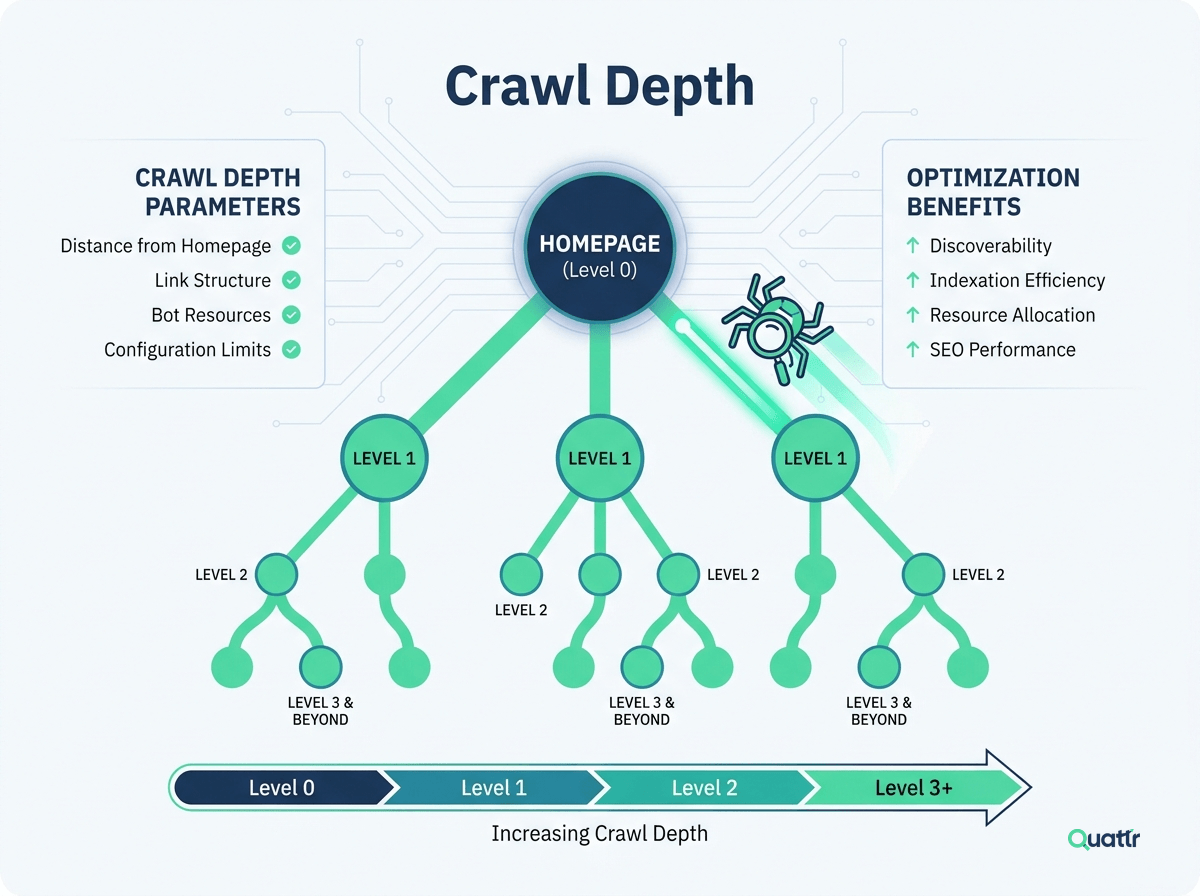
Crawl depth works like a simple level system for your website. The homepage is level 0. Every time someone clicks a link to go to another page, the level increases by one. So a page linked directly from the homepage is level 1. If you need two clicks to reach a page, it is level 2, and so on.
Search engine bots, like Googlebot, usually begin from the homepage. From there, they follow links to find other pages. Pages in your main menu are usually closer to the homepage and easier to find. Pages that are placed deeper inside categories or subpages have higher depth levels and may be crawled less often.
The closer a page is to the homepage, the easier it is for search engines to discover and index it.
Crawl depth directly affects how easily search engines can find, index, and rank your content. When your website has a simple and clear structure, search engines can reach important pages faster. But if the page depth is too deep, search engines may not crawl those pages regularly.
Since search engines have a limited crawl budget, pages that are buried many clicks away from the homepage can be overlooked or indexed less frequently, sometimes ending up as effectively orphan pages that search engines rarely revisit. Here are the main reasons why crawl depth matters:
Search engines only spend a limited amount of time crawling your website. If your important pages are close to the homepage, they are more likely to be discovered and indexed before that limit is reached.
Pages that are closer to the homepage usually receive more internal links. This helps them gain more authority and improves their chances of ranking higher in search results, which ties directly into internal linking best practices.
When users can reach important pages in fewer clicks, they are more likely to stay on your site and explore further. This can reduce bounce rates and increase engagement, a core part of strong user experience.
A shallow site structure makes it easier for search engines to understand which pages are most important, so your key content does not get ignored.
Page depth refers to how many clicks a user takes to reach a specific page on your website. Unlike crawl depth, which is measured from the homepage for search engines, page depth focuses on the user journey. A visitor might land on your site through a blog post, product page, or landing page, and then move to other pages from there.
Because the terms sound similar, many people confuse page depth with crawl depth. However, they are not the same. Crawl depth is about how search engine bots access your pages from the homepage. Page depth is about how users move through your website from any starting point, often guided by elements like breadcrumb navigation.
Understanding the difference is important. Crawl depth mainly affects indexing and SEO performance. Page depth mainly affects user experience, engagement, and how easily visitors can find what they need.
Now let us clearly compare crawl depth and page depth to understand how they differ.
Crawl depth refers to the number of clicks required to reach a certain page from the homepage of a website through internal links. On the other hand, page depth is related to the user's journey to reach a specific page from any entry point on the website, not just the homepage.
Crawl depth refers to how deeply search engine bots explore your website through internal links. It affects indexing and rankings because pages that are closer to the homepage are usually crawled and indexed faster. Crawl depth mainly depends on your internal linking structure and site hierarchy. If pages are too deep, they may not get crawled efficiently, which can waste crawl budget or reduce visibility in search results.
Page depth, on the other hand, focuses on how many clicks it takes for users to reach a specific page. It impacts user experience, navigation, engagement, and retention. Page depth is influenced by website design, menu structure, and linking strategy. The main challenge is keeping important pages easy to access while continuously adding new content without making navigation complicated.

Site structure refers to how the pages and content on a website are organized & linked together. It's like a website blueprint, showing how everything is arranged, from the main sections down to individual pages. Let us look at the best practices to optimize site structure:
1. Design a Logical Hierarchy: Structure your website in a clear, logical way with minimal clicks required to reach every page.
2. Use Siloing: Organize related content into distinct sections or 'silos' to create thematic relevance.
3. Implement a Responsive Design: Ensure your website is mobile-friendly, as Google uses mobile-first indexing.
Enhancing your site's structure facilitates search engine bots in discovering more pages. It aids in better indexing & improving user navigation, ultimately boosting SEO performance & user experience.
Internal linking refers to the practice of including links from one page on a website to another page on the same website. Just like following signs in a building, internal links help you navigate around a website easily. Let's look at how to improve internal linking on your website:
1. Use Relevant Anchor Texts: Choose anchor texts that accurately describe the linked page's content.
2. Incorporate Deep Links: Focus on linking to inner pages rather than just linking to your homepage or contact page.
3. Audit and Remove Broken Links: Regularly check for and fix or remove any broken links hindering crawl efficiency.
A robust internal linking strategy enhances crawl depth by guiding search engines to discover hidden or deeper pages. It helps redistribute page authority to deeper pages, making it easier for search engines to find and index your content.
An XML sitemap is a file that lists a website's important pages, ensuring search engines can locate and crawl them all. It acts as a roadmap for search engines to understand the structure of your site. Here are the best practices for leveraging XML sitemaps:
1. Keep it Updated: Regularly update the sitemap as new pages are added or old ones are removed.
2. Prioritize Important Pages: Ensure the sitemap includes priority pages you want search engines to crawl and index first.
3. Submit to Search Engines: Manually submit your sitemap to Google Search Console and Bing Webmaster Tools for faster indexing.
Utilizing XML sitemaps efficiently accelerates search engines' discovery and indexing of pages. It is crucial for websites with vast content or complex structures, as it ensures no critical page is overlooked, significantly improving visibility.
Page load speed refers to the time a webpage takes to fully display its content. It measures the time it takes for a webpage to display all its elements, like text, images, and buttons. To enhance the page speed of your website, you can do the following:
1. Optimize Images: Compress images without losing quality to reduce their file size.
2. Minimize HTTP Requests: Reduce the number of elements (scripts, images, CSS files) that need to be loaded.
3. Use Browser Caching: Store parts of your site in the user's browser so they don't need to be reloaded on subsequent visits.
Boosting your page load speed makes it easier for search engines to crawl your site quickly and index more pages within their crawl budget. A faster website also means a better user experience, leading to higher engagement rates and potentially more conversions.
Content hubs are centralized pages that link to all relevant content on a particular topic within your website. They serve as a core for thematic content clusters and enhance the internal linking structure. Follow the below best practices when utilizing content hubs:
1. Create Comprehensive Hubs: Develop in-depth hub pages that offer value and comprehensively cover a specific topic.
2. Link Out to Related Content: Use the hub page to link to your site's related articles, guides, and resources.
3. Promote Hubs for User Engagement: Feature your hubs prominently on your site and promote them through social media and newsletters to drive traffic.
Content hubs improve your website's internal linking and navigational structure and boost crawl depth by ensuring thematic pages are interconnected. This strategy enhances the topical authority of your website, making it more likely to rank higher in search engine results.
Improving crawl depth is not just about numbers. Real success means better crawl efficiency, faster indexing, improved user experience, and higher search rankings. All of these should support your main goal, which is more traffic and conversions. To measure success, track these important SEO metrics before and after making changes:
Compare the number of pages crawled to the number of pages indexed over time. If more crawled pages are getting indexed, your crawl efficiency is improving.
Check how fast new or updated pages appear in search results. Faster indexing usually means your page depth and internal linking are working well.
Use SEO tools to see how many important pages are within three to four clicks from the homepage. Key pages should not be buried too deep. After tracking these metrics, ask simple questions.
Are important pages now closer to the homepage?
Are more pages getting indexed?
Is internal linking stronger?
You can also use Google Search Console and Bing Webmaster Tools to check crawl stats. These tools show how often search bots visit your site and how many pages they crawl each day.
It is good to make pages easy to reach. But adding too many internal links on one page can confuse search engines and reduce link value. Keep links relevant and meaningful. Focus on quality, not quantity.
Many people try to keep every page within three clicks. While a shallow structure is usually good, it depends on your website size and type. A large ecommerce site will naturally have deeper pages. Always set realistic goals based on your site structure.
Google is important, but it is not the only search engine. Bing and AI powered search engines also crawl websites differently. Optimizing only for Google may cause you to miss traffic from other platforms.
Crawl depth is crucial for optimizing website performance & ensuring search engines can effectively navigate & index your content. It requires continuous monitoring, analysis, and refinement of your site's structure and content. However, achieving an optimal crawl depth across your website's vast architecture is no small feat.
This is where an SEO platform, like Quattr, can help you with advanced crawl analysis. It renders & analyzes a broad set of pages across your website weekly. Quattr offers a comprehensive view of your site's performance from the perspective of a search engine crawler.
This regular audit includes an examination of crawl errors, lighthouse audits, and site speed scores. It is integrated with historical trends to give you a clear picture of where your site stands compared to competitors.
It also identifies where these bots spend the most time, uncovers the errors they encounter, and highlights areas they're potentially overlooking. Armed with this granular data, you can diagnose issues at their core and make informed decisions to optimize your site's crawl depth effectively.
The crawl depth of a website depends on its structure, link setup, sitemaps, and how fast it loads. Also, how often you update content, the setup of your URLs, and your crawl budget matter. Using canonical tags, robots.txt, and how you handle JavaScript can guide search engines on what to explore.
Incorrect crawl depth can seriously impair a website's online visibility by causing vital content to remain undiscovered by search engines. It diminishes its ability to rank effectively in search results and potentially excludes it from user queries, leading to reduced traffic and lost opportunities for engagement or conversion.
Optimizing your website's crawl depth is an ongoing process, not a one-time task. Regular reviews, ideally every 3-6 months, ensure your site remains efficiently indexed by search engines, enhancing visibility and traffic flow. Adjustments based on user behavior, content updates, and algorithmic changes refine crawl paths and maximize your site's organic reach & performance.

Quattr is an AI-native Search Visibility Platform founded in Palo Alto, California, built for mid-market and enterprise brands competing in the age of generative search. Recently recognized across G2’s Spring 2026 reports with #1 rankings in AEO Results, Usability, and Relationship, Quattr helps brands win visibility across traditional search and AI-generated answer surfaces.
Quattr’s AI agent, GIGA, evaluates content the way AI systems do, identifying gaps across structure, authority, internal linking, and discoverability to surface the highest-impact fixes. With capabilities like autonomous internal linking, E-E-A-T intelligence, and the new GIGA Landing Page Generator for keyword-matched, AI-search-ready pages, Quattr helps teams move from diagnosis to deployed changes without manual bottlenecks.


Try our growth engine for free with a test drive.
Our AI SEO platform will analyze your website and provide you with insights on the top opportunities for your site across content, experience, and discoverability metrics that are actionable and personalized to your brand.


.svg)
.svg)


