

Key Takeaways
- Automated traffic now makes up more than half of all web traffic, and a large share of it is AI crawlers, which is why a deliberate block-or-allow strategy matters more than it used to.
- Not all AI bots are the same. Training crawlers like GPTBot, CCBot, and Bytespider take your content and give nothing back. Search and retrieval crawlers like OAI-SearchBot, ChatGPT-User, PerplexityBot, and Claude-SearchBot can send you citations, traffic, and visibility.
- There’s no universal robots.txt template. A publisher protecting paywalled content and a SaaS brand chasing AI citations should land on very different rules.
- Getting crawler access right is only step one. Being crawlable doesn’t mean being chosen. AI systems evaluate structure, clarity, and trust signals before deciding who gets cited.
- Review your AI crawler policy regularly. New crawlers, like Claude-SearchBot, keep appearing, and a robots.txt file left untouched for a year is very likely out of date.
For twenty years, the answer to “should I block a bot?” was simple. If it wasn’t Googlebot or Bingbot, you probably didn’t care. That world is gone.
As of June 2026, Cloudflare data shows automated requests now make up 57.5% of all HTML traffic on the web, ahead of the 42.5% that comes from real people. That is the first time in internet history that bots have outnumbered humans on the open web. A huge share of that traffic comes from AI crawlers: bots sent out by OpenAI, Anthropic, Google, Perplexity, and dozens of others to read, index, and sometimes train on your content.
So the question every marketing and SEO team is asking right now is fair: should you block these crawlers, or let them in?
The honest answer is that it depends on which crawler, and what it’s doing with your content. Blocking everything can make your brand invisible in ChatGPT, Gemini, and AI Overviews. Allowing everything can mean your content trains a competitor’s model for free, with nothing in return. The real strategy sits in the middle, and it starts with understanding who these bots actually are.
Why does Blocking AI Crawlers Matter More Than It Used To
Search behavior has changed. People are asking questions directly inside ChatGPT, Perplexity, Gemini, and Google’s AI Mode instead of clicking through ten blue links. If your content isn’t reachable by the crawlers that feed these tools, you simply don’t exist in that answer.
And the traffic that does come from AI platforms is worth paying attention to. Recent data shows ChatGPT-referred visitors spend close to 15 minutes on a site compared to about 8 minutes for typical Google visitors, and view more pages per session. Conversion rates from AI referrals are running well above standard organic search, in some reports 4 to 5 times higher. Small volume today, but high intent and growing fast.
At the same time, AI crawlers are hungry. Anthropic’s ClaudeBot reportedly crawls over 11,000 pages for every one human visitor it sends back to your site. OpenAI’s ratio sits closer to 850 to 1. Compare that to Googlebot, which operates closer to 5 to 1. These bots are consuming enormous amounts of server resources and content, and a lot of that consumption gives nothing back.
This is exactly why “block everything” and “allow everything” are both bad defaults. You need a strategy, not a gut reaction.
Before you can build one, though, you need to know exactly who’s showing up in your logs and what each one is actually there to do.
Know Your Crawlers First
Not all AI bots do the same job. Broadly, they fall into two buckets.
Training Crawlers
Training crawlers scrape your content to help build or improve an AI model. They don’t send you traffic. They don’t cite you. Your content becomes training data, and the AI model that results from it may end up competing with you for the same audience. Examples include GPTBot (OpenAI’s original training crawler), CCBot (Common Crawl, which many labs use as a data source), Google-Extended (a robots token, not a separate crawler, that controls whether Googlebot-fetched content is used for Gemini), and Bytespider (ByteDance’s crawler, which has a well-documented history of ignoring robots.txt rules altogether).
Search and Retrieval Crawlers
Search and retrieval crawlers work differently. When someone asks ChatGPT or Perplexity a question, these bots fetch your page in real time to generate an answer, often with a citation and a link back to you. Examples include OAI-SearchBot and ChatGPT-User (OpenAI), PerplexityBot and Perplexity-User (Perplexity), and Claude-SearchBot and Claude-User (Anthropic). Applebot-Extended is not one of them: it is a robots token that controls training use, not a crawler.
Training crawlers take without giving back, search crawlers can send you visibility, traffic, and citations.
That distinction sounds simple, but it still leaves a real question unanswered: even knowing which bucket a crawler falls into, is blocking it actually worth doing? The answer isn’t as obvious as it sounds.
What are the Most Important AI Crawlers to Know
Before deciding what to block, it helps to see every crawler in one place, grouped by what it actually does for you.
Training crawlers (take content, give nothing back)
- GPTBot: OpenAI’s original crawler, used to train its models. No citation, no traffic.
- CCBot: Common Crawl’s bot. Many AI labs, not just one company, use this dataset to train models.
- Bytespider: ByteDance’s crawler. Has a well-documented history of ignoring robots.txt entirely, so a Disallow line alone won’t stop it.
- Meta-ExternalAgent: Meta’s training crawler, same category as the above, no traffic back.
Search and retrieval crawlers (fetch live, usually cite and link back)
- OAI-SearchBot: Powers ChatGPT’s live search results. Block it and you disappear from ChatGPT search entirely.
- ChatGPT-User: Fetches a page in real time when a user triggers a browse action mid-conversation.
- PerplexityBot: Perplexity’s retrieval crawler for live answers.
- Claude-SearchBot and Claude-User: Anthropic's search crawler and its user-triggered fetcher. ClaudeBot, Anthropic's training crawler, is a separate agent with its own robots.txt rule.
- Applebot-Extended: A robots token, not a crawler. It controls whether pages Applebot fetched are used to train Apple's foundation models; it does not fetch pages and does not feed live results.
What Makes “Google-Extended” Different From Other AI Crawlers
- Google-Extended: A robots token, not a crawler. It controls whether content Googlebot fetched is used for Gemini apps and Vertex AI grounding. It does not affect Google Search rankings or AI Overviews, which are built from Googlebot's crawl.
Is Googlebot an AI Crawler?
- Googlebot: The traditional search crawler that powers regular Google rankings, running at roughly a 5-to-1 crawl-to-visit ratio versus ClaudeBot’s 11,000-to-1. Blocking this one has nothing to do with the AI-crawler decision and should never be part of the conversation.
What’s the Real Case for Blocking AI Crawlers
Blocking makes sense when a bot offers you nothing in return for your content. If GPTBot or CCBot scrapes your entire site to train a general-purpose model, you get no citation, no traffic, and no way to track the value exchange. Meanwhile, that same model might later answer a question your page could have answered and send the user nowhere near your site.
There’s also a server cost argument. At the traffic volumes some of these bots operate at, uncontrolled crawling can slow your site down and distort your analytics, making it harder to separate real user behavior from bot noise. That noise has a security cost, too: the more bot traffic you're sifting through, the easier it is to miss the genuinely malicious kind, like credential-stuffing attacks using logins pulled from stealer logs.
And then there’s Bytespider, which deserves a special mention. Its traffic has been wildly volatile. It made up over 40% of AI crawler activity on Cloudflare’s network back in 2024, collapsed to under 3% after platforms started blocking it by default in mid-2025, then climbed back to around 10% by mid-2026 before falling again to roughly 7%.
Through all of that swing, one thing hasn’t changed: Bytespider has a well-documented history of ignoring robots.txt disallow rules entirely. If you’re only going to block one bot, most technical SEO teams still agree it should be this one; just know that a Disallow line alone probably won’t stop it. You’ll need to enforce that block at the CDN or server level to make it stick.
But blocking is only half the decision, and treating it as the safe default misses what’s actually at stake on the other side. Shutting a crawler out doesn’t just protect you from something, it can quietly cut you off from something too.
What’s the Real Case for Allowing AI Crawlers
Blocking the wrong bot can quietly erase you from an entire category of search. If you block OAI-SearchBot, you disappear from ChatGPT’s live search results completely, even though blocking GPTBot has no measurable effect on your regular Google rankings. These are not interchangeable decisions.
And the category you’d be erasing yourself from is growing fast. AI Overviews now appear on 48% of all Google search queries, up from just 31% a year earlier, a 58% year-over-year jump. In some categories the shift is even sharper: B2B tech queries went from triggering AI Overviews 36% of the time to 82%. In plain terms, the answer is increasingly served right inside the search results or the chat window, and if you’re not one of the sources feeding that answer, you’re not in the conversation at all.
The traffic that does come through is also worth more per visitor. ChatGPT-referred users spend around 15 minutes on a site compared to about 8 minutes for a typical Google visitor, and view more pages per session. Conversion rates from AI referrals run well above standard organic search, with some data putting AI-referred visitors at roughly 4 times more valuable than a typical organic visitor. Small volume today, but it’s high-intent traffic, and it’s compounding fast.
None of that happens if the right crawlers can’t reach your content in the first place. Quattr’s own customer data backs this up directly. When Kiteworks rebuilt its internal linking and content structure with Quattr, it saw a 79% expansion in Google AI Overview presence in six weeks, along with a 22% jump in keywords ranking in the top three positions. CloudEagle used Quattr’s AI SEO agent, GIGA, along with the Autonomous Linking API to optimize 33 high-value pages, and saw AI Citation Share triple while organic clicks grew 113% in twelve weeks.
So blocking has real downside, and allowing has real upside, but neither one is a blanket rule. The actual work is figuring out which crawlers deserve which treatment on your site specifically.
How do You Decide Which AI Crawlers to Block or Allow
There’s no single list that works for every site. A publisher guarding paywalled content is not making the same call as a SaaS brand trying to get cited in ChatGPT, and a robots.txt file copied from a blog post rarely fits either one well. What follows is a practical way to work through the decision crawler by crawler, so the choices you land on actually match what your business needs to protect and where it needs to be seen.
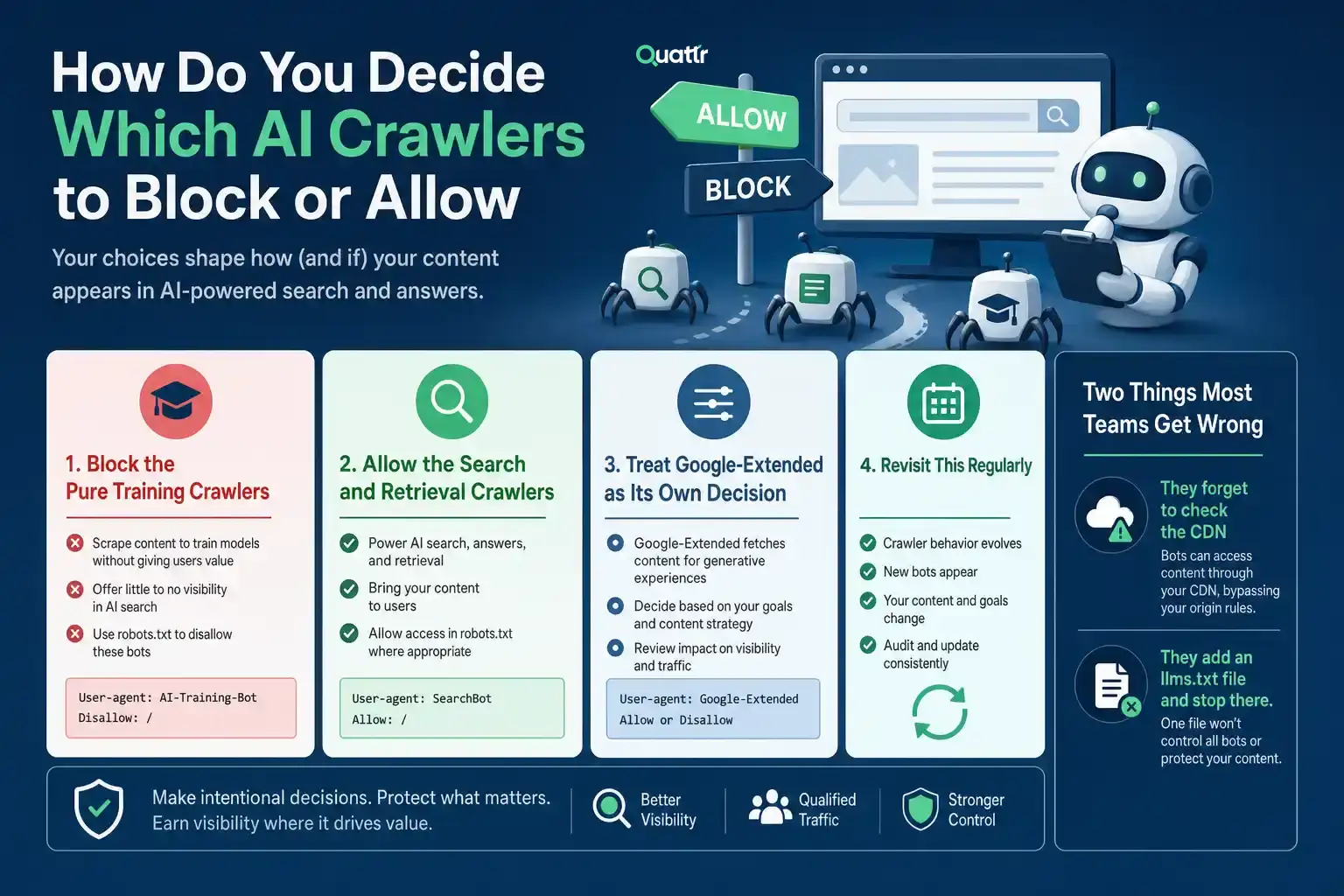
Block the Pure Training Crawlers
If a bot only scrapes your content to build or improve a model, with no citation and no traffic back to you, there’s little reason to let it in. This group includes GPTBot, CCBot, Meta-ExternalAgent, and Bytespider. None of them send you anything in return, and once your content is absorbed into a training set, you lose any ability to track or control how it gets used.
Allow the Search and Retrieval Crawlers
These bots fetch your page in real time to answer a live question, and they typically bring a citation and a link back with them. This group includes ChatGPT-User, OAI-SearchBot, PerplexityBot, Perplexity-User, Claude-SearchBot and Claude-User. Blocking these doesn’t protect you from anything. It just removes you from the answer.
Treat Google-Extended as Its Own Decision
It doesn't touch your regular Google Search rankings or AI Overviews, which are built from Googlebot's crawl. It controls whether content Googlebot fetched is used for Gemini apps and Vertex AI grounding. So blocking it is a decision about Gemini specifically: how much you trust Google's use of your content there, weighed against showing up in Gemini's answers.
Revisit This Regularly
New crawlers show up often, existing ones split into more specialized versions, and companies occasionally change what a given bot is used for without much announcement. A robots.txt file you wrote a year ago and haven’t touched since is very likely out of date. Treat this as a living policy, not a one-time setup task, and check it every time a major AI platform ships a new feature that depends on live web access.
Two Things Most Teams Get Wrong
They forget to check the CDN. Your robots.txt file can say whatever you want, but if your CDN or bot management layer is silently blocking or allowing traffic on its own rules, your robots.txt is decorative. Always verify what’s actually happening at the network level, not just what’s written in the file.
They add an llms.txt file and stop there. An llms.txt file, which signals your brand’s preferred identity and key pages to AI crawlers, is a reasonable addition to your technical setup. But current data suggests only a tiny fraction of AI bot traffic actually reads it. It’s a nice-to-have, not a substitute for the real work of making your content structurally easy for AI systems to trust and cite.
Because access is only step one. Being crawlable doesn’t mean being chosen. AI systems evaluate structure, clarity, and trust signals before they decide who gets cited. That’s a content and authority problem, not just a robots.txt problem.
Which raises the real question most teams can’t answer: once you’ve made your block-and-allow decisions and cleaned up your content, how do you actually know if any of it worked? You can check your server logs to confirm a crawler visited. You can’t easily tell, on your own, whether that visit turned into a citation inside ChatGPT, a mention in an AI Overview, or nothing at all. That gap between “the bot came by” and “we got cited” is where most strategies quietly fail, unmeasured and unnoticed for months.
That’s the gap worth closing before you finalize any crawler policy.
See What You’re Missing Before You Decide
Blocking and allowing crawlers is a guess until you can see the result. Most brands set their robots.txt once, walk away, and never find out whether that choice helped them or quietly cut them out of ChatGPT, Perplexity, or Google’s AI Overviews. The brands that get this right are the ones actively watching what happens after.
Quattr’s GEO platform shows you exactly that: where you’re being cited right now, where you’re invisible, and where competitors are winning prompts you should own. You don’t have to wonder if your crawler strategy is working. You can watch it, week over week, in real numbers tied to your actual traffic and conversions.
Book a demo and we’ll pull up your own domain live, show you where your brand currently stands and point out exactly where you’re leaving citations on the table. No generic report, no guesswork, just your data in front of you.
FAQs
No. GPTBot is OpenAI’s training crawler and has nothing to do with Google Search. Blocking it has no measurable effect on your regular Google rankings. The crawler that actually matters for Google Search is Googlebot, and you should never block that one.
You lose visibility in exactly the places you’d expect. Blocking OAI-SearchBot removes you from ChatGPT’s live search results entirely. Blocking ChatGPT-User means your page can’t be fetched when a live user triggers a browse action inside a ChatGPT conversation. Both are retrieval crawlers, not training crawlers, so blocking them protects you from nothing and costs you visibility.
Check your server logs or your CDN’s bot analytics for user agent strings like GPTBot, ClaudeBot, PerplexityBot, and Bytespider. Most CDNs, including Cloudflare, also offer built-in AI bot reporting that breaks this down without needing to dig through raw logs.
For most crawlers, yes, since respecting robots.txt is the expected standard. But not all of them follow it. Bytespider in particular has a well-documented history of ignoring disallow rules. For any crawler with that kind of track record, you need a second layer of enforcement at your CDN or firewall level, not just a line in the file.
No. Allowing a crawler only gets your content in front of the model. Whether it gets cited depends on structure, clarity, and trust signals, the same things AI systems evaluate before choosing a source. Access is step one. Being chosen is a separate content and authority problem.

Quattr is an AI-native Search Visibility Platform founded in Palo Alto, California, built for mid-market and enterprise brands competing in the age of generative search. Recently recognized across G2's Spring 2026 reports with #1 rankings in AEO Results, Usability, and Relationship, Quattr helps brands win visibility across traditional search and AI-generated answer surfaces.
Quattr's AI agent, GIGA, evaluates content the way AI systems do, identifying gaps across structure, authority, internal linking, and discoverability to surface the highest-impact fixes. With capabilities like autonomous internal linking, E-E-A-T intelligence, and the new GIGA Landing Page Generator for keyword-matched, AI-search-ready pages, Quattr helps teams move from diagnosis to deployed changes without manual bottlenecks.